HomeCare – Handyman Services WordPress Theme
Antivirus scan
Powered by ClamAV
✅ Verified clean
This product file has passed our security filters.
Want to run a fresh ClamAV scan right now? Takes a few seconds and shows scanner version, signature DB and live result.
This can take 5 to 30 seconds.
Clean file Threat detected
No threats detected in this file.
- File
- Size
- Scanned
- ClamAV
- Signature database
⚡ Powered by ClamAV
Scan could not be completed
Report product
If you detected an issue (broken file, malware, inappropriate content, etc.) let us know and we'll review it ASAP.
Sign in to report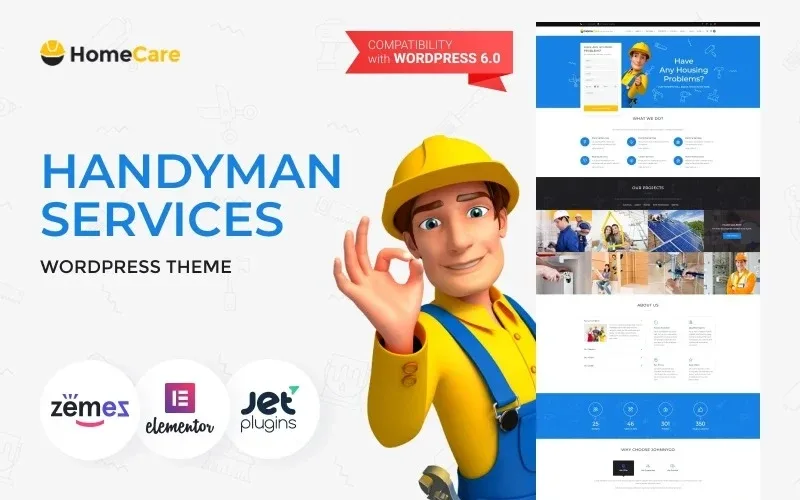
About HomeCare – Handyman Services WordPress Theme
Someone with a leaking bathroom or a sparking socket does not compare designs: they call the first phone number they find. For a plumber, an electrician or a handyman, the website is mostly there to keep the number in plain sight and show that someone answers.
HomeCare puts the phone and the emergency notice in the header
HomeCare – Handyman Services is a theme for repair and home maintenance businesses. The demo opens with a phone number at the top, a 24/7 emergency service notice, social media links and a homepage message about household problems. That way, anyone arriving in a hurry sees how to get in touch before scrolling.
This answers something specific to the trade: repair customers almost never have time to read, because the problem is already in their home. The homepage should answer three questions in a row: what you fix, whether you can come soon and which number to call.
Six trades, each with its own block
The demo's menu and homepage separate electrical work, plumbing, painting, heating, garden care and home maintenance. Each has its own block with a link to the details. That way, someone looking for a painter does not have to wade through the heating offer. If you only do two trades, remove the others instead of leaving empty pages or filler text.
Projects, team and reviews for the customer who hesitates
- Projects: a gallery filtered by category (electrical, garden, heating, maintenance and painting), useful for showing finished jobs.
- Team: profiles of named people, so that whoever opens their front door knows who is coming in.
- About the company: mission, vision and goal, plus four strengths: availability, qualified staff, fair prices and offers.
- Reviews and blog: a testimonials block, recent posts with safety tips and a newsletter signup.
All the demo content is sample material: names, reviews, cities, addresses and the brand that appears in the texts. Replace it with real jobs and real customers. There is also a block of figures (workers, types of jobs, projects and customers): fill it with your own data or remove it.
Appointments and online quotes need another plugin
HomeCare is a design, not a management system. It helps to separate what it brings from what you will have to handle yourself:
- Already solved: a homepage with phone and emergency notice, service pages, a filterable portfolio, team, testimonials, blog, contact and newsletter signup.
- With another plugin: a booking calendar with schedules and availability, a quote calculator or online payments. The demo shows a make-an-appointment button; check what it does before assuming it works as a booking system.
- By hand or with a professional: photos of your real jobs, your own copy and, above all, 24/7 availability. The website only announces it: if nobody answers at three in the morning, the notice works against you.
Frequently asked questions about HomeCare
Does it work if I only offer one trade?
Yes. Keep the service you provide, delete the others from the menu and the homepage, and rebuild the blocks around what you really offer.
Does it include a booking system?
Do not assume so. The demo has a make-an-appointment button, but to manage schedules and availability you will need a separate booking plugin.
Is it suitable for gardening or painting?
Yes, the demo includes both trades, alongside electrical work, plumbing, heating and home maintenance, and the portfolio filters by those categories.
Can I publish tips on a blog?
Yes, the demo shows recent posts about safety and seasonal work. They are a good place to answer the questions your customers already ask you by phone.
Topics
Version history
-
v
2.0.1 Current 17 Jun 2024
Customer reviews
Sign in to leave a review. Only people who have the product can review it.
No reviews for this product yet.
Frequently asked questions
-
GPL (General Public License) is the license under which WordPress and most premium plugins/themes are distributed. It grants you the right to use, modify and redistribute the software in as many projects as you want, with no domain restrictions.
-
Yes. With membership you get automatic updates via our GPLClub Updater plugin (installed on your WP, detects new versions and applies them). With individual purchase, you get one year of manual updates from your account.
-
Depends on the plan. Monthly: 3 domains. Semi-annual: 7. Annual and Lifetime: 15. Individual purchase: 1 domain.
-
GPLClub offers its own support for installation, configuration and compatibility. For direct support from the original author (feature requests, product-specific bugs), a license purchased from the author is required.