HostCluster – WHMCS Hosting WordPress Theme
Antivirus scan
Powered by ClamAV
✅ Verified clean
This product file has passed our security filters.
Want to run a fresh ClamAV scan right now? Takes a few seconds and shows scanner version, signature DB and live result.
This can take 5 to 30 seconds.
Clean file Threat detected
No threats detected in this file.
- File
- Size
- Scanned
- ClamAV
- Signature database
⚡ Powered by ClamAV
Scan could not be completed
Report product
If you detected an issue (broken file, malware, inappropriate content, etc.) let us know and we'll review it ASAP.
Sign in to report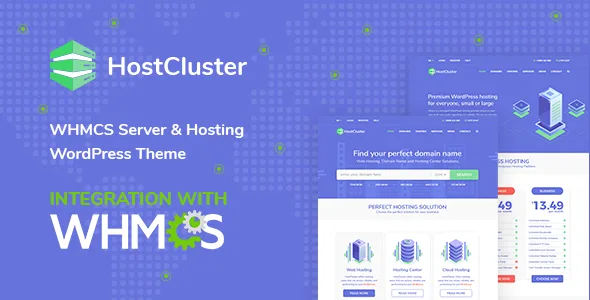
About HostCluster – WHMCS Hosting WordPress Theme
Anyone shopping for hosting compares several sites in one afternoon and picks the one that looks most organized, because they can't try the server yet. If your portal looks improvised, the customer assumes the panel and the invoices will be too.
Also, a hosting provider's work starts after the sale: renewals, invoices, domains, incidents. A nice website that ends in a client area with a different look breaks trust right when it's time to pay. That is where HostCluster tries to help.
HostCluster brings the WHMCS bridge inside the theme
The theme includes the WHMCS Bridge plugin, which connects WordPress to your WHMCS installation so customers don't feel they are switching sites. Its features include caching, permalinks, SEO titles, custom templates, visual integration, Single Sign-On, multilingual WHMCS support and shortcodes. With the Pro version of the bridge, your clients can order custom plans, pay invoices and comment on the blog.
A homepage designed to sell domains, plans and server locations
The home page follows the path of a hosting buyer:
- Domain search: after searching, the customer lands on a registration page where they see the price and add the domain to the cart.
- Hosting solutions block: services are presented as packages and the visitor can open more information about each one.
- Editable extra services: for example data migration, firewall, cloud backup, DDoS protection or security.
- Interactive map: with pop-ups about the locations of your servers.
- Pricing plans, testimonials and logos: to show packages from basic to business plans, customer reviews and partners or previous projects.
One page for each type of hosting and a menu for services beyond hosting
HostCluster includes more than 10 demos, each focused on one part of the server business. The Hosting menu gives its own page to dedicated servers, shared hosting, VPS and WordPress hosting, with pricing plans and testimonials on each one. The Domains menu brings together the search and a set of frequently asked questions. And a services menu lets you sell beyond hosting: online marketing, email marketing, cloud services or CDN, all adaptable to your offer. There is also a blog, useful for attracting traffic with well-optimized SEO articles.
The bridge doesn't replace WHMCS: you set up the billing yourself
- Already solved: the homepage design, the service pages, the domain search, the map, the pricing blocks and the visual connection with WHMCS.
- With the Pro version of the bridge: ordering custom plans, paying invoices and commenting from the customer account.
- You cover it with WHMCS: installing and configuring it, with its products, prices and payment methods. The theme displays and connects, it doesn't manage billing by itself.
- By hand or with a professional: the copy for each service, the real prices, the map data and genuine testimonials from your customers.
Frequently asked questions about HostCluster
Does it work if I don't use WHMCS?
It is built around WHMCS. Without that platform you lose the ordering, domain and client area side, and you are left with a well-designed corporate website.
Can I sell domains from the website?
The search shows the price of the domain searched and lets customers add it to the cart. How the order and registration are handled afterwards depends on your WHMCS setup.
Is it suitable for offering more than hosting?
Yes. There is an editable services menu designed for offers such as email marketing, cloud or CDN, with their own pricing packages.
Topics
Version history
-
v
2.5 Current 8 Jan 2025
Customer reviews
Sign in to leave a review. Only people who have the product can review it.
No reviews for this product yet.
Frequently asked questions
-
GPL (General Public License) is the license under which WordPress and most premium plugins/themes are distributed. It grants you the right to use, modify and redistribute the software in as many projects as you want, with no domain restrictions.
-
Yes. With membership you get automatic updates via our GPLClub Updater plugin (installed on your WP, detects new versions and applies them). With individual purchase, you get one year of manual updates from your account.
-
Depends on the plan. Monthly: 3 domains. Semi-annual: 7. Annual and Lifetime: 15. Individual purchase: 1 domain.
-
GPLClub offers its own support for installation, configuration and compatibility. For direct support from the original author (feature requests, product-specific bugs), a license purchased from the author is required.