ImageLinks - Interactive Image Builder for WordPress
Antivirus scan
Powered by ClamAV
✅ Verified clean
This product file has passed our security filters.
Want to run a fresh ClamAV scan right now? Takes a few seconds and shows scanner version, signature DB and live result.
This can take 5 to 30 seconds.
Clean file Threat detected
No threats detected in this file.
- File
- Size
- Scanned
- ClamAV
- Signature database
⚡ Powered by ClamAV
Scan could not be completed
Report product
If you detected an issue (broken file, malware, inappropriate content, etc.) let us know and we'll review it ASAP.
Sign in to report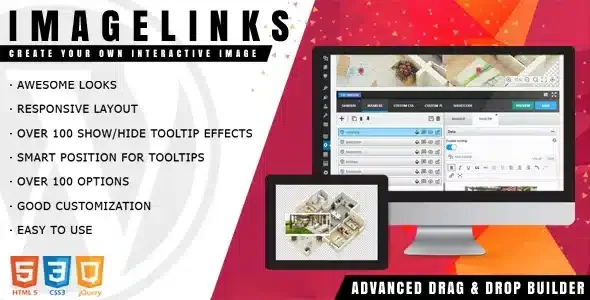
About ImageLinks - Interactive Image Builder for WordPress
A great photo that leads nowhere
You upload an infographic, a product photo or a news image, and the visitor can only look at it. If they want to know more, they have to hunt for the link, the video or the product page on their own, and many don't. ImageLinks turns the image itself into the entry point: you mark specific areas and each one opens its own content.
People who install this usually work with images that already carry information (a catalog, an infographic, a news photograph) and that today force them to write long captions or scatter links through the text. Here the information stays attached to the exact spot in the image that explains it.
Markers, tooltips and previews inside the image
In ImageLinks you place markers on the image and attach content to them. Anything hosted on the web with its own URL works: pages, albums on photo services or YouTube and Vimeo videos. Videos can be watched in a preview over the image, without opening YouTube separately.
- Visual editor: drag and drop, with zoom and pan to place points precisely. You can also move points with the arrow keys.
- Markers: it comes with 17 predefined ones, or you can use your own images or design your own.
- Tooltips: small boxes for short pieces of information, which look for the best available position and offer over 100 show and hide effects.
- Rich content: the content of the popups is edited with the WordPress editor and supports shortcodes.
How it behaves on a real page
Elements adapt to the size of the image, so responsive design doesn't depend on you repositioning anything by hand. You can place several interactive images on the same page, each with its own configuration.
It includes two visual themes, one dark and one light, and you can add your own or adjust the look with custom CSS and JS, using code editors with syntax highlighting. If you work on several sites, you can export the configuration to a file and import it on another domain. Changes are saved via AJAX without reloading the editor, and the configuration is served from files on the server instead of the database.
What to decide before using ImageLinks, and common questions
It is a tool for marking points on an image and linking content. It is not a catalog builder or a store: the points can lead to products, but the cart and payment depend on what you already have set up on your site. It is also not the best choice if you need to draw free-form areas or work with floor plans by levels: what it offers is markers and tooltips.
Does it work for a product catalog?
Yes, to point out items within a photo and link each one to its page. The purchase is completed wherever you already have it set up.
Can I watch videos without leaving the image?
Yes, linked videos from services such as YouTube or Vimeo are shown in a preview over the image itself.
Can I use my own markers and styles?
Yes. You can design markers, create your own theme or extend the look with CSS and JS.
Can I reuse a configuration on another site?
Yes, it is exported to a file and imported on another domain.
Can items from an older version be brought over?
The current version of the editor is completely new and not compatible with the previous one: it only allows importing old items with some restrictions, so don't expect everything to carry over intact.
Version history
-
v
1.7.1 Current 26 Aug 2026
-
v
1.6.0 17 Jan 2025
Customer reviews
Sign in to leave a review. Only people who have the product can review it.
No reviews for this product yet.
Frequently asked questions
-
GPL (General Public License) is the license under which WordPress and most premium plugins/themes are distributed. It grants you the right to use, modify and redistribute the software in as many projects as you want, with no domain restrictions.
-
Yes. With membership you get automatic updates via our GPLClub Updater plugin (installed on your WP, detects new versions and applies them). With individual purchase, you get one year of manual updates from your account.
-
Depends on the plan. Monthly: 3 domains. Semi-annual: 7. Annual and Lifetime: 15. Individual purchase: 1 domain.
-
GPLClub offers its own support for installation, configuration and compatibility. For direct support from the original author (feature requests, product-specific bugs), a license purchased from the author is required.