Impose Blog
Antivirus scan
Powered by ClamAV
✅ Verified clean
This product file has passed our security filters.
Want to run a fresh ClamAV scan right now? Takes a few seconds and shows scanner version, signature DB and live result.
This can take 5 to 30 seconds.
Clean file Threat detected
No threats detected in this file.
- File
- Size
- Scanned
- ClamAV
- Signature database
⚡ Powered by ClamAV
Scan could not be completed
Report product
If you detected an issue (broken file, malware, inappropriate content, etc.) let us know and we'll review it ASAP.
Sign in to report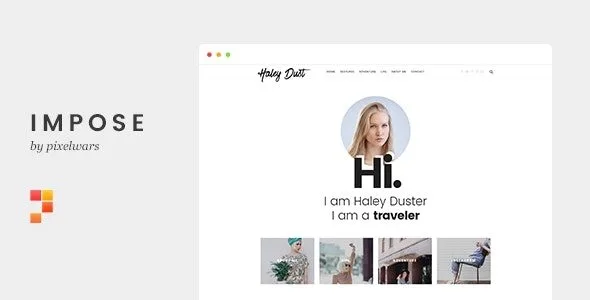
About Impose Blog
A personal blog is won or lost on the front page
Writing well is not enough if someone arriving for the first time sees a grid of posts with no idea who is behind them. On a personal blog, the real asset is the reader who comes back, and they come back when they feel they know the person writing. Impose Blog is a WordPress theme made for bloggers, with a minimalist, distraction-free design that puts the focus on your writing and your face.
This is the typical path of a blogger who installs it, with what it solves at each step and where it stops.
Step 1: a home page that introduces you before showing posts
Impose Blog lets you build a personal intro page with your profile photo, animated rotating words and a list of your latest posts. It helps visitors understand in a single screen who you are and what you publish, and then decide to read.
It is a blogger's front page, not a business one: it has no shop, bookings or service listings.
Step 2: deciding how each post listing looks
This is the core of the theme:
- 10+ blog layouts: regular, grid, masonry, list, creative, bold, waterfall and versions with the first post at full width, with or without a sidebar.
- Two header styles: default and classic, with light and dark options.
- A different layout per archive type: categories, tags, authors, dates and search results can each have their own layout.
- Smart fixed menu: it only shows when needed, and you can also keep it always fixed or static.
Test it with your real content: a masonry looks best with images in varied formats, and a list works better if you write long texts without a featured image.
Step 3: giving readers reasons to stay and subscribe
Impose Blog comes with a related posts module, a trending posts widget to lengthen visits and a customizable featured posts slider. To collect emails it includes a custom-styled newsletter form for Mailchimp for WordPress. Note: that is the visual part; you need to install that plugin and have your Mailchimp account for it to collect subscribers.
It also includes widgets for Flickr, Instagram, Pinterest, Dribbble, Picasa and YouTube, galleries with lightbox or slider built from the native WordPress galleries (no plugin or shortcode) and embedded videos that adapt to different aspect ratios. If you need a contact form, it is compatible with Ninja Forms, which is separate.
Step 4: adjusting the style of Impose Blog without touching code
An options panel lets you turn many features on or off, and the WordPress Customizer lets you change colors and fonts, with more than 600 Google Fonts. It has a responsive design, is retina ready, with touch gestures on the sliders, unlimited sidebars and all post formats.
Frequently asked questions about Impose Blog
Do I need a plugin for galleries?
No. Lightbox collages and sliders are built with the default WordPress galleries.
Does the newsletter form work on its own?
No. It is designed for Mailchimp for WordPress, so you need that plugin and a Mailchimp account.
Is it suitable for a shop or a service business?
It is a blog theme and has no commerce features. To sell or take bookings you would need to look for another solution.
Can I use it in my language?
It is translation ready and includes a .po file.
Topics
Version history
-
v
1.2.0 Current 19 Jun 2024
Customer reviews
Sign in to leave a review. Only people who have the product can review it.
No reviews for this product yet.
Frequently asked questions
-
GPL (General Public License) is the license under which WordPress and most premium plugins/themes are distributed. It grants you the right to use, modify and redistribute the software in as many projects as you want, with no domain restrictions.
-
Yes. With membership you get automatic updates via our GPLClub Updater plugin (installed on your WP, detects new versions and applies them). With individual purchase, you get one year of manual updates from your account.
-
Depends on the plan. Monthly: 3 domains. Semi-annual: 7. Annual and Lifetime: 15. Individual purchase: 1 domain.
-
GPLClub offers its own support for installation, configuration and compatibility. For direct support from the original author (feature requests, product-specific bugs), a license purchased from the author is required.
Related products
Driveim – An Exclusive Driving Training WordPress Theme for Driving Schools!
Kaffa – Cafe & Coffee Shop WordPress Theme + RTL
OneHub – Startup Business Multipurpose WordPress Theme