JetEngine - dynamic tables builder
Antivirus scan
Powered by ClamAV
✅ Verified clean
This product file has passed our security filters.
Want to run a fresh ClamAV scan right now? Takes a few seconds and shows scanner version, signature DB and live result.
This can take 5 to 30 seconds.
Clean file Threat detected
No threats detected in this file.
- File
- Size
- Scanned
- ClamAV
- Signature database
⚡ Powered by ClamAV
Scan could not be completed
Report product
If you detected an issue (broken file, malware, inappropriate content, etc.) let us know and we'll review it ASAP.
Sign in to report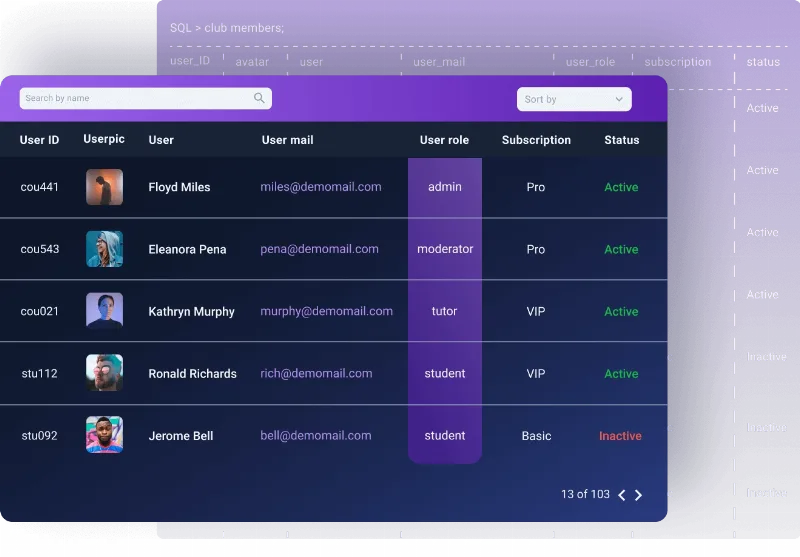
About JetEngine - dynamic tables builder
When your site's data doesn't fit into a list of cards
An ebook catalog, a staff directory or a property listing have something in common: visitors don't want to admire them, they want to compare them. If you cram ten fields per item into a card grid, you force people to open each card to know which one interests them. A table solves exactly that: one row per item, one column per data point, and the eye scans the information from top to bottom.
JetEngine - dynamic tables builder is the dynamic tables feature of JetEngine, by Crocoblock. Rows aren't typed by hand: they come from a query you define, so the table grows on its own as you add content.
Where JetEngine - dynamic tables builder gets its rows and how it turns them into columns
The workflow has three steps and it's worth understanding them before you start:
- Query: you decide which data is read from the database and how.
- Columns: the fields from that query are fetched as options to display on the front end.
- Preview: you review the result before placing it on a page.
As a source you can use custom post types (CPT), CCTs, terms, users, comments, products, SQL tables or a REST API. The latter is useful for pulling data from another site, for example statistics stored in its meta fields.
In each cell you choose between showing the raw value or a listing template. That way, a cell can hold an audio player, a download button or a link to a teammate's page. You can also apply a conversion function to the value, set the width and alignment of header and cells, and enable horizontal scroll for very wide tables. Header and body styling is adjusted from the page builder.
Tables that already make sense: from a user directory to a property database
Some uses that fit this approach well:
- Ebook catalog: title, author, format, genre, date, price and a download button, with filters by category or year.
- Staff directory: photo, position, department and contact details from a CCT, with a button to each person's page.
- User listing: name, photo, role and subscription level, with filtering by role or search by contact details.
- WooCommerce products: image, name, category, type, gallery and price in table format.
- Properties from SQL tables: floors, bedrooms and floor area, grouped and sortable.
- Podcast archive: name, date and a template with each episode's player.
- Comments: ID, author, date, text and approval status, with pagination.
It is displayed with the Dynamic Table widget or block, available for Elementor and Gutenberg; the product page also indicates compatibility with Bricks.
What to decide before choosing JetEngine - dynamic tables builder
This feature is part of JetEngine: it is an add-on of that plugin and doesn't work on its own. If you want visitors to filter, search or sort columns, you also need JetSmartFilters installed; without it, the table displays but doesn't offer that interaction. And if you're after a chart, that belongs to another JetEngine feature (Charts Builder), not to tables.
Nor is it a manual cell editor: if your table is small, fixed and never changes, a regular table block saves you configuration. The value appears when the data already lives in CPTs, fields or SQL databases and is updated frequently.
Can I display custom field data?
Yes, you can pull data from custom fields and show it as a raw value or through a listing template.
Can columns be sorted and searched?
Yes, with JetSmartFilters: filtering by different data types, searching the content and ascending or descending sorting.
Does it work with WooCommerce?
Yes, it can list products with their image, name, category, type, gallery and price.
Does it work with very wide tables on mobile?
It offers horizontal scroll for large tables. Check in the demo how it behaves with your number of columns.
Version history
-
v
1.0.9 Current 14 May 2024
Customer reviews
Sign in to leave a review. Only people who have the product can review it.
No reviews for this product yet.
Frequently asked questions
-
GPL (General Public License) is the license under which WordPress and most premium plugins/themes are distributed. It grants you the right to use, modify and redistribute the software in as many projects as you want, with no domain restrictions.
-
Yes. With membership you get automatic updates via our GPLClub Updater plugin (installed on your WP, detects new versions and applies them). With individual purchase, you get one year of manual updates from your account.
-
Depends on the plan. Monthly: 3 domains. Semi-annual: 7. Annual and Lifetime: 15. Individual purchase: 1 domain.
-
GPLClub offers its own support for installation, configuration and compatibility. For direct support from the original author (feature requests, product-specific bugs), a license purchased from the author is required.