Koala – WordPress Magazine & Blog Theme
Antivirus scan
Powered by ClamAV
✅ Verified clean
This product file has passed our security filters.
Want to run a fresh ClamAV scan right now? Takes a few seconds and shows scanner version, signature DB and live result.
This can take 5 to 30 seconds.
Clean file Threat detected
No threats detected in this file.
- File
- Size
- Scanned
- ClamAV
- Signature database
⚡ Powered by ClamAV
Scan could not be completed
Report product
If you detected an issue (broken file, malware, inappropriate content, etc.) let us know and we'll review it ASAP.
Sign in to report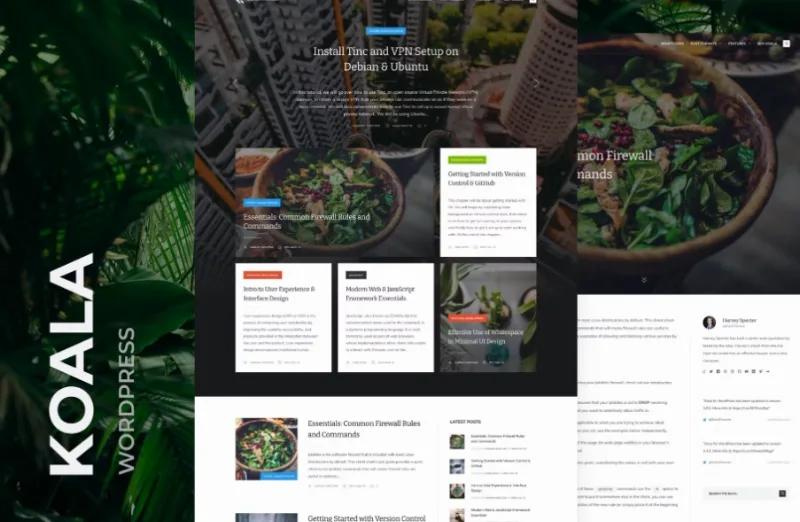
About Koala – WordPress Magazine & Blog Theme
A blog with several bylines gets messy fast
When three or four people write on the same blog, each one publishes in their own way: one uploads a huge photo, another pastes code, another quotes someone else's paragraph. If the theme doesn't impose order, the result looks like a grab bag. Koala is a blog and magazine theme built for multiple authors, with a minimal, mobile-friendly, content-focused design and a two-column layout as its base.
The practical benefit is that the design doesn't compete with what you publish: the article takes the lead and the theme stays in the background. It's a good starting point for a technical or educational publication where reading is what matters.
Koala and its three headers for opening each article
The header is the first thing readers see, and Koala lets you choose how each post is presented:
- Full cover header: the image fills the whole opening of the article, useful for features with a strong photo.
- Half cover header: gives the image presence without pushing the text too far down.
- Standard header: the understated option for tutorials and notes where the image is secondary.
You can also place the sidebar on the left or use a full-width layout. Mixing headers and layouts keeps a long tutorial and an opinion piece from looking identical.
The pages a magazine blog usually leaves half-finished
Many themes polish the homepage and neglect everything else. Koala includes templates designed for those secondary pages:
- Author page: important if you want each writer to have their own space on a collective blog.
- Category page and search results: so readers can find articles by topic or keyword.
- 404 error page: so visitors aren't left on an empty screen.
- Syntax highlighting: code is displayed distinctly from the text, which is key if you publish programming or system administration tutorials.
It also supports Gutenberg post formats and content blocks, so the editor you already know remains your working tool. The design provides optional areas for advertising in banner and large rectangle formats.
The newsletter and the ads are up to you
Koala is a content theme, not a monetization suite. It helps to separate what it already includes from what you'll need to handle elsewhere:
- Already covered: magazine layout with two columns, headers, post formats, author, category, search and 404 pages, and code highlighting.
- With another plugin or service: sending emails and managing subscribers for a newsletter.
- With your own code or ad network: the ads that will fill the reserved spaces.
- By hand: the texts, images and the organization of categories and tags.
If you want a store, bookings or a payment portal, this is not the theme: it is built for publishing and reading.
Frequently asked questions about Koala
Does it work for a single-author blog?
Yes. Although it is designed for multiple bylines, you can use it with just one person.
Can I show code in my articles?
Yes, it includes syntax highlighting, which makes it suitable for technical tutorials.
Does it adapt to mobile?
Its design is responsive, so it adjusts to different screen sizes. Check in the demo how your favorite headers look on a phone.
Does it include a built-in newsletter system?
Don't assume so: to collect and send emails to subscribers you'll need an email plugin or service.
Topics
Version history
-
v
4.1.0 Current 16 Jun 2024
Customer reviews
Sign in to leave a review. Only people who have the product can review it.
No reviews for this product yet.
Frequently asked questions
-
GPL (General Public License) is the license under which WordPress and most premium plugins/themes are distributed. It grants you the right to use, modify and redistribute the software in as many projects as you want, with no domain restrictions.
-
Yes. With membership you get automatic updates via our GPLClub Updater plugin (installed on your WP, detects new versions and applies them). With individual purchase, you get one year of manual updates from your account.
-
Depends on the plan. Monthly: 3 domains. Semi-annual: 7. Annual and Lifetime: 15. Individual purchase: 1 domain.
-
GPLClub offers its own support for installation, configuration and compatibility. For direct support from the original author (feature requests, product-specific bugs), a license purchased from the author is required.