LearnDash Notes | Snap Orbital
Antivirus scan
Powered by ClamAV
✅ Verified clean
This product file has passed our security filters.
Want to run a fresh ClamAV scan right now? Takes a few seconds and shows scanner version, signature DB and live result.
This can take 5 to 30 seconds.
Clean file Threat detected
No threats detected in this file.
- File
- Size
- Scanned
- ClamAV
- Signature database
⚡ Powered by ClamAV
Scan could not be completed
Report product
If you detected an issue (broken file, malware, inappropriate content, etc.) let us know and we'll review it ASAP.
Sign in to report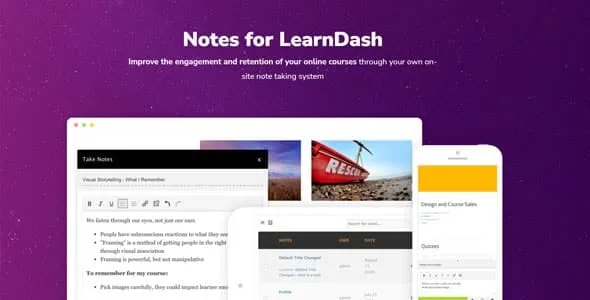
About LearnDash Notes | Snap Orbital
The clarification you give one student is missing for the next
A student gets stuck in a lesson and sends you an email that begins "I have a question about the course". You have to work out which lesson they mean before you can answer, and the other students do not see the reply.
A private answer settles one person's doubt; turned into a public note, the clarification can also reach the students who have not asked yet.
LearnDash Notes, by Snap Orbital, is a LearnDash add-on that gives each student a notepad tied to the content they are studying. Notes stay associated with the lesson where they were written, and the instructor can answer them.
Notes for the student and tools for the instructor
For the student:
- Sticky notes for quick annotations and marking key takeaways.
- Questions to the instructor sent from the note itself.
- Notes per content: each one is linked to the lesson or content where it was written.
- Customizable color and title on each note.
- A notepad that works on phones and tablets.
- Download as a Microsoft Word document and one-click printing.
For the instructor:
- One-click answers to student notes.
- Note review from the dashboard tools, optional and with the ability to leave feedback.
- Public notes you can use to push clarifications to students.
Note-taking can be enabled on any content type, inside or outside LearnDash. It is designed to work with any theme, and the colors adjust to your site's branding.
A hard lesson with a public note
This combination is our own and should be tested in a test course before applying it to a real one. Take the lesson where students usually get stuck and review their notes. When a question arrives, answer it from the dashboard and, if the doubt looks common, publish a public note with the clarification so that whoever reaches that lesson later can see it.
Check with a test student account that the public note appears where you expect, that the question reaches the instructor and that you can answer it from the dashboard.
One dependency and two instructor decisions
It needs LearnDash, because it is an add-on for it. Reviewing notes and leaving feedback is optional, so it is worth deciding who will do it. Public notes are visible to students, so they are not suited to internal comments.
Installing and trying the first note
- Install and activate LearnDash, then LearnDash Notes with the WordPress installer.
- Enable note-taking on the content types where you want to offer it.
- Choose the colors so they match your brand.
- Sign in as a test student, write a note in a lesson and ask the instructor a question.
- Sign in as an instructor and answer from the dashboard tools.
LearnDash add-ons to compare
From the same vendor, the catalog includes Private Sessions for LearnDash. For another way to follow students, look at LearnDash Gradebook.
Answers about LearnDash Notes
Can the student take their notes with them?
Yes. They can download them as a Microsoft Word document or print them with one click.
Can I change the note colors?
Yes. Colors are customizable so they match your brand.
Does it work on mobile?
Yes, the notepad is designed for phones and tablets.
Does it work on pages that are not LearnDash?
Yes. It can be enabled on any content type, inside or outside LearnDash.
Topics
Version history
-
v
2.1.0 Current 14 May 2026
-
v
2.0.1 15 Jan 2026
Customer reviews
Sign in to leave a review. Only people who have the product can review it.
No reviews for this product yet.
Frequently asked questions
-
GPL (General Public License) is the license under which WordPress and most premium plugins/themes are distributed. It grants you the right to use, modify and redistribute the software in as many projects as you want, with no domain restrictions.
-
Yes. With membership you get automatic updates via our GPLClub Updater plugin (installed on your WP, detects new versions and applies them). With individual purchase, you get one year of manual updates from your account.
-
Depends on the plan. Monthly: 3 domains. Semi-annual: 7. Annual and Lifetime: 15. Individual purchase: 1 domain.
-
GPLClub offers its own support for installation, configuration and compatibility. For direct support from the original author (feature requests, product-specific bugs), a license purchased from the author is required.