Magazine Pro Theme
Antivirus scan
Powered by ClamAV
✅ Verified clean
This product file has passed our security filters.
Want to run a fresh ClamAV scan right now? Takes a few seconds and shows scanner version, signature DB and live result.
This can take 5 to 30 seconds.
Clean file Threat detected
No threats detected in this file.
- File
- Size
- Scanned
- ClamAV
- Signature database
⚡ Powered by ClamAV
Scan could not be completed
Report product
If you detected an issue (broken file, malware, inappropriate content, etc.) let us know and we'll review it ASAP.
Sign in to report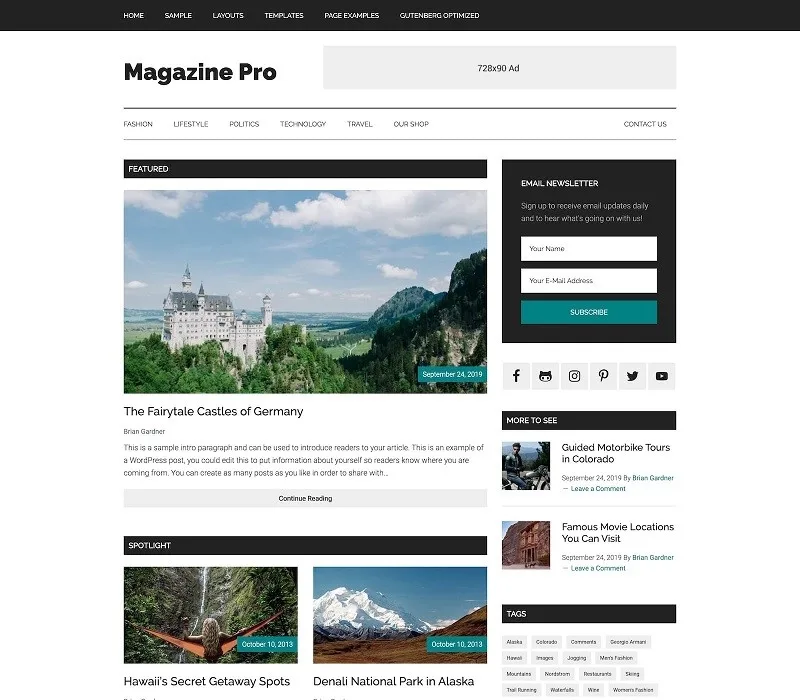
About Magazine Pro Theme
A front page that is out of date the day you publish it
A digital magazine is judged by its front page: if readers arrive and find a drawer of posts sorted by date, they cannot tell what matters from what happened yesterday. And many new publishers find out late that maintaining that front page is daily work, not a design you do once.
Magazine Pro is a StudioPress theme with an editorial publication look: built for image-rich content and for anyone who wants a polished front page. It relies on Genesis Framework and is edited with Gutenberg blocks.
Magazine Pro step by step: from the demo to your first front page
Imagine you are launching a publication on a specific topic and want a presentable front page as soon as possible. This would be the path:
- Load the demo content. The one-click setup installs sample content, the required plugins and the homepage blocks already assembled. It gives you a visible starting point, but it is sample material: you will have to replace texts and images before publishing.
- Add your identity. From the customizer you upload your logo, change colors and settings, and see a live preview before saving.
- Rearrange the front page with blocks. The homepage modules are Gutenberg blocks: you move, change or replace them from the editor. It matters because the front page is what you will tweak the most.
- Check mobile with real headlines. The theme adapts to different browsers, devices and screen sizes. Even so, test your own front page with your headlines: long ones are the first thing to throw off a magazine layout.
- If you sell something, add the store separately. It has styles prepared for WooCommerce, but WooCommerce is an independent plugin that you install and set up yourself: the theme only takes care of the look.
If your revenue plan is advertising, check in the demo whether the front page has spaces designed for ads; do not assume it does.
Common questions before choosing Magazine Pro
Is it suitable for a personal blog?
Yes, if you want a magazine look. But if you publish few posts, a front page with many modules can end up with gaps: it performs better with a regular publishing rhythm.
Do I need to know how to code?
Not to customize it: the customizer covers logo, colors and settings, and the blocks cover the structure of the front page.
Can I build a store with it?
You can, with WooCommerce installed on your own. The theme comes with it styled, but it does not replace the store plugin or its configuration.
Is it accessible?
It is built to be accessibility ready, but the final result also depends on your content: check the contrast of the colors you choose and add alt text to your images.
Genesis as a foundation: what it provides and what remains yours
The theme is built on Genesis Framework, a foundation with a focus on SEO and security. That gives you a good technical starting point, but it does not replace the groundwork: clear headlines, internal links and content worth reading are still up to you.
Topics
Version history
-
v
3.5.1 Current 17 Jun 2024
Customer reviews
Sign in to leave a review. Only people who have the product can review it.
No reviews for this product yet.
Frequently asked questions
-
GPL (General Public License) is the license under which WordPress and most premium plugins/themes are distributed. It grants you the right to use, modify and redistribute the software in as many projects as you want, with no domain restrictions.
-
Yes. With membership you get automatic updates via our GPLClub Updater plugin (installed on your WP, detects new versions and applies them). With individual purchase, you get one year of manual updates from your account.
-
Depends on the plan. Monthly: 3 domains. Semi-annual: 7. Annual and Lifetime: 15. Individual purchase: 1 domain.
-
GPLClub offers its own support for installation, configuration and compatibility. For direct support from the original author (feature requests, product-specific bugs), a license purchased from the author is required.