Messenger chat support
Antivirus scan
Powered by ClamAV
✅ Verified clean
This product file has passed our security filters.
Want to run a fresh ClamAV scan right now? Takes a few seconds and shows scanner version, signature DB and live result.
This can take 5 to 30 seconds.
Clean file Threat detected
No threats detected in this file.
- File
- Size
- Scanned
- ClamAV
- Signature database
⚡ Powered by ClamAV
Scan could not be completed
Report product
If you detected an issue (broken file, malware, inappropriate content, etc.) let us know and we'll review it ASAP.
Sign in to report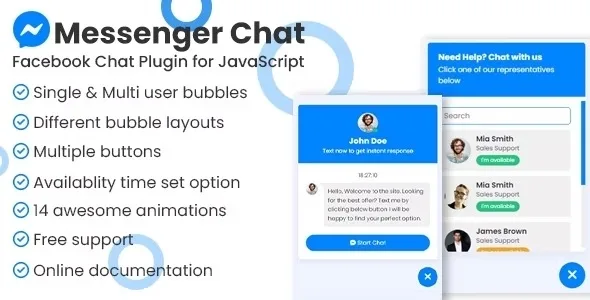
About Messenger chat support
When the customer hesitates and goes to another tab
A visitor looks at your products or services, is left with a small doubt (do you deliver to my area? do you have this in another size?) and never gets it answered because filling in a form or hunting for a phone number feels like too much effort. They leave, and the question that would have closed the sale never arrives. Messenger chat support targets exactly that moment: it puts a bubble or a button on the screen so people can write to you on Messenger in a few clicks.
The conversation does not live in WordPress: messages land in your Facebook page. Whoever replies has to watch that inbox, not the website dashboard. If your business already handles enquiries on Facebook, the plugin gives you a new entry point without changing your habits.
One bubble with a single page or with several agents in Messenger chat support
The plugin offers two ways of working:
- Single agent: one bubble linked to a single Facebook page, where you receive all the messages.
- Multiple agents: you can add as many Facebook pages as you want, and the visitor chooses which one to talk to.
Besides the floating bubble, it includes a set of call-to-action buttons that you can place anywhere on the site, for example next to a specific service or at the end of a product page. Each button is configured separately, so they do not all have to go to the same place or behave the same way.
Opening hours, time zone and an offline notice
This is what best prevents misunderstandings. You can set availability hours for one agent, for several, and for the buttons. Outside those hours, the plugin shows that you are offline, so the visitor does not expect an instant reply at eleven at night.
It is worth setting the time zone in the settings. If you do not, the schedule is calculated from each visitor's computer clock, which can show someone in another country that you are available when you are not.
Other settings that affect the experience:
- Animations for the floating bubble, with plenty of styles.
- Visibility by device: you can show it only on desktop, only on mobile or only on tablet.
- Several layouts and colors, with header options, positioning on either side and a dark mode, as its screenshots show.
Everything is managed from the WordPress dashboard, with no code.
Does your team reply from Facebook? That decides whether to install it
This plugin is a bridge to Messenger, not a full customer service system. Before deciding, be clear about the following: you need an active Facebook page, and replies happen there. Do not expect a conversation history, tags or ticket assignment inside WordPress. There is also no chat that is resolved inside your site: the visitor moves over to Messenger. If you prefer WhatsApp or a chat with operators on the site itself, this is not the one for you.
Do I receive the messages in WordPress?
No. They arrive in the Facebook page you have added, and you answer them there.
Can I connect several pages?
Yes. The multiple agents mode supports as many Facebook pages as you want, and the visitor chooses which one to write to.
Can I stop it from showing on mobile?
Yes. You can limit it to desktop, to mobile or to tablet.
What happens if nobody is available?
Based on the schedule you set, the plugin shows that you are offline. Set the time zone properly so that notice matches your real time.
Do I need to know how to code?
No. It is installed and managed from the WordPress settings, and it comes with documentation for anyone who wants to customize it further.
Topics
Version history
-
v
1.1.2 Current 13 May 2024
Customer reviews
Sign in to leave a review. Only people who have the product can review it.
No reviews for this product yet.
Frequently asked questions
-
GPL (General Public License) is the license under which WordPress and most premium plugins/themes are distributed. It grants you the right to use, modify and redistribute the software in as many projects as you want, with no domain restrictions.
-
Yes. With membership you get automatic updates via our GPLClub Updater plugin (installed on your WP, detects new versions and applies them). With individual purchase, you get one year of manual updates from your account.
-
Depends on the plan. Monthly: 3 domains. Semi-annual: 7. Annual and Lifetime: 15. Individual purchase: 1 domain.
-
GPLClub offers its own support for installation, configuration and compatibility. For direct support from the original author (feature requests, product-specific bugs), a license purchased from the author is required.