Messenger Chat Support WordPress Plugin
Antivirus scan
Powered by ClamAV
✅ Verified clean
This product file has passed our security filters.
Want to run a fresh ClamAV scan right now? Takes a few seconds and shows scanner version, signature DB and live result.
This can take 5 to 30 seconds.
Clean file Threat detected
No threats detected in this file.
- File
- Size
- Scanned
- ClamAV
- Signature database
⚡ Powered by ClamAV
Scan could not be completed
Report product
If you detected an issue (broken file, malware, inappropriate content, etc.) let us know and we'll review it ASAP.
Sign in to report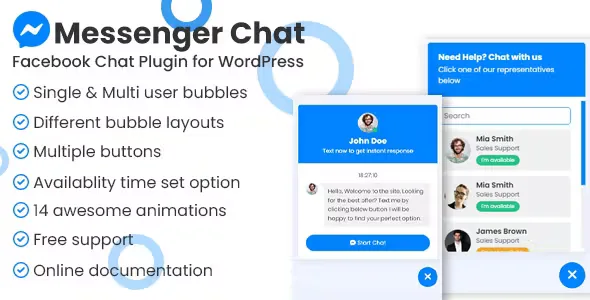
About Messenger Chat Support WordPress Plugin
A chat button nobody answers scares people off more than it helps
Adding a chat to your website sounds simple: the visitor hesitates, asks a question and buys. A chat only works if someone replies in time. A bubble that promises an answer and stays silent for days looks worse than having none at all. With Messenger Chat Support the conversation lands on your Facebook page, so what matters is who watches it and when.
The plugin lets visitors message you on Messenger in three clicks, without leaving what they were looking at: your products or your services. It is a direct line for enquiries designed to turn browsers into potential customers, and you install and manage it from WordPress without touching code.
Messenger Chat Support depending on who answers the messages
A business with a single Facebook page
If you answer yourself, use single support mode: one bubble tied to one Facebook page, with every message in the same place. It is the most convenient option if you already reply to customers on Messenger and just want to make it easier for them to reach you from the website.
A team with several people or departments
Multiple agents mode accepts unlimited Facebook pages, and the visitor chooses who to talk to. Each agent can have their own availability hours.
A website with lots of mobile traffic and little desktop (or the other way round)
You can show the chat only on desktop, only on mobile or only on tablet. It helps if the bubble covers content on small screens or if you want the chat only where your visitors usually make decisions.
Bubble, buttons and hours: what you can configure
Besides the floating bubble, the plugin includes a set of call to action buttons to place anywhere on the site, and each button accepts its own settings. These are the pieces that matter most when deciding:
- Availability hours: set for a single agent, for several agents and for the buttons.
- Timezone: if you set it, the schedule follows yours; if not, it follows the clock on each visitor's computer.
- Offline notice: outside your hours, the bubble shows as offline, so visitors know there will be no immediate reply.
- Bubble animations: there are several to catch attention, and it is best not to overdo them if your site is understated.
If you want to tweak the look in depth, the main code is just JS, CSS and HTML, so it is within reach of anyone with some customization skills.
Frequently asked questions before installing Messenger Chat Support
Do I need a Facebook page? Yes. Messages arrive on the Facebook page you add, not in an inbox of the plugin's own.
Can I offer several contacts? Yes, with multiple agents mode and unlimited Facebook pages. The visitor chooses who to message.
Can I stop the chat from showing at night? It does not hide it, but with availability hours the bubble shows as offline when you are away.
Do I need to know how to code? Not to set it up: it is managed from the WordPress panel. The code only matters if you want to customize beyond the options.
Messages live on Facebook, not inside WordPress
This plugin is a bridge to Messenger, not a customer service system. Do not expect a conversation history inside the WordPress panel: everything is handled on the Facebook page. If your team does not use Messenger every day, the chat will go unanswered. Check in the demo how the bubble and the offline state look before deciding.
Topics
Version history
-
v
1.1.1 Current 3 May 2024
Customer reviews
Sign in to leave a review. Only people who have the product can review it.
No reviews for this product yet.
Frequently asked questions
-
GPL (General Public License) is the license under which WordPress and most premium plugins/themes are distributed. It grants you the right to use, modify and redistribute the software in as many projects as you want, with no domain restrictions.
-
Yes. With membership you get automatic updates via our GPLClub Updater plugin (installed on your WP, detects new versions and applies them). With individual purchase, you get one year of manual updates from your account.
-
Depends on the plan. Monthly: 3 domains. Semi-annual: 7. Annual and Lifetime: 15. Individual purchase: 1 domain.
-
GPLClub offers its own support for installation, configuration and compatibility. For direct support from the original author (feature requests, product-specific bugs), a license purchased from the author is required.