MySupplier Theme
Antivirus scan
Powered by ClamAV
✅ Verified clean
This product file has passed our security filters.
Want to run a fresh ClamAV scan right now? Takes a few seconds and shows scanner version, signature DB and live result.
This can take 5 to 30 seconds.
Clean file Threat detected
No threats detected in this file.
- File
- Size
- Scanned
- ClamAV
- Signature database
⚡ Powered by ClamAV
Scan could not be completed
Report product
If you detected an issue (broken file, malware, inappropriate content, etc.) let us know and we'll review it ASAP.
Sign in to report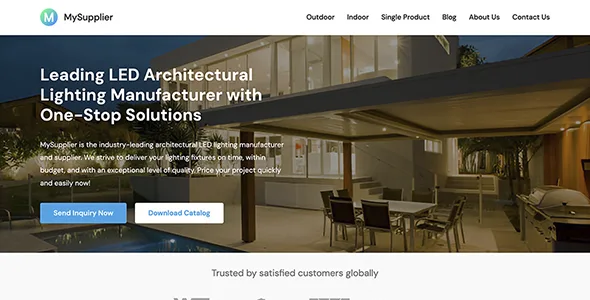
About MySupplier Theme
A professional buyer asks for the spec table before the price
People buying for a project or for resale rarely arrive with a card in hand. They arrive with a list of conditions: power, dimensions, voltage, minimum quantity, customization. If your site shows them nice photos and a phone number, they have to write to you to learn the basics, and they may try another supplier who already publishes them first.
MySupplier, by WPEnjoy, starts from that journey. It is a theme for manufacturers, wholesalers and suppliers who sell by quotation: in its demo, an LED lighting manufacturer, there is no cart and no prices, and the home page and product page end in a quote request. The piece holding it all together is the product page with its specification table, which is why it pays to prepare that data before thinking about colors.
The product page, section by section
The demo product page follows this order:
- Header with title, image and two buttons: request a quote and download the catalog.
- Overview with description, image and three feature blocks.
- Reasons to choose you, in three points, and a row of four images.
- Specification table with columns for model, power, dimensions, input, color temperature and beam.
- Benefits for the customer and FAQs as plain text.
- Closing call to request a quote.
The pages around the product page
The home page presents the manufacturer with a main message, client logos, category cards, a block on the factory and its certifications, six reasons to choose you, testimonials, blog posts and a quote request. The demo uses those six reasons to cover minimum order, customization or warranty; replace them with terms your company can meet.
Category pages gather cards with image, title, short description and button, plus text guiding the buyer on product types and how to choose. The set is completed by the blog, About Us and Contact, with a form for name, email and message, plus address, phone and WhatsApp.
Where the theme ends and your work begins
The demo category pages are content pages, with no product grid, no filters and no basket. Each card leads to the sample product page, so you will need to point each button to its own page and create those product pages yourself.
The demo also has no shop with online payment and no quotation system: the quote buttons lead to Contact. If you need the customer to build a product list or see prices by group, another piece is required. In the demo, the catalog button also leads to Contact, so you need to upload your own file and link it.
Installing MySupplier and importing the demo
Use a fresh WordPress install, which is where the importer fits best. Then:
- Upload the .zip from Appearance, Themes, Add New, and activate it.
- Install and activate the One Click Demo Import plugin from the Appearance menu.
- Start the import under Import Demo Data. It can take up to five minutes depending on the server.
- If no posts or pages appear, run it again. If it still fails, the files are in the theme's demo-content folder for a manual import.
- Open the Site Editor and replace texts, images and contact details.
WooCommerce for selling online or quoting
If you prefer a wholesale shop, Angro is a WooCommerce theme with private buying areas and B2B and B2C side by side. If you already sell with WooCommerce and want to keep quotation, YITH WooCommerce Request a Quote lets customers gather products in a quote list and turns the accepted offer into an order.
Taking MySupplier to your own sector
Is it only for lighting?
No. The demo uses that sector, but the theme is meant to show the products and services of businesses in general.
Do I need to know how to code?
Not to create the pages: the layouts and block patterns are edited in the Site Editor without writing code.
Does it look right on mobile?
Yes, the design adapts to computers, phones and tablets. Check long specification tables on small screens.
Can the demo content be used as it is?
No: its texts describe a sample company and part of the content is placeholder. Rewrite it with your real data.
Topics
Version history
-
v
1.0.0 Current 8 Jan 2025
Customer reviews
Sign in to leave a review. Only people who have the product can review it.
No reviews for this product yet.
Frequently asked questions
-
GPL (General Public License) is the license under which WordPress and most premium plugins/themes are distributed. It grants you the right to use, modify and redistribute the software in as many projects as you want, with no domain restrictions.
-
Yes. With membership you get automatic updates via our GPLClub Updater plugin (installed on your WP, detects new versions and applies them). With individual purchase, you get one year of manual updates from your account.
-
Depends on the plan. Monthly: 3 domains. Semi-annual: 7. Annual and Lifetime: 15. Individual purchase: 1 domain.
-
GPLClub offers its own support for installation, configuration and compatibility. For direct support from the original author (feature requests, product-specific bugs), a license purchased from the author is required.