NeoMag – News and Magazine WordPress Theme
Antivirus scan
Powered by ClamAV
✅ Verified clean
This product file has passed our security filters.
Want to run a fresh ClamAV scan right now? Takes a few seconds and shows scanner version, signature DB and live result.
This can take 5 to 30 seconds.
Clean file Threat detected
No threats detected in this file.
- File
- Size
- Scanned
- ClamAV
- Signature database
⚡ Powered by ClamAV
Scan could not be completed
Report product
If you detected an issue (broken file, malware, inappropriate content, etc.) let us know and we'll review it ASAP.
Sign in to report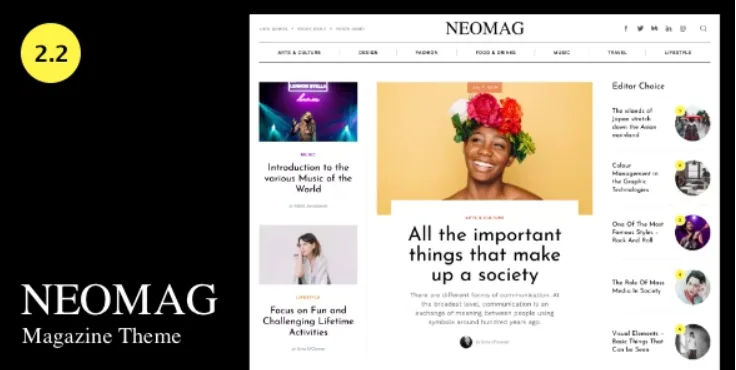
About NeoMag – News and Magazine WordPress Theme
Seven homepage sections eat articles nonstop
You import a magazine theme demo and the homepage looks dense and alive. When your own content replaces the samples the problem shows: each block asks for different posts, and a small newsroom does not always have them.
A magazine homepage feeds on volume, so before picking a design it pays to decide how much you publish. NeoMag serves both small indie magazines and large multidisciplinary outlets, and it gives you room to fit the homepage to your pace: its seven sections can be changed, and one of them brings the old archive back into view.
Seven blocks to spread what you publish
- Top Carousel, the top carousel.
- Newest Posts, with five layouts.
- Latest Posts, with two.
- Center Carousel, with two.
- Posts By Category, with four.
- Older Posts, with four, for pieces that still hold up.
- Carousel Bottom, with two.
A switch lets you show the same posts in several sections, which helps while you build up content. Pagination can be disabled so the homepage ends like a magazine.
Ten ad slots with individual control
Advertising is built in and works through widgets, with 10 slots spread across the header, footer, sidebar and below the content. Each one is controlled separately. In category archives you can place an ad instead of the last post, and sidebars can stay fixed on the homepage, archives and posts.
Reading, archives and headers
When a reader reaches the end of a post, the next one can load on its own with scrolling. Popular posts are shown with their view counts, and each article supports related posts and an author box you can show or hide.
The single post comes with or without a sidebar, in two variations. Categories have three layouts for the newest posts and two for the latest, and other archives have four options. The author page carries an image, name, bio and social icons, with two post layouts.
- Six headers, an offcanvas panel on desktop or mobile with menus, search, social links or custom content, and sticky navigation.
- Customizer with live preview, Google fonts, colors, and regular or human-readable dates.
- Editors: Gutenberg and Classic, with the Canvas template for building pages with blocks.
- Right-to-left writing and compatibility with the AMP plugin.
- Widget-based footer, where each widget becomes a column.
Setting up the magazine to match your publishing pace
The social sharing icons and the custom sidebar widgets depend on NeoMag Addons, a plugin installed separately after activating the theme. Custom fonts are added with third-party plugins. This is how it gets going:
- Activate NeoMag and import a demo with one click.
- Install NeoMag Addons.
- Define your categories and replace the sample content.
- Fit the sections to the posts you can sustain.
- Assign the ad slots through widgets.
If your outlet charges its readers
Among the features of NeoMag there is no paywall or membership.
JNews adds a paywall and more than 150 homepages. Fabula covers everything from a personal blog to an outlet with paid content. Herald also organizes the homepage by sections rather than by date, aimed at news portals.
Homepage, ads and sharing buttons in NeoMag
Does it work for a small magazine?
Yes, it is also meant for small indie magazines.
Can I repeat posts on the homepage?
Yes, with a switch to show the same posts in several sections.
How many ads does it support?
It has 10 widget-based slots, each controlled separately.
Does it work for an Arabic or Hebrew site?
It supports right-to-left languages.
Why are the sharing buttons not showing?
They depend on the NeoMag Addons plugin, which is installed separately.
Topics
Version history
-
v
2.0 Current 21 Aug 2024
Customer reviews
Sign in to leave a review. Only people who have the product can review it.
No reviews for this product yet.
Frequently asked questions
-
GPL (General Public License) is the license under which WordPress and most premium plugins/themes are distributed. It grants you the right to use, modify and redistribute the software in as many projects as you want, with no domain restrictions.
-
Yes. With membership you get automatic updates via our GPLClub Updater plugin (installed on your WP, detects new versions and applies them). With individual purchase, you get one year of manual updates from your account.
-
Depends on the plan. Monthly: 3 domains. Semi-annual: 7. Annual and Lifetime: 15. Individual purchase: 1 domain.
-
GPLClub offers its own support for installation, configuration and compatibility. For direct support from the original author (feature requests, product-specific bugs), a license purchased from the author is required.