Next Image Effect Pro
Antivirus scan
Powered by ClamAV
✅ Verified clean
This product file has passed our security filters.
Want to run a fresh ClamAV scan right now? Takes a few seconds and shows scanner version, signature DB and live result.
This can take 5 to 30 seconds.
Clean file Threat detected
No threats detected in this file.
- File
- Size
- Scanned
- ClamAV
- Signature database
⚡ Powered by ClamAV
Scan could not be completed
Report product
If you detected an issue (broken file, malware, inappropriate content, etc.) let us know and we'll review it ASAP.
Sign in to report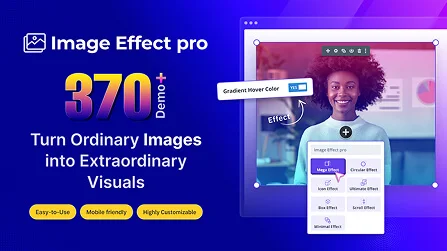
About Next Image Effect Pro
Hover Effects for Images Inside Divi
When the images on a page always look the same, with no interaction at all, they can easily go unnoticed by visitors. Next Image Effect Pro fixes this by adding dedicated modules for Divi Builder that turn any image into an interactive element through hover animations and transitions. Rather than relying on custom code or extra CSS, designers can work directly from the Visual Builder, with adjustable options for each effect.
Modules Included in Next Image Effect Pro
The plugin brings together a set of modules built for different uses within the same page, each with its own visual style:
- Mega Image Effect: includes more than 220 hover effect variations, from classic slides to floating block animations or directional zoom.
- Ultimate Image Effect: offers 24 different transition styles for combining an image with overlaid text.
- Circular Image Effect: applies the animations within a circular frame, useful for teams, testimonials or profiles.
- Image Hover Box: displays content inside a rectangular block with more than 50 effects available.
- Image Icon Effect: combines the image with an icon and focused text, with six interaction variants.
- Minimal Image Hover Effect: more understated effects such as zoom, rotation, blur or brightness, designed for clean layouts.
- Image Scroll Effect: applies transformations to the image as the user scrolls down the page.
- Image Effect Lite: a stripped-down version with basic hover options for simpler cases.
Customization Right From the Builder
Each module exposes its controls in Divi's usual panels: typography, color, spacing, borders and transition timing can all be adjusted without leaving the visual editor. This makes it possible to match each effect to the site's identity instead of using a generic animation, and to try out different combinations of text, icon and image until you find what works best for each section.
Common Use Cases
Next Image Effect Pro is especially useful for portfolios, team pages, product galleries, services sections and "about us" blocks, where showing an image together with a short description on hover improves the page's visual flow without dumping extra content all at once. It's also a practical choice for anyone who builds sites with Divi on a regular basis and wants to vary the way images are presented from one project to the next, instead of always reusing the same visual trick.
| Product type | Plugin |
| Compatibility | Divi Builder (Divi Theme Builder and Visual Builder) |
| Modules included | Mega Image Effect, Ultimate Image Effect, Circular Image Effect, Image Hover Box, Image Icon Effect, Minimal Image Hover Effect, Image Scroll Effect, Image Effect Lite |
Frequently Asked Questions
Do I need to know how to code to use these effects?
No. All modules are configured from Divi's visual panels, with no need to write CSS or any additional code.
Does it work with any theme, or only with Divi?
Next Image Effect Pro is built as a module extension for Divi Builder, so it requires this builder to work.
Can I combine several modules on the same page?
Yes, each module is independent and can be inserted as many times as needed, even several different effect types within the same section.
Do the effects affect the page's load time?
The animations are based on CSS transitions, so their impact on performance is similar to that of any other visual Divi module with custom styles.
Can it be used for product images in a store?
Yes, the modules work with any image on the site, including those in product catalogs built with Divi.
Version history
-
v
2.0.0 Current 1 Nov 2026
Customer reviews
Sign in to leave a review. Only people who have the product can review it.
No reviews for this product yet.
Frequently asked questions
-
GPL (General Public License) is the license under which WordPress and most premium plugins/themes are distributed. It grants you the right to use, modify and redistribute the software in as many projects as you want, with no domain restrictions.
-
Yes. With membership you get automatic updates via our GPLClub Updater plugin (installed on your WP, detects new versions and applies them). With individual purchase, you get one year of manual updates from your account.
-
Depends on the plan. Monthly: 3 domains. Semi-annual: 7. Annual and Lifetime: 15. Individual purchase: 1 domain.
-
GPLClub offers its own support for installation, configuration and compatibility. For direct support from the original author (feature requests, product-specific bugs), a license purchased from the author is required.