One Page Freelancer Photographer Portfolio WordPress Theme
Antivirus scan
Powered by ClamAV
✅ Verified clean
This product file has passed our security filters.
Want to run a fresh ClamAV scan right now? Takes a few seconds and shows scanner version, signature DB and live result.
This can take 5 to 30 seconds.
Clean file Threat detected
No threats detected in this file.
- File
- Size
- Scanned
- ClamAV
- Signature database
⚡ Powered by ClamAV
Scan could not be completed
Report product
If you detected an issue (broken file, malware, inappropriate content, etc.) let us know and we'll review it ASAP.
Sign in to report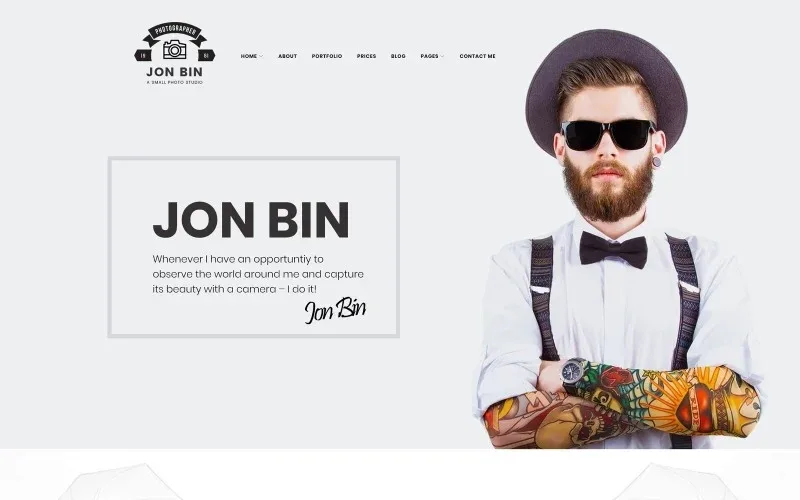
About One Page Freelancer Photographer Portfolio WordPress Theme
A photographer who sells sessions and wants a single page, not an agency website
This theme is built for people who earn per session (weddings, portraits, newborns, families) and need one long page where the client sees the work, understands what is on offer and clicks the booking button. If instead you run a studio with dozens of private albums, client proofing or print sales, this template is not designed for that: it is a showcase, not a shop or a delivery manager.
It is also a poor fit if you want a website with many sections and a deep hierarchy. Everything here revolves around a home page that links to blocks on the same page, although the menu also includes sections such as Portfolio, Prices and Blog.
The problem One Page Freelancer Photographer Portfolio solves: showing your work without losing the client
A photographer often has a problem that has nothing to do with the camera: the potential client arrives from a phone, looks at three images, can't find the price and leaves for someone else. This theme lays out the journey on a single page: introduction, services, works, prices by type of session, recent blog posts, testimonials and a final booking button.
The demo template organizes prices in cards by type of session, with a booking button on each. It is a good idea at its core: someone looking for a wedding photographer doesn't want to read a newborn rate to reach theirs.
Seven headers and three footers so it doesn't look like someone else's site
One of the strong points is the variety of structure:
- Headers: seven different styles, depending on whether you want a discreet menu or a more prominent logo.
- Footers: three styles.
- Blog: classic, grid, masonry and justified layouts, with a sidebar on the left, on the right or none.
- Post formats: gallery, image, link, quote, video and audio.
This matters because two photographers with the same template and the same header end up looking alike. Changing the header helps you stand out.
Pre-designed blocks for the points that convert most
The template includes elements such as accordions, tabs, buttons, calls to action, counters, countdown timer, contact form, maps, pricing tables, testimonials, video, sliders and social sharing buttons. For a photographer, the most useful are:
- Pricing table, to show packages without explaining them in paragraphs.
- Testimonials, so that the words of previous clients accompany the photos.
- Contact form and map, for those who prefer to write or locate you.
- Video and video slider, to show a wedding in motion as well as in photos.
Before publishing: what you need to rewrite
The demo comes with placeholder text that you shouldn't keep. For example, it includes testimonials and a loan comparison block that have nothing to do with photography, and sample prices that are purely decorative. Replace everything with your real offer, your rates and genuine client opinions. Publishing fake reviews can be a legal and reputational problem.
The demo blog dates are old: if the blog is left abandoned it reduces trust, so publish with some regularity or keep it hidden until you have material.
Frequently asked questions
Is it suitable for a freelance photographer with little content?
Yes, that is exactly its use case: one page with your best work, services and contact details is enough to start.
Can I build a blog with it?
Yes, with several layouts, an optional sidebar and formats such as gallery, video or quote.
Can I use it to sell photos or manage private client albums?
That is not its purpose: it is aimed at showing your work and getting bookings. For a shop or protected galleries you would need other tools.
Topics
Version history
-
v
1.0.0 Current 13 Jun 2024
Customer reviews
Sign in to leave a review. Only people who have the product can review it.
No reviews for this product yet.
Frequently asked questions
-
GPL (General Public License) is the license under which WordPress and most premium plugins/themes are distributed. It grants you the right to use, modify and redistribute the software in as many projects as you want, with no domain restrictions.
-
Yes. With membership you get automatic updates via our GPLClub Updater plugin (installed on your WP, detects new versions and applies them). With individual purchase, you get one year of manual updates from your account.
-
Depends on the plan. Monthly: 3 domains. Semi-annual: 7. Annual and Lifetime: 15. Individual purchase: 1 domain.
-
GPLClub offers its own support for installation, configuration and compatibility. For direct support from the original author (feature requests, product-specific bugs), a license purchased from the author is required.