PartyMaker – Halloween WordPress Theme
Antivirus scan
Powered by ClamAV
✅ Verified clean
This product file has passed our security filters.
Want to run a fresh ClamAV scan right now? Takes a few seconds and shows scanner version, signature DB and live result.
This can take 5 to 30 seconds.
Clean file Threat detected
No threats detected in this file.
- File
- Size
- Scanned
- ClamAV
- Signature database
⚡ Powered by ClamAV
Scan could not be completed
Report product
If you detected an issue (broken file, malware, inappropriate content, etc.) let us know and we'll review it ASAP.
Sign in to report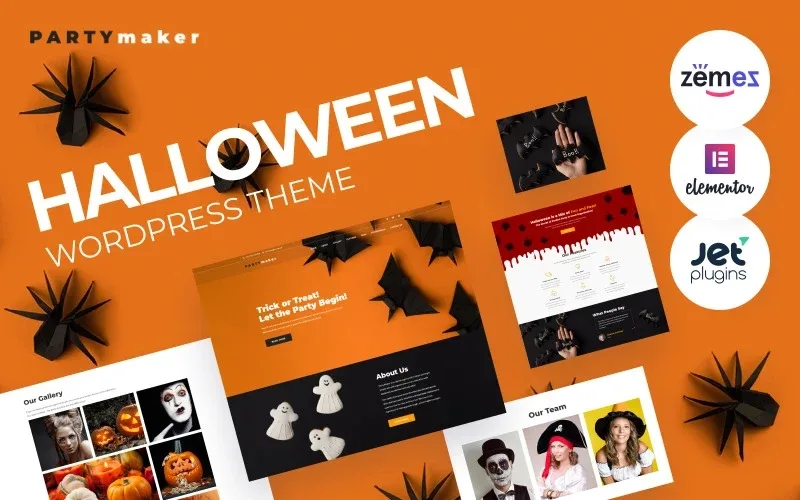
About PartyMaker – Halloween WordPress Theme
October fills the calendar and November empties the website
If you organize parties, your website has a calendar problem: people look for you in the weeks before Halloween, browse photos of past parties and decide quickly who to hire. A generic events website doesn't convey that atmosphere, and a custom-built one for a single season costs more than it earns.
PartyMaker is a one-page theme with a Halloween look, designed for a creative party agency. A themed party is sold with photos and tone, not with lists of services. That's why the gallery and a text with some humor matter more here than any technical sheet.
Seven menu sections on a page you can scroll through in one go
The content sits on a single page and the menu leads to seven blocks: Home, About, Gallery, Features, Team, Testimonials and Contact. Visitors don't open separate pages, which is welcome on mobile and when they arrive from a seasonal campaign.
- Front section with a call to action: an eye-catching headline along the lines of «Trick or Treat» and buttons to keep reading.
- Gallery: the space to show parties you've already organized, which is what tips the balance when someone is torn between two agencies.
- Features block: in the demo it's a list of party essentials (candy bags, punch, tableware, drinks and desserts).
- Team, testimonials and newsletter: an introduction to the people, client opinions and email subscription, with social media icons and contact details in the footer.
PartyMaker in the hands of three kinds of organizer
The agency that already has parties to show
With photos and happy clients, make the gallery and testimonials the center of the page and keep the rest short. The theme saves you from planning the structure and the order in which visitors move through it.
Those who throw parties for children and adults
The demo talks about games for both audiences. Separate the two formats with their own text: a parent looking for a children's birthday shouldn't read an offer meant for adults. And if you mention alcoholic drinks, make clear they are for adult-only parties.
Those who want to use it all year
The look and headlines of the demo are made for October, so if you want to use it for another celebration, the adaptation work will be bigger than it seems.
Questions before installing PartyMaker
Is it a multi-page website? No. It's a one-page landing and the menu takes you to each block within it.
Can I remove the sample content? Yes, and you should: the team and testimonials in the demo are samples and repeat the same text.
Does it work if my agency doesn't do Halloween? Only if you accept redoing the look and headlines, because the setting is very distinctive.
No bookings, no shop and sample texts to replace
PartyMaker is not an event management system or a store for party supplies. It's a one-page showcase. The header details in the demo, such as the phone number or the 24-hour service notice, are samples and you will have to replace them with your own before publishing. Check in the demo how the gallery block looks with your own photos.
Topics
Version history
-
v
1.0.1 Current 13 Jun 2024
Customer reviews
Sign in to leave a review. Only people who have the product can review it.
No reviews for this product yet.
Frequently asked questions
-
GPL (General Public License) is the license under which WordPress and most premium plugins/themes are distributed. It grants you the right to use, modify and redistribute the software in as many projects as you want, with no domain restrictions.
-
Yes. With membership you get automatic updates via our GPLClub Updater plugin (installed on your WP, detects new versions and applies them). With individual purchase, you get one year of manual updates from your account.
-
Depends on the plan. Monthly: 3 domains. Semi-annual: 7. Annual and Lifetime: 15. Individual purchase: 1 domain.
-
GPLClub offers its own support for installation, configuration and compatibility. For direct support from the original author (feature requests, product-specific bugs), a license purchased from the author is required.