PressBook Premium
Antivirus scan
Powered by ClamAV
✅ Verified clean
This product file has passed our security filters.
Want to run a fresh ClamAV scan right now? Takes a few seconds and shows scanner version, signature DB and live result.
This can take 5 to 30 seconds.
Clean file Threat detected
No threats detected in this file.
- File
- Size
- Scanned
- ClamAV
- Signature database
⚡ Powered by ClamAV
Scan could not be completed
Report product
If you detected an issue (broken file, malware, inappropriate content, etc.) let us know and we'll review it ASAP.
Sign in to report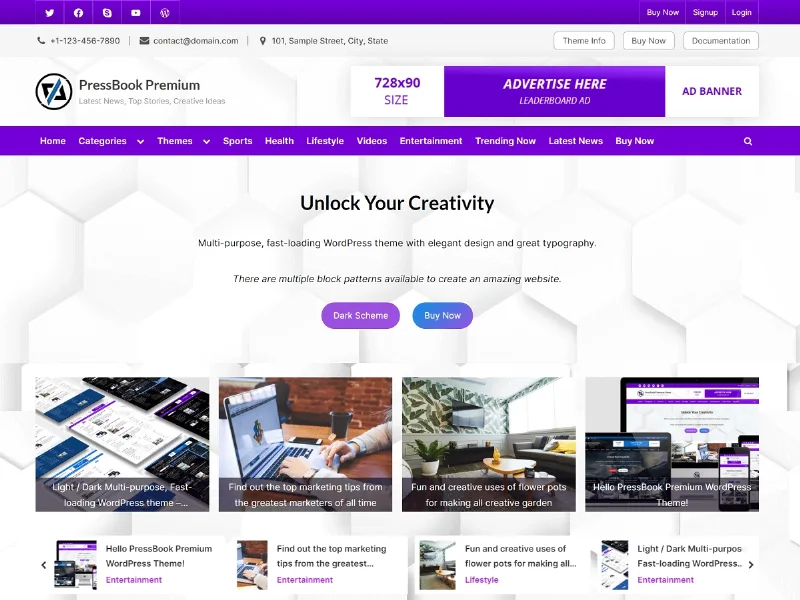
About PressBook Premium
Whoever lands on your blog almost never comes in through the homepage
Setting up a blog or a digital magazine often ends with a carefully designed home page that almost nobody sees, while the reader arriving from Google lands on a single article, reads it and leaves. In a content site, what matters is everything around each post: the sidebar, the listings, the footer and readability. PressBook Premium is built for that job. It is a multipurpose theme for magazines, news, blogs, marketing and educational sites, with light and dark schemes and several listing formats.
From an empty blog to a homepage that retains readers, step by step with PressBook Premium
Step 1: define the color scheme
You choose custom RGBA palettes so the theme matches your brand. You can build a light or a dark theme that applies to the content, the sidebars, the header and the footer, and that is also reflected in the block editor, so you see the result while you write. It includes a transparent background effect. Note: you set the scheme as the editor; check in the demo whether readers can change it themselves.
Step 2: decide how posts are listed
There are three formats: classic, standard grid and masonry grid, each with its own options. To switch to a grid, go to Appearance > Customize > Blog Options and tick the option to show posts in a grid. In addition, the posts carousel lets you highlight content at the top.
Step 3: build the header, footer and sections
The paid version comes with 4 header blocks and 3 footer blocks; the basic version of PressBook includes only one of each. Block patterns let you build sections for calls to action, services, features, columns, media, text, buttons or a hero header. They are block editor patterns: they arrange and shape content, but they do not add functions such as forms or a store. That depends on the plugins you install.
Step 4: adjust typography and sidebars
The selector offers more than 80 Google fonts and lets you load them locally. There are typography settings, single or double sidebars and a sticky sidebar. With over 100 advanced options you have plenty of room, but also plenty to review: set aside time to decide what to change and what to leave as it is.
Grid, footer and fonts: the usual questions
- How do I switch the listing to a grid? From Appearance > Customize > Blog Options, by ticking the option to show posts in a grid. You can also choose masonry.
- Can I remove the footer credit? Yes, the paid version includes the option to remove the footer credit.
- Is it good for more than a blog? It is designed as multipurpose: magazines, news, blogs, marketing and education. For other uses, check in the demo whether the patterns come close to what you need.
- Can it be translated and used in right-to-left languages? It is translation ready and supports RTL.
- Are fonts loaded from Google? You can choose between Google fonts or loading them locally.
A presentation theme, not a toolbox
PressBook Premium solves how your content looks and is organized, on large screens and on mobile, since the layout adapts to screen size. It fits if you publish often and want control over colors, listings and typography without touching code. If you are after a store, a booking system or a membership, the theme does not do it on its own: you will need to add the corresponding plugins.
Topics
Version history
-
v
2.3.4 Current 17 Jun 2024
Customer reviews
Sign in to leave a review. Only people who have the product can review it.
No reviews for this product yet.
Frequently asked questions
-
GPL (General Public License) is the license under which WordPress and most premium plugins/themes are distributed. It grants you the right to use, modify and redistribute the software in as many projects as you want, with no domain restrictions.
-
Yes. With membership you get automatic updates via our GPLClub Updater plugin (installed on your WP, detects new versions and applies them). With individual purchase, you get one year of manual updates from your account.
-
Depends on the plan. Monthly: 3 domains. Semi-annual: 7. Annual and Lifetime: 15. Individual purchase: 1 domain.
-
GPLClub offers its own support for installation, configuration and compatibility. For direct support from the original author (feature requests, product-specific bugs), a license purchased from the author is required.