Reel – WPZoom WordPress Theme
Antivirus scan
Powered by ClamAV
✅ Verified clean
This product file has passed our security filters.
Want to run a fresh ClamAV scan right now? Takes a few seconds and shows scanner version, signature DB and live result.
This can take 5 to 30 seconds.
Clean file Threat detected
No threats detected in this file.
- File
- Size
- Scanned
- ClamAV
- Signature database
⚡ Powered by ClamAV
Scan could not be completed
Report product
If you detected an issue (broken file, malware, inappropriate content, etc.) let us know and we'll review it ASAP.
Sign in to report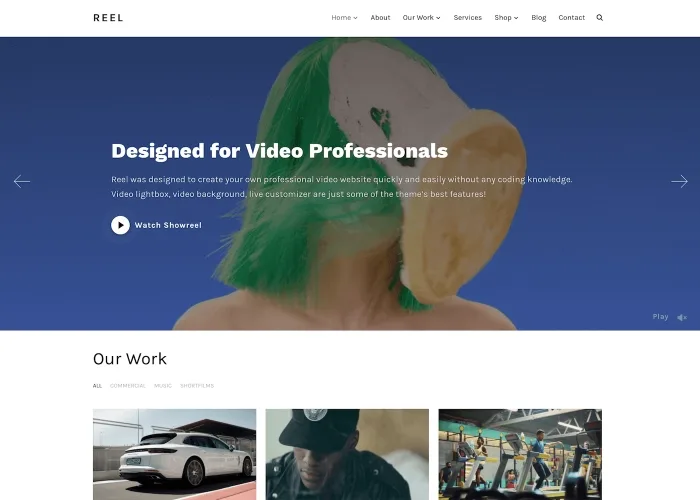
About Reel – WPZoom WordPress Theme
Your showreel runs two minutes, but your website has to convince first
A videographer often has excellent footage and a website that hides it: a YouTube link, a static thumbnail, a video that takes ages to load. Anyone looking for a production company compares several sites back to back, so your page is the first piece of your work they see. If it feels slow or generic, they will judge your editing by it.
Reel is a theme designed for videographers, filmmakers and production studios who want a clean portfolio where video comes first. You can host videos on your own server or embed them from YouTube and Vimeo.
How to build a portfolio with Reel, from the homepage to the last project
Step 1: a homepage with your showreel
The homepage is a slideshow that supports images or video backgrounds. You paste the URL of a YouTube or Vimeo video, or upload your own, and the theme does the rest. If you would rather not have a slider, you can turn it into a static section. It also includes a video lightbox to open your showreel or a product video full screen. On mobile, the background video plays automatically with self-hosted or Vimeo videos as long as the device is not in low power mode; if you prefer a still image, there is an option in the Customizer to turn it off. With Vimeo it works best with Plus, Pro or Business accounts.
Step 2: the project grid
It comes with three portfolio templates that you can configure, with 2, 3 or 4 video columns. Each project can have a short clip that plays on hover. Thanks to the GIPHY integration, that clip can come from a YouTube or Vimeo link, so you do not have to prepare an MP4 by hand, and you can adjust the duration and starting point of each one. There is also an option to make all of them play continuously. Since they are short, optimized clips, they should not weigh down loading, but check in the demo how it behaves with as many projects as you plan to publish.
Step 3: each project page
Each project can open with a full-width header video, self-hosted or from YouTube and Vimeo. In the grid you can choose to open the lightbox by clicking the whole thumbnail, and for long lists there is regular pagination or infinite scroll with a button.
Step 4: adapt it to your brand without touching code
The Customizer shows changes live: colors, fonts (more than 800 Google Fonts), background, logo, menu and widgets. A gradient editor adjusts the color overlay on the slideshow. To get started, there are several starter designs you can import in one click (blue, dark, brown, red, minimal, bold, among others). One of them is built with Elementor: if you want to reorder homepage sections with that editor, you need the Elementor plugin. It also includes its own page builder with templates for home, services and about pages.
Common questions from people who shoot and edit
Do I have to upload my videos to my server? No. You can use YouTube or Vimeo links on the homepage, in the lightbox and in projects, and also for the clip that plays on hover.
Does it look good on mobile? The layout is responsive for mobile and tablet, and the background video has the image fallback option described above.
Can I sell my services or products? It is compatible with WooCommerce, a separate free plugin: you have to install and set up the shop yourself.
Is it useful if I am not a videographer? It works as a visual portfolio, but its whole logic revolves around video.
A personal portfolio, not a tube-style platform
Reel is made to show your work or a studio's work. If you are after a portal with several creators, a video blog or a tube-style streaming site, you need a different kind of theme. Here the stars are your showreel and your projects, presented with care.
Topics
Version history
-
v
3.0.6 Current 17 Jun 2024
Customer reviews
Sign in to leave a review. Only people who have the product can review it.
No reviews for this product yet.
Frequently asked questions
-
GPL (General Public License) is the license under which WordPress and most premium plugins/themes are distributed. It grants you the right to use, modify and redistribute the software in as many projects as you want, with no domain restrictions.
-
Yes. With membership you get automatic updates via our GPLClub Updater plugin (installed on your WP, detects new versions and applies them). With individual purchase, you get one year of manual updates from your account.
-
Depends on the plan. Monthly: 3 domains. Semi-annual: 7. Annual and Lifetime: 15. Individual purchase: 1 domain.
-
GPLClub offers its own support for installation, configuration and compatibility. For direct support from the original author (feature requests, product-specific bugs), a license purchased from the author is required.