Revealer
Antivirus scan
Powered by ClamAV
✅ Verified clean
This product file has passed our security filters.
Want to run a fresh ClamAV scan right now? Takes a few seconds and shows scanner version, signature DB and live result.
This can take 5 to 30 seconds.
Clean file Threat detected
No threats detected in this file.
- File
- Size
- Scanned
- ClamAV
- Signature database
⚡ Powered by ClamAV
Scan could not be completed
Report product
If you detected an issue (broken file, malware, inappropriate content, etc.) let us know and we'll review it ASAP.
Sign in to report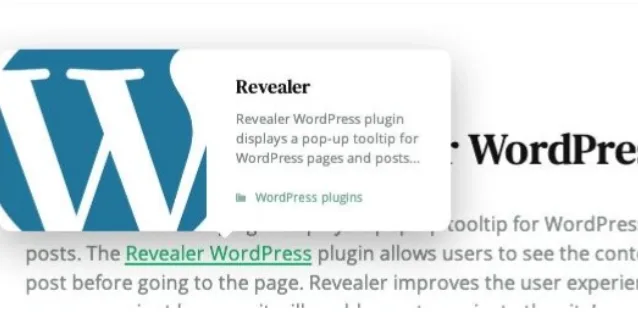
About Revealer
Revealer: visitors see what is behind a link before they click
On a site with hundreds of articles, every internal link is a gamble: readers do not know whether the destination will help them and, if they guess wrong, they lose the thread of what they were reading. Many prefer not to risk it and do not click. Revealer places a popup tooltip over the link with a preview of the content, as Wikipedia has done for years, so they decide with information and not just the anchor text.
The sites that benefit most are those whose content is heavily interlinked: blogs, glossaries, portfolios, magazines or stores. There, the internal link is what keeps visitors browsing, and a preview turns a doubtful click into an informed one.
What the Revealer tooltip shows and where it falls short
It works with pages and posts, categories, tags, author pages, WooCommerce products and links to external sites. You decide what is shown:
- Featured image: show it or hide it.
- Excerpt: adjust its length.
- Author, category and comment count: choose where they appear.
- Style and animation: there are several styles and five entrance animations.
For WooCommerce products the tooltip uses its own layout and adds price and rating to the usual post information.
Now the limits. Revealer does not create content: the preview is only as good as what each page already has. If your posts have no featured image or a well-written excerpt, the tooltip will look poor. Nor is it a marketing window or a lightbox: it only informs about where the link leads. And with external links, check in the demo exactly what information appears before you plan your design around them.
Under the hood it uses native JavaScript, without jQuery, it suits right-to-left languages and it includes a pot file for translating the texts.
Common questions before installing Revealer
Does it work with Elementor, Divi or my theme?
It is designed to coexist with the usual page builders (Elementor, WPBakery, Visual Composer, Divi, Beaver Builder, Gutenberg and others) and with any WordPress theme.
Does it look good on mobile?
It is built for phones, tablets and the main browsers. Since a touchscreen has no cursor, check in the demo from your phone how the tooltip is triggered.
Can I translate the texts?
Yes, it includes a pot file so you can do it in any language.
Is it useful for a WooCommerce store?
Yes: products have their own tooltip layout with price and rating. It adds no buying features, it only informs before the click.
Where Revealer shines and where it is unnecessary
It stands out on sites with lots of related material: a glossary where some terms point to others, a blog whose articles cite each other, a catalogue with many products or a magazine with a long archive. On a website with five fixed pages and clear menus it adds little: there is nothing to anticipate.
Think about link density too. If every paragraph has several links, a popup for each one can feel pushy. It is best kept for the links that really make readers hesitate.
You activate it and it works; what you need to decide is which links it applies to
There is no long setup wizard: once installed and activated, it is already operational. The real work is choosing where you want tooltips. Revealer includes its own interface for binding it to categories and to specific pages.
- Start with one high-traffic category and review the result.
- Make sure those posts have a featured image and an excerpt.
- Test the excerpt size and the animations on desktop and mobile.
- Then extend it to more categories, to tags or to products.
Version history
-
v
1.0.2 Current 14 May 2024
Customer reviews
Sign in to leave a review. Only people who have the product can review it.
No reviews for this product yet.
Frequently asked questions
-
GPL (General Public License) is the license under which WordPress and most premium plugins/themes are distributed. It grants you the right to use, modify and redistribute the software in as many projects as you want, with no domain restrictions.
-
Yes. With membership you get automatic updates via our GPLClub Updater plugin (installed on your WP, detects new versions and applies them). With individual purchase, you get one year of manual updates from your account.
-
Depends on the plan. Monthly: 3 domains. Semi-annual: 7. Annual and Lifetime: 15. Individual purchase: 1 domain.
-
GPLClub offers its own support for installation, configuration and compatibility. For direct support from the original author (feature requests, product-specific bugs), a license purchased from the author is required.