Rocket – Mobile App Landing Page WordPress Theme
Antivirus scan
Powered by ClamAV
✅ Verified clean
This product file has passed our security filters.
Want to run a fresh ClamAV scan right now? Takes a few seconds and shows scanner version, signature DB and live result.
This can take 5 to 30 seconds.
Clean file Threat detected
No threats detected in this file.
- File
- Size
- Scanned
- ClamAV
- Signature database
⚡ Powered by ClamAV
Scan could not be completed
Report product
If you detected an issue (broken file, malware, inappropriate content, etc.) let us know and we'll review it ASAP.
Sign in to report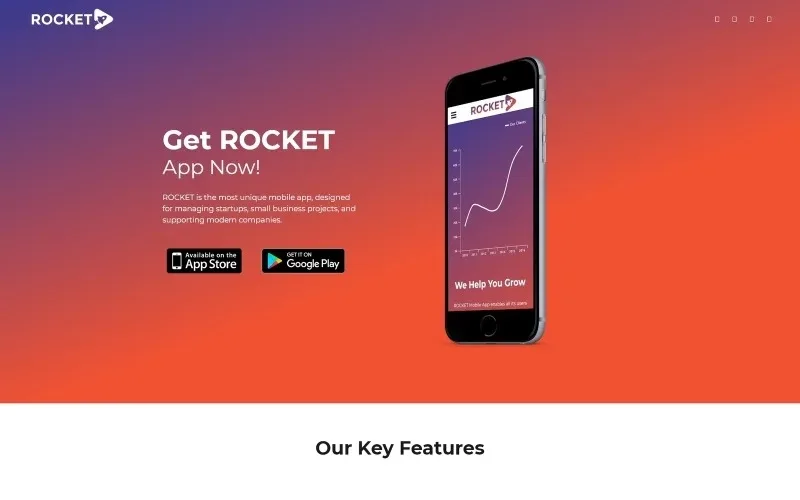
About Rocket – Mobile App Landing Page WordPress Theme
An app without its own website depends on its store listing
Launching an app and sending all the traffic to its app store listing leaves the most important things untold: who it is for, what it solves and why to trust it. A one-page landing exists for that: it takes the visitor from the ad link to the download button without losing them on the way.
And here is what many product teams miss: someone arriving at an app landing page does not want to explore your website, they want to decide whether that app fits their work. Every extra page is an exit. Rocket is designed for apps that manage startups and small business projects, and its structure follows that logic.
Rocket step by step: from the header to the subscription form
This is how a visitor moves through the demo page, and what you have to do at each step:
- Header and first message: a menu with links to the sections (Home, Features, Responsive, Help, Testimonials, Contact Us), social media icons and a headline with a button to get the app. Here you answer "what is this?" with one sentence and one action.
- Key features: three short blocks. The demo talks about secure data transfer with SSL, a network workflow and a highly rated product. They are sample texts: keep only what is true of your app.
- Responsive and Retina: a block dedicated to the app being usable on any device, with download buttons. Those buttons are links you point to your store.
- Help to grow and services: two blocks to explain what else people get when they install the app, with buttons to try it or download it.
- Testimonials: three opinions with name and job title.
- Contact, news and newsletter: phone, email, address, two blog posts and a subscription field.
The theme lays out the page; it does not include the app or handle downloads. Do not assume which email service the subscription form sends to, either: check it on your own installation before announcing a newsletter.
Questions about Rocket before choosing it
Does it work for a website with several pages?
That is not its approach: the demo is a landing page with internal links. For a site with a catalog, a shop or many sections, look for another theme.
Is it suitable for something other than an app?
The structure (features, services, opinions, contact) fits a digital product or a startup, but the texts and download buttons are designed for apps.
Can you publish news?
Yes, the demo includes a latest news block with two posts, useful for announcing product changes.
Does it look good on mobile?
The demo talks about responsive design and Retina ready technology. Even so, open the demo on your phone and check how your own texts look.
Replace the demolink.org content before publishing
The demo testimonials carry names and job titles from a sample company, and the awards, worldwide recognition and 2017 news are filler. Publishing them as they are means putting fake reviews under your brand. Replace them with real opinions or remove the block; the page works the same without it.
The same goes for the San Diego address, the sample phone and email, and the SSL promise: if you state it, it has to be true of your app.
Topics
Version history
-
v
1.0.0 Current 13 Jun 2024
Customer reviews
Sign in to leave a review. Only people who have the product can review it.
No reviews for this product yet.
Frequently asked questions
-
GPL (General Public License) is the license under which WordPress and most premium plugins/themes are distributed. It grants you the right to use, modify and redistribute the software in as many projects as you want, with no domain restrictions.
-
Yes. With membership you get automatic updates via our GPLClub Updater plugin (installed on your WP, detects new versions and applies them). With individual purchase, you get one year of manual updates from your account.
-
Depends on the plan. Monthly: 3 domains. Semi-annual: 7. Annual and Lifetime: 15. Individual purchase: 1 domain.
-
GPLClub offers its own support for installation, configuration and compatibility. For direct support from the original author (feature requests, product-specific bugs), a license purchased from the author is required.