SecondLine – Dixie WordPress Theme
Antivirus scan
Powered by ClamAV
✅ Verified clean
This product file has passed our security filters.
Want to run a fresh ClamAV scan right now? Takes a few seconds and shows scanner version, signature DB and live result.
This can take 5 to 30 seconds.
Clean file Threat detected
No threats detected in this file.
- File
- Size
- Scanned
- ClamAV
- Signature database
⚡ Powered by ClamAV
Scan could not be completed
Report product
If you detected an issue (broken file, malware, inappropriate content, etc.) let us know and we'll review it ASAP.
Sign in to report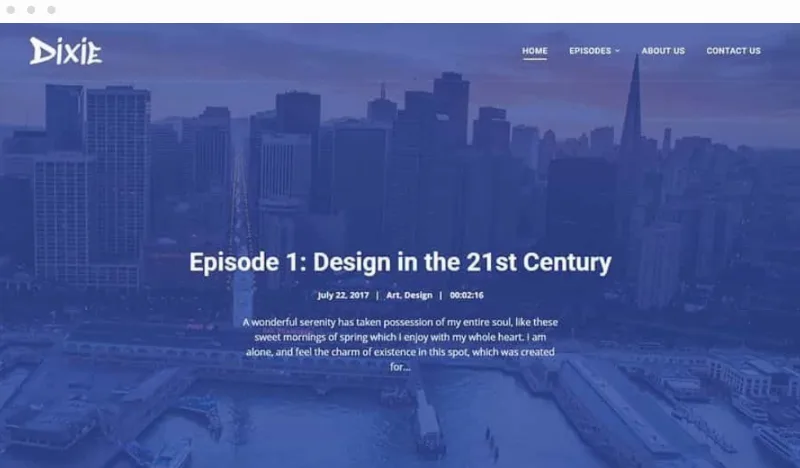
About SecondLine – Dixie WordPress Theme
Dixie: a podcast website that is not just a blog with a pasted-in player
Many podcasters end up with episodes buried in a generic blog, a player that looks bad on mobile and no page introducing the people behind the mic. On top of that, a good part of the audience listens from their app and rarely visits your site, so whoever does arrive is usually someone who wants to know more. That visit deserves to find the latest episode, the faces of the show and a way to subscribe quickly.
Dixie is a SecondLine theme designed for podcasting from the start. It also works for a blog or a portfolio, but episodes are its strength.
Episodes as a list, grid, masonry or slider
Dixie lets you choose how your episode archive is displayed:
- One-column list or a grid of 2 to 6 columns.
- Masonry layout.
- Episode slider.
- Audio and video players inside the grid or the header.
- Filter by podcast category with animated buttons.
- Pagination with a load more button, infinite scroll or classic numbering.
The player works in all browsers and on mobile, and can include a download button or an option to open in a new window. You can also show a single episode in context.
Be clear about what Dixie is: the showcase for your show. The audio comes from plugins such as PowerPress, Seriously Simple Podcasting or Simple Podcast Press, from local or external MP3 files, or from Libsyn, SoundCloud, Mixcloud or YouTube embeds. To build pages with Elementor the free version is enough; Pro is not essential. And you choose the podcasting plugins or the service where you host the audio.
Four questions before you pick Dixie
Does it work with my podcast plugin?
It is compatible with PowerPress, Seriously Simple Podcasting and Simple Podcast Press. If you publish from another platform, check whether it offers an embed: Libsyn, SoundCloud, Mixcloud and YouTube are covered.
Do I need Elementor Pro?
No. The theme includes its own Elementor add-ons and demo templates, and works with the free version.
Can the site be translated?
Yes. It is ready for translation with the plugin you prefer, it is compatible with WPML and it supports RTL orientation.
Is it useful if I have no podcast?
Yes, as a blog or portfolio, and it is compatible with WooCommerce. Still, its advantage shows with episodes.
Colors, fonts and the show hosts page
From the WordPress Customizer you can change the full color palette and choose among more than 900 Google Fonts, so your site does not look like the demo. It includes a show hosts or About Us page: photo, bio and social links for each person, designed so the audience can put a face to the voices.
The theme is responsive and optimized for speed and SEO. It offers many settings to turn elements on or off and to control how many episodes are shown.
The whole demo imports in one click, the content is yours to add
The demo importer brings in the entire example site at once. After that you replace texts, images and episodes with your own. Before you start, have Elementor and the podcast plugin you plan to use installed, and check in the demo how the slider or grid looks with your real episode titles and covers.
Topics
Version history
-
v
1.5.7 Current 16 Jun 2024
Customer reviews
Sign in to leave a review. Only people who have the product can review it.
No reviews for this product yet.
Frequently asked questions
-
GPL (General Public License) is the license under which WordPress and most premium plugins/themes are distributed. It grants you the right to use, modify and redistribute the software in as many projects as you want, with no domain restrictions.
-
Yes. With membership you get automatic updates via our GPLClub Updater plugin (installed on your WP, detects new versions and applies them). With individual purchase, you get one year of manual updates from your account.
-
Depends on the plan. Monthly: 3 domains. Semi-annual: 7. Annual and Lifetime: 15. Individual purchase: 1 domain.
-
GPLClub offers its own support for installation, configuration and compatibility. For direct support from the original author (feature requests, product-specific bugs), a license purchased from the author is required.