Skole Children Kindergarten Theme
Antivirus scan
Powered by ClamAV
✅ Verified clean
This product file has passed our security filters.
Want to run a fresh ClamAV scan right now? Takes a few seconds and shows scanner version, signature DB and live result.
This can take 5 to 30 seconds.
Clean file Threat detected
No threats detected in this file.
- File
- Size
- Scanned
- ClamAV
- Signature database
⚡ Powered by ClamAV
Scan could not be completed
Report product
If you detected an issue (broken file, malware, inappropriate content, etc.) let us know and we'll review it ASAP.
Sign in to report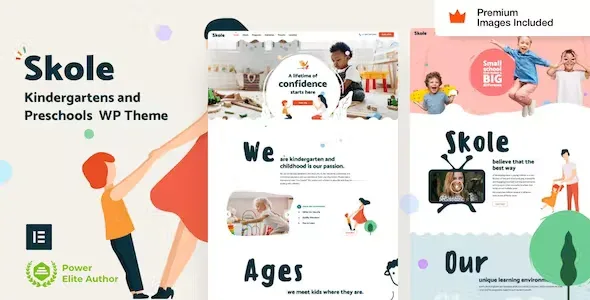
About Skole Children Kindergarten Theme
Built for kindergartens and preschools that already work with Elementor Pro
A family looking for a place for their child usually compares several websites in a single evening, almost always on a phone, and settles on the one that answers three questions first: what the hours are, how to apply for a place and who will look after their child. A cheerful design does not make up for answers buried three clicks away.
Skole is designed for kindergartens, preschools, playschools, child care centers and art or craft academies for kids. It can be handled both by someone who cannot code and by someone who builds websites every day.
It is not for you if:
- You do not want to work with Elementor Pro: the theme is built with its widgets and needs it, even to import the demo content and do the setup.
- You expect an enrollment system, tuition payments or a private area for families: Skole provides design and templates, and requests would be handled with Elementor Pro forms.
- You prefer another page builder: here everything, from the header to the pop-ups, is edited with Elementor.
Skole does not make you learn yet another options panel
Most themes come with their own panel, their own widgets and extra plugins. Skole does the opposite: the Elementor Pro Global Styles panel works as the theme panel, so you change colors and fonts where you already know how. If the center changes its logo or palette, you adjust it in one place.
The theme's own code only extends Elementor and Elementor Pro widgets with styles and animations, and you can turn it off widget by widget. That reduces dependence on third-party code if you ever want to switch designs.
Header, forms and pop-ups built with Elementor Pro
- Header, footer and mega menus: edited visually, useful if the center has many sections (programmes, groups, admissions, families).
- Forms: the Elementor Pro ones, for contact or information requests.
- Pop-ups: they can be used to announce an admissions deadline or an open day.
- Dynamic templates: blog posts, blog and product archives, 404 page, maintenance mode, coming soon page and search results.
The pages a family expects to find in Skole
The theme is geared to presenting classes, teachers and daily activities, and to highlighting programmes, schedules, admissions and events without overloading the page. It also lets you create pages for groups, learning activities and information for parents.
A tip: before customizing, decide which three things you want a family to see without scrolling (schedule, how to apply and how to get in touch) and put them at the top. The design helps, but the order is up to you.
Mobile and tablet control with custom breakpoints matters here, because a good share of visits will come from phones. It includes RTL support for right-to-left languages, and it is listed as compatible with WPML for multilingual sites.
WooCommerce is among the requirements, and the demo images come with it
The requirements the theme lists are WordPress, Elementor, Elementor Pro and WooCommerce. With the Elementor Pro WooCommerce builder you design products, product archives, my account, cart and checkout. It can be handy if the center sells something, such as supplies or clothing, but it is not a school management tool.
The images shown on the demo website are delivered with the demo content and you can reuse them in your project. There is also a setup guide and a series of HD video tutorials aimed at beginners.
Frequently asked questions about Skole
Does it work without Elementor Pro?
No. Elementor Pro is required to import the demo content and for the theme setup, and much of the design is built with its widgets.
Do I have to learn an options panel of its own?
No. Global settings are handled from the Elementor Pro Global Styles.
Can I remove the theme code?
Yes, widget by widget, if you prefer to keep only the Elementor widgets.
Is it suitable for other children's businesses?
Yes, for those focused on the care and education of children, such as kindergartens, nurseries and art or craft centers. For a business unrelated to children, the design will not fit.
Topics
Version history
-
v
61 Current 2 Nov 2026
-
v
57 15 Sep 2026
-
v
55 5 Sep 2026
-
v
49 28 Apr 2026
Customer reviews
Sign in to leave a review. Only people who have the product can review it.
No reviews for this product yet.
Frequently asked questions
-
GPL (General Public License) is the license under which WordPress and most premium plugins/themes are distributed. It grants you the right to use, modify and redistribute the software in as many projects as you want, with no domain restrictions.
-
Yes. With membership you get automatic updates via our GPLClub Updater plugin (installed on your WP, detects new versions and applies them). With individual purchase, you get one year of manual updates from your account.
-
Depends on the plan. Monthly: 3 domains. Semi-annual: 7. Annual and Lifetime: 15. Individual purchase: 1 domain.
-
GPLClub offers its own support for installation, configuration and compatibility. For direct support from the original author (feature requests, product-specific bugs), a license purchased from the author is required.