Slider Revolution Backup Add-On
Antivirus scan
Powered by ClamAV
✅ Verified clean
This product file has passed our security filters.
Want to run a fresh ClamAV scan right now? Takes a few seconds and shows scanner version, signature DB and live result.
This can take 5 to 30 seconds.
Clean file Threat detected
No threats detected in this file.
- File
- Size
- Scanned
- ClamAV
- Signature database
⚡ Powered by ClamAV
Scan could not be completed
Report product
If you detected an issue (broken file, malware, inappropriate content, etc.) let us know and we'll review it ASAP.
Sign in to report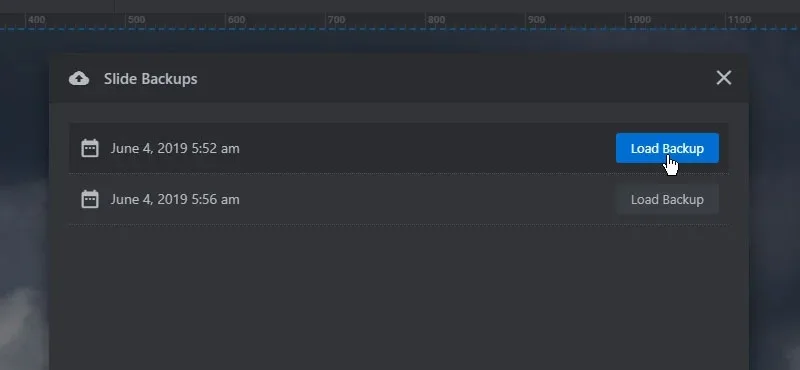
About Slider Revolution Backup Add-On
One bad save in a slider does not justify sending the whole site back to yesterday
You change three layers on the main slide, save, look at the page and no longer like the result. The previous version has gone from the editor. If your only way out is the full site backup, the fix drags everything else along: restoring it returns posts, comments and orders to that backup's date, just to recover a headline and two images.
Damage in a slider comes from editing mistakes, not disasters, and it calls for a tool of the same size. That is Slider Revolution Backup Add-On: an automatic copy of each slide when you save it, restored from the editor itself, without touching the rest of the installation.
Two levels of undo: the slide and the module
- A copy on save. With the add-on active, every slide save produces its copy without you asking for it.
- Restore per slide. In the slide's settings, the Backups tab shows its copies through the Show Backups for this Slide button.
- Versions of module settings. Beyond the slides, the module keeps versions of its configuration.
- Eleven saves within reach. Module Settings has its own Backup tab, which brings back one of the last eleven saves.
- Global scope. It is a global add-on: it is activated for the whole site, not module by module.
How to fit it into daily work
Since the copy is born on save, it pays to save with intent. These habits get more out of each copy:
- Save before a big change. If you are about to redo an animation, save first: that way the working state sits among the copies.
- Check the public page. After restoring, look at the published result and not only the editor.
- Tell the failures apart. If what changed was a layer or a text, look in that slide's copies. If it was sizes, navigation or another general setting, look at the Module Settings tab.
- Export before a redesign. Slider Revolution lets you download each module as a zip and import it again. Importing does not overwrite the original: it appears as another module, so you can compare both calmly.
Outside these copies
It does not protect what you did not save. The copy is created on save, so a change lost before that moment has no copy.
It is not your site's backup. It covers slides and module settings. Your pages, your shop and your plugins stay outside, and if the whole site goes down you will need another system.
No scheduling or external storage. Among its features there are no scheduled backups and no sending to external storage. To keep a version of a module outside WordPress, export the zip and store it separately.
The limit of eleven belongs to the settings. That figure refers to Module Settings. Do not extend it to slides: open the Backups tab and check how many copies you see in your case.
Activating it on Slider Revolution
It needs Slider Revolution installed, since it works inside its editor. Getting started takes three steps:
- Open the Slider Revolution Addon Library and find the backup add-on.
- Enable it as a global add-on so it is available across the site.
- Save a test slide, open its Backups tab and restore the copy to walk the route before you really need it.
What completes the safety net
For the entire installation, UpdraftPlus makes incremental WordPress backups to Drive, Dropbox or S3, with a backup before updating. They are different jobs: one saves the site and the other saves a slide, and having both makes sense.
If what happens is that you start every slider from zero, Slaido brings more than three hundred templates for Slider Revolution, importable with one click from WordPress.
Before you count on these copies
Do I have to trigger the copy by hand?
Not for slides: it is created on its own each time you save one with the add-on active.
Where do I restore a slide?
In the slide's settings, Backups tab, with the Show Backups for this Slide button.
Does it also recover module settings?
Yes. Module Settings has a Backup tab that takes you back to one of the last eleven saves.
Does it replace a backup plugin?
No. It looks after slides and module settings, and the rest of the site needs its own backup.
Does it work without Slider Revolution?
No. It is an add-on for that plugin and is used from its editor.
Does exporting a module still make sense?
Yes. The exported zip stays outside WordPress and can be imported into another site, something a slide's internal copies do not give you.
Version history
-
v
7.2.2 Current 28 Oct 2026
-
v
2.0.2 14 May 2024
Customer reviews
Sign in to leave a review. Only people who have the product can review it.
No reviews for this product yet.
Frequently asked questions
-
GPL (General Public License) is the license under which WordPress and most premium plugins/themes are distributed. It grants you the right to use, modify and redistribute the software in as many projects as you want, with no domain restrictions.
-
Yes. With membership you get automatic updates via our GPLClub Updater plugin (installed on your WP, detects new versions and applies them). With individual purchase, you get one year of manual updates from your account.
-
Depends on the plan. Monthly: 3 domains. Semi-annual: 7. Annual and Lifetime: 15. Individual purchase: 1 domain.
-
GPLClub offers its own support for installation, configuration and compatibility. For direct support from the original author (feature requests, product-specific bugs), a license purchased from the author is required.