Slife – Lifestyle WordPress Elementor Theme WordPress Theme
Antivirus scan
Powered by ClamAV
✅ Verified clean
This product file has passed our security filters.
Want to run a fresh ClamAV scan right now? Takes a few seconds and shows scanner version, signature DB and live result.
This can take 5 to 30 seconds.
Clean file Threat detected
No threats detected in this file.
- File
- Size
- Scanned
- ClamAV
- Signature database
⚡ Powered by ClamAV
Scan could not be completed
Report product
If you detected an issue (broken file, malware, inappropriate content, etc.) let us know and we'll review it ASAP.
Sign in to report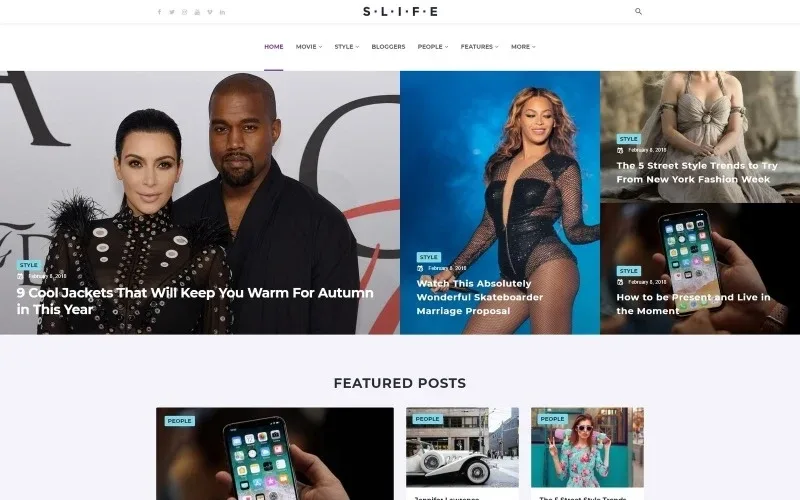
About Slife – Lifestyle WordPress Elementor Theme WordPress Theme
A lifestyle blog competes for the homepage, not for the article
Publishing well is not enough if visitors see a chronological list of posts and leave. A fashion, music, film or people blog lives on each visit finding three more things to read before closing the tab. Slife is a WordPress theme built for that: a magazine-style homepage where categories, featured posts and most-read content share the space.
The practical truth in this sector is that readers rarely arrive through the home page: they land on a single post from Google or a social network. That is why what surrounds each article matters so much: recommended posts, latest posts, tags and the newsletter signup.
Slife features for building a magazine homepage
The demo shows a homepage with several content zones and a category menu (Movie, Style, Bloggers, Lifestyle, Music, People, Fashion). These are the pieces you can see:
- Smart Tiles and Smart List: blocks of featured posts in a mosaic or a list, with several variants of each, to decide which story leads the header.
- Video Playlist, Reviews and Text Ticker: a video list, a reviews block and a moving headline strip.
- Ten post layouts and more variants: the demo lists Post Layout 1 to 10 plus additional options, so each article has the structure that fits each section.
- Post formats: standard, gallery, image, quote, audio, video and link.
- Site layouts: boxed, framed and fullwidth, with a left sidebar, a right sidebar or none.
- Category listings: listing, grid, masonry, timeline and justify, with standard pagination or a load more button.
The demo also includes registration and login, plus blocks for social networks, a newsletter and an Instagram feed. Keep in mind that the Instagram feed has to be connected to your account and appears empty in the demo, and that the newsletter only shows the form: sending the emails has to be handled by another tool.
What to know before choosing it
It is a blog and magazine theme, not a shop or a booking system. Some homepage blocks (Smart Tiles, Video Playlist, Reviews) look like they come from Elementor add-ons, so check in the demo which ones you can edit with your setup. And the demo is very editorial, with many posts on the home page: if you publish little, the homepage will look empty until you have content.
Frequently asked questions about Slife
Does it work for a personal blog with few posts?
Yes, but mosaic and list homepages look best with volume. With few posts, choose a simple listing or grid layout.
Can I change the menu and the footer?
The demo shows a category menu and a footer with quick links, recent posts and a newsletter. Check in the editor which parts you can modify visually.
Does it support posts with audio and video?
Yes, the post formats include audio and video, as well as gallery, image, quote and link.
Does it work for a news site?
Its structure (categories, ticker, featured and most-read posts) allows it, although it is designed for lifestyle.
The demo homepage is assembled piece by piece
The demo home combines many blocks. The most sensible approach is to start with the structure: define your categories, choose the site layout (boxed, framed or fullwidth) and decide whether you want a sidebar. Then activate the homepage blocks one at a time instead of reproducing everything at once. Check the result on mobile, because a homepage packed with mosaics is the first thing to suffer on small screens.
Topics
Version history
-
v
1.1.0 Current 13 Jun 2024
Customer reviews
Sign in to leave a review. Only people who have the product can review it.
No reviews for this product yet.
Frequently asked questions
-
GPL (General Public License) is the license under which WordPress and most premium plugins/themes are distributed. It grants you the right to use, modify and redistribute the software in as many projects as you want, with no domain restrictions.
-
Yes. With membership you get automatic updates via our GPLClub Updater plugin (installed on your WP, detects new versions and applies them). With individual purchase, you get one year of manual updates from your account.
-
Depends on the plan. Monthly: 3 domains. Semi-annual: 7. Annual and Lifetime: 15. Individual purchase: 1 domain.
-
GPLClub offers its own support for installation, configuration and compatibility. For direct support from the original author (feature requests, product-specific bugs), a license purchased from the author is required.