Smart Manager Pro Plugin
Antivirus scan
Powered by ClamAV
✅ Verified clean
This product file has passed our security filters.
Want to run a fresh ClamAV scan right now? Takes a few seconds and shows scanner version, signature DB and live result.
This can take 5 to 30 seconds.
Clean file Threat detected
No threats detected in this file.
- File
- Size
- Scanned
- ClamAV
- Signature database
⚡ Powered by ClamAV
Scan could not be completed
Report product
If you detected an issue (broken file, malware, inappropriate content, etc.) let us know and we'll review it ASAP.
Sign in to report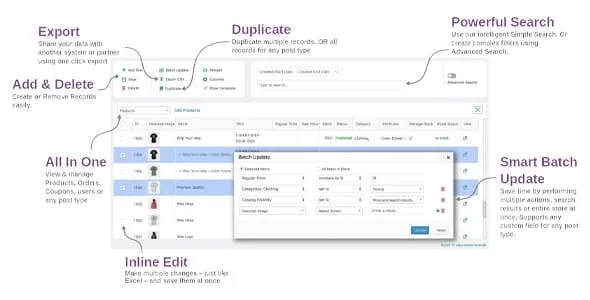
About Smart Manager Pro Plugin
Changing the price of 300 products by opening each one is a lost afternoon, and by the third hour you have already made a mistake or two. As a WooCommerce store grows, the bottleneck stops being selling and becomes keeping the catalog up to date. Smart Manager Pro Plugin gives you an Excel-like grid from which you edit everything at once.
The catalog gets messy faster than it sells
Whoever runs an online store lives on turnover: promotions that start and end, stock that changes every week, orders that need a new status, expired coupons nobody deletes. The biggest cost is not the campaign but the repetitive work of setting up and undoing changes. That is where this plugin makes sense: it will not sell more, but it saves you hours of admin and reduces typing errors.
What you do from the Smart Manager grid
You pick a dashboard (products, orders, coupons, users, posts, pages or another content type) and work on rows and columns. The functions that matter most:
- Inline editing: you change values directly in the table, with auto-fill or copy and paste, and save everything together.
- Bulk editing of several columns at once: for example, cut the price by 25%, append a word to the name and add stock units by category, in a single operation. The plugin does the calculations for you.
- Stock and prices: quantities, regular and sale price, backorders, products and variations at the same time.
- Scheduled changes: you prepare a price drop for a promotion or a restock ahead of a launch.
- Saved actions and undo: you save edits you repeat (an end-of-month discount, setting orders to completed) and can revert changes if you make a mistake.
- Advanced search with saved views: you filter by custom fields and save the filter, for example to see only percentage discount coupons.
- Duplicate and delete in bulk: you copy or remove selected or filtered records, such as test products.
- CSV import and export: you import products and export products, coupons, orders or any content type, with date or column filters. Order exports can be scheduled.
Where its scope ends
It is not a campaign builder or a reporting system: it edits and organizes data that already exists. For posts, orders or subscriptions, advanced editing of some third-party fields depends on that plugin being installed and being one of the supported ones. These include WooCommerce Subscriptions, Bookings, Memberships, Product Add-ons, Advanced Custom Fields, Yoast SEO and RankMath. If you use another one, check in the demo that its fields appear as columns.
Questions from people comparing it with native editing
Is it useful for small stores?
Yes, if you repeat changes often. With a dozen products you rarely touch, standard WooCommerce editing is enough.
Can I undo a mistake?
You can undo bulk and inline edits, and restore previous values, for example after a sale. Even so, it is wise to test first with a small filter.
Does it work with variations?
Yes, you can edit stock and prices of products and variations at the same time.
Does it only manage products?
No: also orders, coupons, users, posts, pages and other custom content types.
Is it available in Spanish?
The interface supports translation into several languages, including Spanish.
Start with a small filter and a saved view
When you first use it, do not launch a change across the whole catalog. Filter one specific category, apply the edit and check the result in the store. If it works, save it as a reusable action. Then organize your columns: show only the ones you use (price, stock, status) and create a custom view for frequent tasks, such as draft products or expired coupons. Before any large operation, export a CSV copy of the data as a backup.
Topics
Version history
-
v
8.98.0 Current 7 Oct 2026
-
v
8.97.0 23 Sep 2026
-
v
8.96.0 28 Aug 2026
-
v
8.86.0 18 Apr 2026
Customer reviews
Sign in to leave a review. Only people who have the product can review it.
No reviews for this product yet.
Frequently asked questions
-
GPL (General Public License) is the license under which WordPress and most premium plugins/themes are distributed. It grants you the right to use, modify and redistribute the software in as many projects as you want, with no domain restrictions.
-
Yes. With membership you get automatic updates via our GPLClub Updater plugin (installed on your WP, detects new versions and applies them). With individual purchase, you get one year of manual updates from your account.
-
Depends on the plan. Monthly: 3 domains. Semi-annual: 7. Annual and Lifetime: 15. Individual purchase: 1 domain.
-
GPLClub offers its own support for installation, configuration and compatibility. For direct support from the original author (feature requests, product-specific bugs), a license purchased from the author is required.