Socialize: Multi-Purpose BuddyPress Theme
Antivirus scan
Powered by ClamAV
✅ Verified clean
This product file has passed our security filters.
Want to run a fresh ClamAV scan right now? Takes a few seconds and shows scanner version, signature DB and live result.
This can take 5 to 30 seconds.
Clean file Threat detected
No threats detected in this file.
- File
- Size
- Scanned
- ClamAV
- Signature database
⚡ Powered by ClamAV
Scan could not be completed
Report product
If you detected an issue (broken file, malware, inappropriate content, etc.) let us know and we'll review it ASAP.
Sign in to report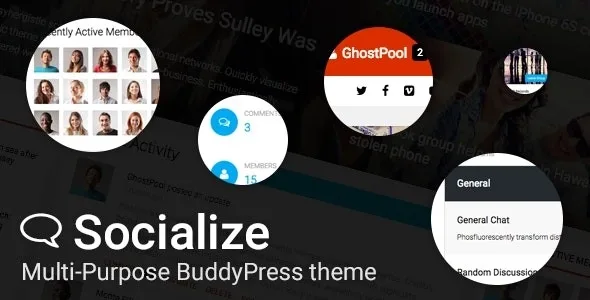
About Socialize: Multi-Purpose BuddyPress Theme
The demo brings the home page and menus, but people are not included
You see a community demo with recent activity, full groups and members online, you import it into your WordPress, and what appears is well-designed pages with nobody inside. Socialize imports posts, pages, categories, media, widgets and menus, but the BuddyPress activity, groups and members seen in its demo are not imported.
A new community opens empty, and that emptiness is the first thing newcomers find. That is why the theme should also be judged by what it shows while there are few people yet: a blog home with a slider, portfolios, events or forums that can carry the site before the activity wall has a life of its own. It is a multi-purpose theme by GhostPool designed to make the most of BuddyPress, with bbPress redesigned to look like a traditional forum.
Profiles, forums and content on the same site
- BuddyPress integrated: profile link with a notifications counter, and front-end login.
- bbPress redesigned, with elements for search, forum list, recent replies and topics, and statistics.
- WPBakery Page Builder included, with its own elements: activity, groups, members, friends, recently active, who's online, events list, pricing table, team and testimonials.
- Blog, carousel, portfolio, showcase and slider that show posts from the categories you choose.
- WooCommerce integrated, compatible with The Events Calendar, and ready for Contact Form 7.
- Multiple advertisement areas, page headers, sticky and unlimited sidebars, and five footer widget areas.
Menus that change depending on who is looking
In a community, the visitor and the member need different things. The menu system handles that with a mega menu, content menu and tab content menu, plus login, register, logout and profile links.
Each item can be shown by device and by whether the person is logged in, with Font Awesome icons, text or an image. With Super Socializer, social login is integrated into the login window.
BP Classic and the other setup warnings
- BP Classic for BuddyPress elements. With recent BuddyPress versions, those theme elements need that plugin. When you update, BuddyPress widgets leave the sidebars; to get them back you install Classic Widgets and BP Classic and add them again.
- Made for WPBakery. The theme is not optimized for Gutenberg, and the home page is built with its WPBakery template.
- Speed does not depend on the theme alone. Autoptimize is one of the recommended plugins for page optimization.
- Reimporting duplicates menus. Posts and images are not repeated, but menu items are.
What to install and the order to get going
The package includes WPBakery Page Builder, Visual Sidebars Editor and the Socialize plugin. As recommended plugins, those used by the demo: BuddyPress, bbPress, The Events Calendar, Autoptimize and Super Socializer. To install:
- Upload the socialize.zip file, not the outer package, and activate the theme.
- Install the plugins from the welcome page or under Appearance, Install Plugins.
- Import the data under Appearance, Socialize Setup, Import Demo Data.
- Create a page with the Homepage template and set it as the static front page under Settings, Reading.
- To see the community with content during testing, use BuddyPress Default, which generates sample data.
If you plan to change templates, first activate Socialize Child, from Theme Addons.
Communities with courses or inside a company
BuddyBoss Theme is the visual layer of a community built on the BuddyBoss platform, with app-style navigation and screens for courses.
Alliance uses BuddyPress for another purpose: a company intranet or extranet with profiles and groups already solved.
Socialize in four answers
Are the demo members and groups imported?
No. Posts, pages, categories, media, widgets and menus are imported, without BuddyPress activity, groups or members.
Does the import delete my content?
It does not overwrite existing content or WordPress settings.
Does it work for a shop?
It integrates WooCommerce, so the community can live alongside a shop on the same site.
Is it ready for other languages?
Yes. The theme and its plugin are translated with Loco Translate or Poedit.
Topics
Version history
-
v
2.43.5 Current 17 Jun 2024
Customer reviews
Sign in to leave a review. Only people who have the product can review it.
No reviews for this product yet.
Frequently asked questions
-
GPL (General Public License) is the license under which WordPress and most premium plugins/themes are distributed. It grants you the right to use, modify and redistribute the software in as many projects as you want, with no domain restrictions.
-
Yes. With membership you get automatic updates via our GPLClub Updater plugin (installed on your WP, detects new versions and applies them). With individual purchase, you get one year of manual updates from your account.
-
Depends on the plan. Monthly: 3 domains. Semi-annual: 7. Annual and Lifetime: 15. Individual purchase: 1 domain.
-
GPLClub offers its own support for installation, configuration and compatibility. For direct support from the original author (feature requests, product-specific bugs), a license purchased from the author is required.