Starbelly – Restaurant & Cafe WordPress Theme
Antivirus scan
Powered by ClamAV
✅ Verified clean
This product file has passed our security filters.
Want to run a fresh ClamAV scan right now? Takes a few seconds and shows scanner version, signature DB and live result.
This can take 5 to 30 seconds.
Clean file Threat detected
No threats detected in this file.
- File
- Size
- Scanned
- ClamAV
- Signature database
⚡ Powered by ClamAV
Scan could not be completed
Report product
If you detected an issue (broken file, malware, inappropriate content, etc.) let us know and we'll review it ASAP.
Sign in to report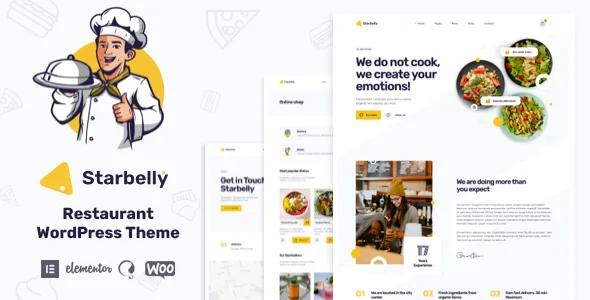
About Starbelly – Restaurant & Cafe WordPress Theme
For the restaurant that wants menu, reservations and orders in a single site
Hungry people decide from their phone, and the first thing they look for is the menu: what is on it, what it costs and how to book or order. If that page is an unreadable PDF or out of date, the customer goes to the place next door. Starbelly is made for that buyer: restaurants, cafes, bakeries, pizzerias, burger places, bistros or catering services that want a carefully designed site and, if it suits them, to sell online.
It is not for everyone:
- It is built on Elementor. If you prefer the WordPress block editor or another page builder, this is not your theme.
- To charge for dishes you need WooCommerce, and the payment methods depend on what it offers.
- Reservations are handled with OpenTable or with a Contact Form 7 form, not with a built-in table and shift system.
- The demo images are not included: you will have to use your own photos.
The Starbelly menu: to show dishes or to sell them
The menu is the page that changes the most in a restaurant: seasonal dishes, prices, items that run out. The theme includes more than six menu layouts (as listings and as tabs) that work as their own content type, designed for display. It includes six or more others that connect to WooCommerce products, designed so customers can order.
The difference matters: if you only want to show what you cook, you do not need to set up a shop. There are also animated carousels for menus, products and blog posts.
Booking a table with OpenTable or a simple form
Starbelly includes table reservations in two ways: by integrating OpenTable or with a form built with Contact Form 7. The form notifies you of the request, but you manage capacity and confirmations yourself. If you need control over shifts, check first whether OpenTable fits your venue.
Building Starbelly with Elementor without touching code
- Widgets and pages: more than 30 Elementor widgets made for restaurants and more than 20 pre-built pages.
- Your own header and footer: a builder to create as many layouts as you want.
- Theme options: it uses ACF Pro (included) for unlimited colors, more than 1,000 Google Fonts and blog and shop settings.
- One-click demo: you import the sample content and replace it with your own.
- Child theme: supported, so you can tweak things without losing changes.
The design is responsive, retina ready and includes animation and parallax effects. If your customers mostly come from mobile, check how it behaves in the demo.
Gallery, blog and languages for a varied clientele
There is an Ajax gallery with filters and lightbox, Instagram feeds, grid blog layouts, and sections for team, testimonials and FAQs. If your venue welcomes tourists, the theme is translation ready (a .pot file is included) and compatible with WPML, Polylang and TranslatePress, which are separate plugins.
Questions before choosing Starbelly
Can I use it just as an informational site?
Yes. WooCommerce is only needed if you want orders.
Does it process orders by itself?
No. Payments go through WooCommerce and its gateways.
Does it include the demo photos?
No. Prepare your own images of dishes and venue.
Is it suitable for a multilingual site?
Yes, with WPML, Polylang or TranslatePress installed separately.
Do I need to know how to code?
Not for page layouts: you work with Elementor and the importable demo. Code only if you want very specific changes.
Topics
Version history
-
v
1.5.0 Current 19 Oct 2026
-
v
1.3.4 8 Jan 2025
Customer reviews
Sign in to leave a review. Only people who have the product can review it.
No reviews for this product yet.
Frequently asked questions
-
GPL (General Public License) is the license under which WordPress and most premium plugins/themes are distributed. It grants you the right to use, modify and redistribute the software in as many projects as you want, with no domain restrictions.
-
Yes. With membership you get automatic updates via our GPLClub Updater plugin (installed on your WP, detects new versions and applies them). With individual purchase, you get one year of manual updates from your account.
-
Depends on the plan. Monthly: 3 domains. Semi-annual: 7. Annual and Lifetime: 15. Individual purchase: 1 domain.
-
GPLClub offers its own support for installation, configuration and compatibility. For direct support from the original author (feature requests, product-specific bugs), a license purchased from the author is required.