Stylish Cost Calculator Premium
Antivirus scan
Powered by ClamAV
✅ Verified clean
This product file has passed our security filters.
Want to run a fresh ClamAV scan right now? Takes a few seconds and shows scanner version, signature DB and live result.
This can take 5 to 30 seconds.
Clean file Threat detected
No threats detected in this file.
- File
- Size
- Scanned
- ClamAV
- Signature database
⚡ Powered by ClamAV
Scan could not be completed
Report product
If you detected an issue (broken file, malware, inappropriate content, etc.) let us know and we'll review it ASAP.
Sign in to report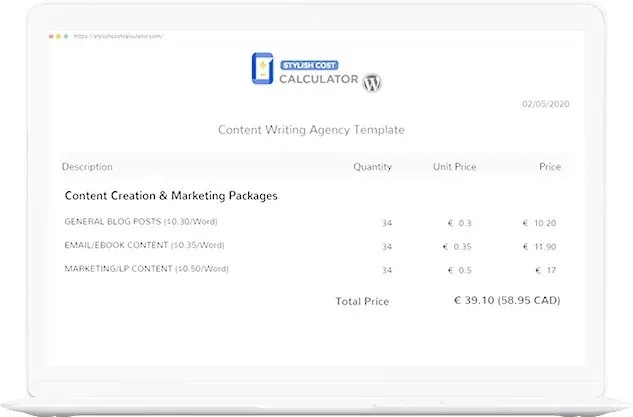
About Stylish Cost Calculator Premium
The quote that can be printed is the one decided at home
It is the feature that looks administrative and turns out to be the one closing domestic sales, and it is worth understanding why.
In any service paid for from a household budget (a renovation, a removal, a wedding photographer, garden work), the person looking at your site hardly ever decides alone. They have to discuss it with their partner, their business partner or whoever pays the other half. And that conversation happens that evening, on the sofa, far from your website.
If the number only ever existed on screen, there is nothing concrete in that conversation and it gets postponed. If they took it away by email or as a PDF, the conversation happens over a document carrying your name and your terms.
Stylish Cost Calculator builds that instant quote with little or no code, and the result can be printed or emailed.
What it brings
- An instant quote visible while the visitor browses.
- Sliders, dropdowns and checkboxes so the customer enters their own details.
- A printable or emailed quote, with the personalised calculation.
- Barely any code and a careful finish, which is its other priority.
- Templates already built for several sectors.
Slider or dropdown: not the same, and it changes the answers
It is a design decision that affects the outcome, and since this plugin lets you choose, it is worth knowing what to choose.
The slider invites exploration. The person moves it up and down to see how the price changes, and learns how your pricing works. That is what you want when the aim is for them to understand that the expensive part is not you but the quantity they are asking for. It works well with metres, hours or units.
The dropdown forces a decision. By choosing a specific option, the person commits to it. That is what you want when the options are qualitative and you want to push towards the upper one: basic, mid or premium finish.
And the rule that applies to both: make the starting value the realistic one, not the lowest. A slider starting at the minimum shows a price almost nobody will pay, and then every movement feels like getting more expensive. Starting at the middle value, the initial number is credible and the journey feels like adjusting rather than climbing.
What belongs under the number
Two lines, and both save a phone call.
What is not included. Materials, travel, tax, permits. That is where every misunderstanding with this kind of tool is born.
How firm that number is. If it is indicative subject to a visit, say so. If it is firm, say that too, because then it is a first-rate commercial argument and hardly anybody uses it.
Requirements
It needs WordPress. For emailing the quote, the site has to send email reliably, which on shared hosting is not always the case.
Alternatives in the catalogue
The direct alternative is Cost Calculator Builder, with more weight on the calculation builder and on lead capture. Between the two, the honest choice is this: if yours is a calculation with many variables, the other one; if yours is a clear quote the customer takes away with them, this one.
If the calculation is for a loan, neither: WP Amortization Calculator produces the schedule with genuine interest.
If the calculated price has to go to the cart rather than to a lead, Uni CPO is the piece, because it calculates a WooCommerce product's price from a formula.
And if you genuinely cannot give a number without seeing the job, better not to pretend: Request a Quote manages the quote request, and WS Form PRO builds the form in steps so it gets completed.
If the quote has to come out as a document with your template and your terms, E2Pdf turns the submission into a PDF with your design.
Frequently asked questions
Can the customer take the quote away?
Yes, printable or by email, and that is what lets them discuss it at home before deciding.
Slider or dropdown?
Slider for quantities, dropdown for finishes. The slider invites exploration; the dropdown forces a choice.
What value should the slider start at?
The realistic one, not the minimum. Starting low makes every movement feel like a price rise.
Is programming needed?
Little or no code, and it brings ready-made templates.
Can it take payment?
Not its territory. Selling at a calculated price needs a WooCommerce plugin.
What goes under the result?
What is not included and whether the number is indicative or firm. Those two lines save a call.
Topics
Version history
-
v
5.7.9 Current 16 May 2024
Customer reviews
Sign in to leave a review. Only people who have the product can review it.
No reviews for this product yet.
Frequently asked questions
-
GPL (General Public License) is the license under which WordPress and most premium plugins/themes are distributed. It grants you the right to use, modify and redistribute the software in as many projects as you want, with no domain restrictions.
-
Yes. With membership you get automatic updates via our GPLClub Updater plugin (installed on your WP, detects new versions and applies them). With individual purchase, you get one year of manual updates from your account.
-
Depends on the plan. Monthly: 3 domains. Semi-annual: 7. Annual and Lifetime: 15. Individual purchase: 1 domain.
-
GPLClub offers its own support for installation, configuration and compatibility. For direct support from the original author (feature requests, product-specific bugs), a license purchased from the author is required.