Swape – App Showcase & App Store WordPress Theme
Antivirus scan
Powered by ClamAV
✅ Verified clean
This product file has passed our security filters.
Want to run a fresh ClamAV scan right now? Takes a few seconds and shows scanner version, signature DB and live result.
This can take 5 to 30 seconds.
Clean file Threat detected
No threats detected in this file.
- File
- Size
- Scanned
- ClamAV
- Signature database
⚡ Powered by ClamAV
Scan could not be completed
Report product
If you detected an issue (broken file, malware, inappropriate content, etc.) let us know and we'll review it ASAP.
Sign in to report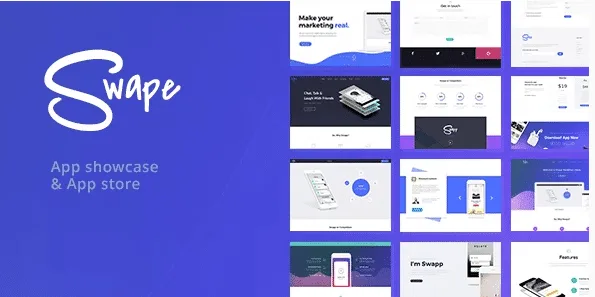
About Swape – App Showcase & App Store WordPress Theme
For anyone launching an app who wants a website that does what the store listing can't
Your app already has a page in the app store, with screenshots and a description you don't fully control. What the store doesn't give you is a site of your own where you can say who makes the app, show the rest of your catalog, post news and collect the email of people who haven't downloaded it yet. That's what Swape is for: a theme designed to present apps, with a portfolio and a blog under the same design.
It fits if you are an independent developer, a studio with several apps or a startup that needs its launch website. It doesn't fit in three cases:
- If you expect a directory where others upload their apps, rate them or where downloads are counted: Swape provides design and layout, and you would have to solve those features with other plugins.
- If you prefer to work with Elementor or the block editor: pages are built with WPBakery, which is included.
- If you want to set up a store: it has design for WooCommerce, but WooCommerce is installed separately.
Swape starts with importable demos and ready-made pages
You import a demo with one click and have a working site, with many pre-designed pages that you only need to adapt with your own texts and screenshots. That saves the slowest part of an app website: deciding how the home page, features, screenshots and download call to action are arranged.
One detail worth knowing: the images in the demo are not part of the theme, so have your own screenshots and graphics ready before importing. For the header you have Revolution Slider, which lets you animate the presentation of the app. There are also many header and menu options, a sticky navigation, a mega menu, an advanced footer, unlimited colors and styles and typography options with Google Fonts.
Cube Portfolio to organize your apps, screenshots and videos
If you have more than one app, or an app with many screens to show, the portfolio is the part you will use the most. Swape includes several portfolio designs with Cube Portfolio and a photo gallery with a pop-up window and full screen, useful for letting visitors see screenshots at full size.
- Videos from the usual services, such as YouTube and Vimeo, for an app trailer.
- Audio from services such as SoundCloud, if your app has music or sound to show.
- Retina-ready display, so screenshots look sharp.
Mailchimp, social feeds and a blog so your site isn't a static page
An app website that only shows screenshots is exhausted after one visit. Swape integrates Mailchimp to collect emails, links to Twitter, shows social feeds and lets you embed a Google map if your studio has an office to show. The blog has several designs, advanced options and search with AJAX results, so you can publish release news or articles about your app.
If your audience is international, the theme is ready for WPML, supports right-to-left languages and comes with po/mo files for translation. It includes 10 custom widgets, unlimited sidebars, import and export of theme options and a basic child theme for your code tweaks.
Frequently asked questions before choosing Swape
Do I have to buy WPBakery or Revolution Slider separately?
No, both are included with the theme, along with Ultimate Addons and Cube Portfolio.
Does it work for a multilingual website?
Yes: it is ready for WPML, supports RTL and can be translated with po/mo files.
Can I sell from the website?
It has built-in design for WooCommerce, but you need to install WooCommerce separately to sell.
Will it look the same as the demo after importing it?
The structure will, but the images in the demo are not part of the theme: you will have to add your own.
Can I customize it with code without losing my changes?
It includes a basic child theme made for that.
Topics
Version history
-
v
2.5 Current 18 Sep 2026
-
v
2.4 5 Sep 2026
-
v
2.3 31 Jul 2025
Customer reviews
Sign in to leave a review. Only people who have the product can review it.
No reviews for this product yet.
Frequently asked questions
-
GPL (General Public License) is the license under which WordPress and most premium plugins/themes are distributed. It grants you the right to use, modify and redistribute the software in as many projects as you want, with no domain restrictions.
-
Yes. With membership you get automatic updates via our GPLClub Updater plugin (installed on your WP, detects new versions and applies them). With individual purchase, you get one year of manual updates from your account.
-
Depends on the plan. Monthly: 3 domains. Semi-annual: 7. Annual and Lifetime: 15. Individual purchase: 1 domain.
-
GPLClub offers its own support for installation, configuration and compatibility. For direct support from the original author (feature requests, product-specific bugs), a license purchased from the author is required.