Takeout - Cafe & Fast Food WordPress Theme
Antivirus scan
Powered by ClamAV
✅ Verified clean
This product file has passed our security filters.
Want to run a fresh ClamAV scan right now? Takes a few seconds and shows scanner version, signature DB and live result.
This can take 5 to 30 seconds.
Clean file Threat detected
No threats detected in this file.
- File
- Size
- Scanned
- ClamAV
- Signature database
⚡ Powered by ClamAV
Scan could not be completed
Report product
If you detected an issue (broken file, malware, inappropriate content, etc.) let us know and we'll review it ASAP.
Sign in to report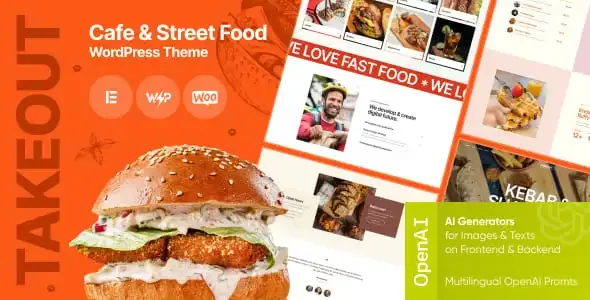
About Takeout - Cafe & Fast Food WordPress Theme
A fast food place or a cafe lives on customers deciding in seconds what to order, and the website often ruins it: PDF menus that are unreadable on a phone, photos that don't make anyone hungry and no clue about how to place an order. Takeout is a theme built for that kind of business, with food-oriented demos and built on Elementor.
A working day with Takeout, from demo to published menu
Imagine you run a food truck or a burger place and want a website this week. This is the realistic route.
Step 1: choose a starting point
The theme includes 7 premade layouts, with demos for delivery, fast food, food truck, tea and coffee, ice cream shop, bakery, kebab, and crepes and waffles. You pick the one closest to your place and import the demo with one click, so you don't start from a blank page.
Step 2: adapt the header, footer and pages
The header and footer are edited with Elementor, just like any page. Ready-made pages come included, such as about us, team and products. You change texts, colors and typography, and the theme options panel has more than 750 customization settings, so almost everything can be tweaked without code.
Step 3: build the menu
The theme advertises restaurant menu management and support for a main menu and a user menu. Go in with your eyes open here: delivery ordering relies on its delivery plugin and WooCommerce, so check in the demo how the ordering flow behaves before promising it to your customers.
Step 4: organize the catalog if you sell online
If you activate WooCommerce, the theme integrates with a wishlist and product quick view through compatible plugins. The search uses Ajax, which helps if your menu is long.
What you need to install for it to work like the demo
- Elementor: it is the editing base of the theme. Some features, such as certain header or footer layouts, may require Elementor Pro.
- WooCommerce: essential if you want to sell or receive orders online.
- Supporting plugins: ThemeREX Addons provides its own widgets and shortcodes; Slider Revolution and Swiper Slider are included for the sliders.
- Contact Form 7 and MailChimp for WP: they are compatible, but must be installed separately for forms and subscriptions.
- WPML: compatible if your place serves tourists and needs the website in several languages.
The demo images (photos and illustrations) are not part of the theme, so you will need to use your own. And don't expect a built-in table reservation system: the demo mentions reservations, but check how it is handled before counting on it.
Frequently asked questions about Takeout
Is it suitable for a cafe or a bakery, or only for fast food?
It works for both. There are demos for tea and coffee, bakery, ice cream shop and more, as well as for fast food and food truck.
Can I change the design without touching code?
Yes. It is done with Elementor and with the theme options panel, which has more than 750 settings.
Is it responsive?
Yes, the design adapts to mobile devices and offers boxed or fullwidth page layouts.
Is it good for a blog of recipes or news?
Yes. It includes several blog styles, more than 20 post animations, related posts, sharing buttons and counters for views and likes.
Details that help day to day
You get a setting inheritance and override system, so you can define something globally and change it only on a specific page. There are also its own content types, widget sets and shortcodes. Keep in mind that, since it relies on several of the developer's own plugins, your website will depend on keeping all of them active and up to date.
Topics
Version history
-
v
1.3.0 Current 19 Jul 2025
Customer reviews
Sign in to leave a review. Only people who have the product can review it.
No reviews for this product yet.
Frequently asked questions
-
GPL (General Public License) is the license under which WordPress and most premium plugins/themes are distributed. It grants you the right to use, modify and redistribute the software in as many projects as you want, with no domain restrictions.
-
Yes. With membership you get automatic updates via our GPLClub Updater plugin (installed on your WP, detects new versions and applies them). With individual purchase, you get one year of manual updates from your account.
-
Depends on the plan. Monthly: 3 domains. Semi-annual: 7. Annual and Lifetime: 15. Individual purchase: 1 domain.
-
GPLClub offers its own support for installation, configuration and compatibility. For direct support from the original author (feature requests, product-specific bugs), a license purchased from the author is required.