Trustify
Antivirus scan
Powered by ClamAV
✅ Verified clean
This product file has passed our security filters.
Want to run a fresh ClamAV scan right now? Takes a few seconds and shows scanner version, signature DB and live result.
This can take 5 to 30 seconds.
Clean file Threat detected
No threats detected in this file.
- File
- Size
- Scanned
- ClamAV
- Signature database
⚡ Powered by ClamAV
Scan could not be completed
Report product
If you detected an issue (broken file, malware, inappropriate content, etc.) let us know and we'll review it ASAP.
Sign in to report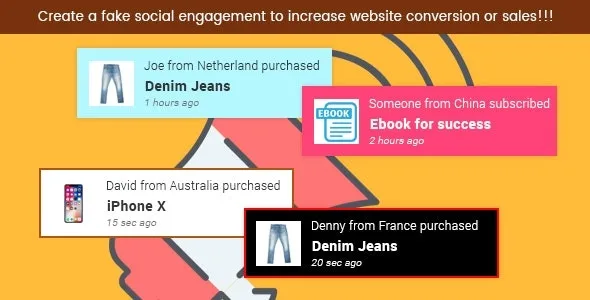
About Trustify
Trustify and the silence of a store nobody has seen sell
Someone arriving at a store they don't know asks themselves the same question before buying: has anyone else trusted this? If the site doesn't answer, the doubt stays open and the cart gets abandoned. Trustify answers with small floating notices in a corner of the screen, along the lines of "someone just bought this product".
The underlying idea is simple: people decide by looking at what others do, and a notice only convinces if it is believable. That is why what matters in Trustify is not the visual effect, but where the messages come from.
Automatic or handwritten notices: how Trustify gets fed
The plugin works in two ways:
- Automatic: real-time sales notifications for WooCommerce and Easy Digital Downloads, highlighting what other customers have bought.
- Manual: messages you write yourself, useful for announcing new items or creating a sense of urgency around a new product.
It works with all content types, not just products. Each notice can be text only, or text with an image on the left or right, and the product image can have a square or circular frame.
Three sites, three ways to use Trustify
WooCommerce store with steady sales
This is the natural case: you turn on automatic notices and visitors see real purchases by other customers while they browse. The busier the store, the more natural the effect feels.
Download seller with Easy Digital Downloads
For digital products, where buyers can't touch anything, seeing that others have already downloaded or bought carries a lot of weight. Trustify includes real-time sales notices for this plugin.
Site without a store: services, blog or newsletter
Here only manual notices are useful. You can highlight a new item, always with messages that are true.
Corner, colors and mobile: keeping the notice from covering your site
You can place the notice in any of the four corners (top or bottom, left or right). It has fixed positioning, so it stays in view even when the window is resized. You can also adjust the box color, its size, and the font color and size.
Two important controls: you can show or hide it on mobile, where a floating box takes up a lot of space, and decide whether logged-in users see it or not. It also includes a configuration file for WPML, in case your site is multilingual.
The reporting system counts impressions and clicks, with graphs, so you can check whether the notices are seen and clicked or just get in the way.
Frequently asked questions about Trustify
Do I need WooCommerce to use it?
Not for manual notices. Automatic sales notifications do require WooCommerce or Easy Digital Downloads.
Can I turn it off on mobile?
Yes, you can choose whether it shows on mobile devices or not.
Does it work for pages and posts, not just products?
Yes, it is compatible with all content types.
Can I tell whether the notices work?
Yes, the report records impressions and clicks with graphs.
Manual notices are not real sales: don't use them to invent purchases
A manual message is written by you and the plugin displays it as is, without checking anything. If you use it to simulate purchases that haven't happened, you may mislead the visitor and, in many countries, that is considered deceptive advertising. Keep manual notices for true information and let the automatic ones show real sales.
Topics
Version history
-
v
2.4 Current 24 Sep 2026
-
v
2.2 16 May 2024
Customer reviews
Sign in to leave a review. Only people who have the product can review it.
No reviews for this product yet.
Frequently asked questions
-
GPL (General Public License) is the license under which WordPress and most premium plugins/themes are distributed. It grants you the right to use, modify and redistribute the software in as many projects as you want, with no domain restrictions.
-
Yes. With membership you get automatic updates via our GPLClub Updater plugin (installed on your WP, detects new versions and applies them). With individual purchase, you get one year of manual updates from your account.
-
Depends on the plan. Monthly: 3 domains. Semi-annual: 7. Annual and Lifetime: 15. Individual purchase: 1 domain.
-
GPLClub offers its own support for installation, configuration and compatibility. For direct support from the original author (feature requests, product-specific bugs), a license purchased from the author is required.