Variation Swatches for WooCommerce – Pro
Antivirus scan
Powered by ClamAV
✅ Verified clean
This product file has passed our security filters.
Want to run a fresh ClamAV scan right now? Takes a few seconds and shows scanner version, signature DB and live result.
This can take 5 to 30 seconds.
Clean file Threat detected
No threats detected in this file.
- File
- Size
- Scanned
- ClamAV
- Signature database
⚡ Powered by ClamAV
Scan could not be completed
Report product
If you detected an issue (broken file, malware, inappropriate content, etc.) let us know and we'll review it ASAP.
Sign in to report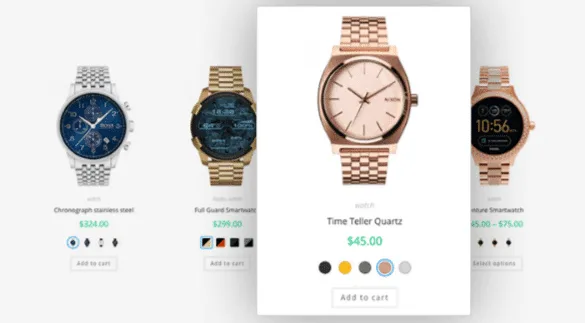
About Variation Swatches for WooCommerce – Pro
Nobody buys a colour from a dropdown
"Navy", "Petrol blue", "Midnight blue". Three options in a list and the customer has no idea how they differ. They can open the product page, change the selection, wait for the photo to load and compare from memory, or they can go to another shop where the colours are visible. Almost always they choose the second.
This plugin turns those WooCommerce dropdowns into swatches you can see: colour blocks, images, buttons or radio lists.
Where they appear
- On the product page, which is the basic case.
- On the shop listing, for choosing without opening the product.
- In quick view and in the filter widgets.
With hover tooltips, in text or with an image, and with out-of-stock variations dimmed or hidden, plus the option to show how many units remain.
What the paid version adds
Automatic conversion of the dropdown into image swatches using each variation's featured photo, which saves configuring them one by one. Dual-colour swatches, for two-tone products. Choosing which attribute shows on the shop listing, so it does not get crowded. Direct links to a specific variation, useful for social media and campaigns. And per-product configuration, not only global.
The real work happens beforehand
Here is what no product page mentions: for a colour swatch to have a colour, the attribute has to be a global WooCommerce attribute with its terms defined, and each term needs its colour or image assigned.
If your catalogue uses attributes typed by hand on each product, which is the most common case when a shop grew without a plan, the plugin has nothing to paint. First those have to be converted into global attributes and the names unified, because "Black", "black" and "Matte black" will come out as three different swatches.
That is the real effort, and worth sizing before buying: on a catalogue of three hundred products it can be an afternoon or it can be three days.
Frequently asked questions
Do the swatches appear on the shop listing?
Yes, as well as on the product page, quick view and filters.
What happens with out-of-stock variations?
They can be dimmed or hidden, and the remaining units can be shown.
Can I use images instead of colours?
Yes, and the paid version can generate them from each variation's featured photo.
Does the catalogue need preparing?
Yes. Attributes must be global with defined terms in order to assign a colour or image.
Topics
Version history
-
v
2.6.0 Current 21 Oct 2026
-
v
2.5.1 22 Sep 2026
-
v
2.5.0 18 Sep 2026
-
v
2.3.0 10 Jun 2026
-
v
2.2.3 9 Feb 2026
Customer reviews
Sign in to leave a review. Only people who have the product can review it.
No reviews for this product yet.
Frequently asked questions
-
GPL (General Public License) is the license under which WordPress and most premium plugins/themes are distributed. It grants you the right to use, modify and redistribute the software in as many projects as you want, with no domain restrictions.
-
Yes. With membership you get automatic updates via our GPLClub Updater plugin (installed on your WP, detects new versions and applies them). With individual purchase, you get one year of manual updates from your account.
-
Depends on the plan. Monthly: 3 domains. Semi-annual: 7. Annual and Lifetime: 15. Individual purchase: 1 domain.
-
GPLClub offers its own support for installation, configuration and compatibility. For direct support from the original author (feature requests, product-specific bugs), a license purchased from the author is required.