VEDA | Multi-Purpose Theme
Antivirus scan
Powered by ClamAV
✅ Verified clean
This product file has passed our security filters.
Want to run a fresh ClamAV scan right now? Takes a few seconds and shows scanner version, signature DB and live result.
This can take 5 to 30 seconds.
Clean file Threat detected
No threats detected in this file.
- File
- Size
- Scanned
- ClamAV
- Signature database
⚡ Powered by ClamAV
Scan could not be completed
Report product
If you detected an issue (broken file, malware, inappropriate content, etc.) let us know and we'll review it ASAP.
Sign in to report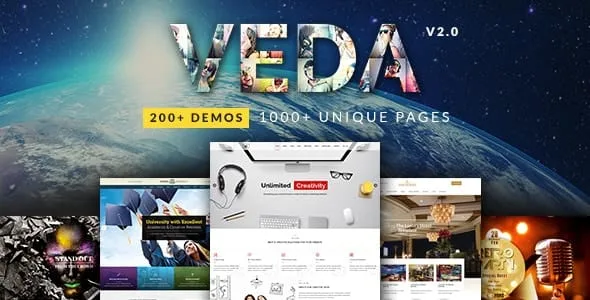
About VEDA | Multi-Purpose Theme
A demo imported over a live site changes what you already had
The temptation with a multipurpose theme is to install it on the site that already works, import the favorite demo and retouch the text. With Veda that shortcut has a cost: the importer replaces the theme options, the reading settings and the widget configuration. In other words, it can change which page serves as the home page and what sits in your sidebars.
That is why the importer is recommended for fresh installs. If your business already has a site, the sensible order is to set up Veda on a copy, import there, build the pages and move the result across when it is finished.
Veda is a DesignThemes theme meant to cover many kinds of business from the same base. That range comes from a set of demos and sector add-ons.
Sector add-ons and the rest of the box
- Add-ons for building demos and layouts: attorney, doctor, event and night club, model, fitness, restaurant, hotel and university.
- WPBakery Visual Composer included, with frontend and backend editors, and predefined templates.
- Its own elements: pricing boxes, timelines, testimonials, team, speakers and a Mailchimp newsletter.
- Two sliders included: LayerSlider WP and Revolution Slider.
- Several header styles, with sticky and transparent options, and mega menus.
- Predefined skins and a custom skin, with a wide palette of Google fonts.
- Several portfolio post styles and several blog layouts.
- WooCommerce with several product styles for shop and archive pages.
- One-page parallax templates and side navigation templates.
Each sector also asks for its own plugins
Some demos rely on free plugins you install according to the project:
- WooCommerce, if you are building a shop.
- bbPress, if you will have a forum.
- The Events Calendar, if the site showcases events.
- Contact Form 7, for forms.
The fewer sectors you touch, the fewer pieces you will have to maintain.
The limits to know before choosing it
It is tied to a companion plugin. DesignThemes Core Features is required to use Veda, and its features depend on it being active.
Pages are built with WPBakery. If your team works with another builder, that change of tool is part of the project.
The import can end up incomplete. If media fails, placeholder images are used instead, so the look of the demo does not always arrive whole. And if PHP limits are low, the import can fail. The recommended values are 180 for execution time, 128M of memory and 32M for upload and post size.
The reach of each add-on has to be checked. They serve to build demos and layouts. If your business needs bookings, appointments or enrollments, test exactly what your sector add-on does before counting on it.
A first install, in order
You need a WordPress install with the PHP limits above and, where possible, no content to protect. The package comes with a child theme: use it if you will touch code, so changes are not lost on update.
- Upload the theme and its child theme, and activate only the child.
- Install DesignThemes Core Features and the included plugins you will use.
- Activate your sector add-on and the plugins your demo asks for.
- Choose the demo in the importer and run it on that clean install.
- Review the home page, menus and widgets, the settings the importer changed.
- Replace the placeholder images and sample text.
Multipurpose with other builders and other emphases
If you prefer working with Elementor, Hub lets you choose that builder in its wizard and offers more than a hundred prebuilt websites. For creative portfolios, Salient ships its own version of WPBakery. And Avada comes with its own builder and WooCommerce integration.
What usually decides the purchase
Can I import the demo onto a site I already have?
It is not what is recommended: theme options, reading and widgets get replaced. Do it on a copy or a clean install.
Does it work in several languages?
It is compatible with WPML for multilingual sites, and with right-to-left writing by installing an RTL version of WordPress, such as Arabic or Hebrew.
Can I add code or content at fixed positions?
Yes. It has hooks at the top, before and after the content and at the bottom, which accept HTML and shortcodes, plus fields for custom CSS and JavaScript.
Topics
Version history
-
v
4.6 Current 18 Mar 2026
Customer reviews
Sign in to leave a review. Only people who have the product can review it.
No reviews for this product yet.
Frequently asked questions
-
GPL (General Public License) is the license under which WordPress and most premium plugins/themes are distributed. It grants you the right to use, modify and redistribute the software in as many projects as you want, with no domain restrictions.
-
Yes. With membership you get automatic updates via our GPLClub Updater plugin (installed on your WP, detects new versions and applies them). With individual purchase, you get one year of manual updates from your account.
-
Depends on the plan. Monthly: 3 domains. Semi-annual: 7. Annual and Lifetime: 15. Individual purchase: 1 domain.
-
GPLClub offers its own support for installation, configuration and compatibility. For direct support from the original author (feature requests, product-specific bugs), a license purchased from the author is required.