Webteck IT Solution and Technology Theme
Antivirus scan
Powered by ClamAV
✅ Verified clean
This product file has passed our security filters.
Want to run a fresh ClamAV scan right now? Takes a few seconds and shows scanner version, signature DB and live result.
This can take 5 to 30 seconds.
Clean file Threat detected
No threats detected in this file.
- File
- Size
- Scanned
- ClamAV
- Signature database
⚡ Powered by ClamAV
Scan could not be completed
Report product
If you detected an issue (broken file, malware, inappropriate content, etc.) let us know and we'll review it ASAP.
Sign in to report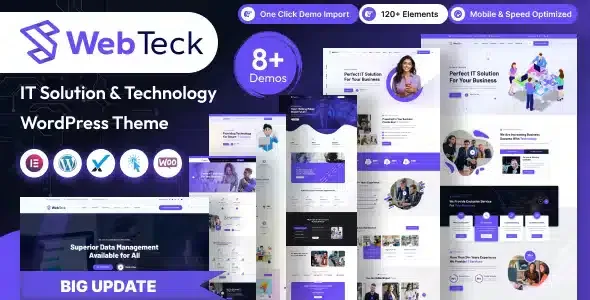
About Webteck IT Solution and Technology Theme
A tech company often has an image problem it doesn't see: its product is complex, but the website has to explain it at a glance to someone who isn't technical. When the site looks like a generic template, the client assumes the service is generic too. Webteck starts from that problem with a visual base designed for IT companies, cybersecurity, SaaS, agencies and startups.
What Webteck does for a technology website
The theme is built on Elementor, so everything is edited on the front end by dragging and dropping, without writing code. It includes several homepages with different approaches (IT company, digital agency, web development, software, startup, app landing, SaaS landing, cybersecurity, AI technology, help desk, CRM consulting, among others) and ready-made inner pages. That lets you pick the starting point closest to your business instead of starting from scratch.
The mix is useful if you sell something hard to explain: you can rely on service, process and case sections with a design already solved and spend your time on the message.
Webteck's design tools, and where they end
- Custom Elementor addons: creative widgets made for this theme, compatible with several languages. They work with Elementor, not on their own.
- Color: from the theme options panel you change the primary color and the look of the header, menu, buttons, links and backgrounds.
- Header and footer: there are two systems for each. The default one is configured from the theme options and widgets. The page builder one, from the theme's own header and footer builder. Decide which one you'll use so you don't spread settings across two places.
- WooCommerce: the theme is compatible with the plugin, but the store is up to you: WooCommerce is a separate plugin you must install and configure.
- Languages: it is prepared for multilingual sites, although you have to translate your own content.
Frequently asked questions about Webteck
Do I need to know how to code?
No. Customization is done with Elementor, the options panel and the header and footer builders.
Is it for an agency or only for IT companies?
It suits agencies, software, SaaS, startups, cybersecurity and also educational or scientific projects, because it includes demos aimed at several of those profiles.
Can I sell with it?
Yes, through WooCommerce, which you must install separately.
Does it adapt to mobile?
It has a responsive design for desktop, tablet and mobile, and is built for the usual browsers (Safari, Chrome, Firefox, Opera and Edge).
Will it be fast?
Final speed depends on your content, images and hosting. Measure your site with PageSpeed Insights or GTmetrix once it is built.
The demo imports with one click, but the content is yours
The demo installer replicates the chosen design with its pages and sections. It is the fastest way to see the theme working, but afterwards you have to replace texts, images and menus with your own.
- First choose the homepage closest to your business and work from it.
- Set colors in the options panel before touching individual sections.
- Decide whether you'll use the default header and footer or the builder ones.
- If you plan to sell, install and configure WooCommerce before reviewing the store pages.
Topics
Version history
-
v
2.0.0 Current 31 Mar 2026
Customer reviews
Sign in to leave a review. Only people who have the product can review it.
No reviews for this product yet.
Frequently asked questions
-
GPL (General Public License) is the license under which WordPress and most premium plugins/themes are distributed. It grants you the right to use, modify and redistribute the software in as many projects as you want, with no domain restrictions.
-
Yes. With membership you get automatic updates via our GPLClub Updater plugin (installed on your WP, detects new versions and applies them). With individual purchase, you get one year of manual updates from your account.
-
Depends on the plan. Monthly: 3 domains. Semi-annual: 7. Annual and Lifetime: 15. Individual purchase: 1 domain.
-
GPLClub offers its own support for installation, configuration and compatibility. For direct support from the original author (feature requests, product-specific bugs), a license purchased from the author is required.