Wiloke Timeline
Antivirus scan
Powered by ClamAV
✅ Verified clean
This product file has passed our security filters.
Want to run a fresh ClamAV scan right now? Takes a few seconds and shows scanner version, signature DB and live result.
This can take 5 to 30 seconds.
Clean file Threat detected
No threats detected in this file.
- File
- Size
- Scanned
- ClamAV
- Signature database
⚡ Powered by ClamAV
Scan could not be completed
Report product
If you detected an issue (broken file, malware, inappropriate content, etc.) let us know and we'll review it ASAP.
Sign in to report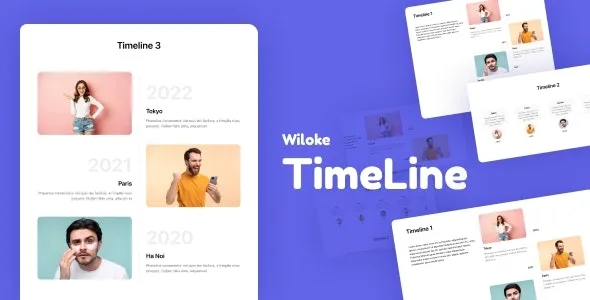
About Wiloke Timeline
The About Us page nobody reads to the end
Almost every company has a story to tell, and almost all of them tell it the same way: a block of text with dates lost between paragraphs. Visitors scroll through it and remember nothing. Wiloke Timeline is an Elementor addon that turns that story into a visual timeline: where you started, which milestones marked the way and where you are heading.
There is a business detail worth keeping in mind: a timeline works when you choose few milestones. If you add twenty dates, you are back to a wall of text with different decoration. And if you include the future (a roadmap), every date you publish becomes a promise your customers can check.
Three Wiloke Timeline layouts for different stories
The addon includes three timeline templates. You can change images, dates and texts without altering the structure, so the design does not fall apart when the content changes. They are useful for much more than brand history:
- Appointments and events ordered by date.
- A product roadmap, with what is done and what is coming.
- A program timeline, such as a course or a campaign.
- Process steps, such as explaining how you work with a client.
Colors, fonts and images your way
You can adapt the colors, fonts and images so the timeline fits your brand and does not look like a foreign block in the rest of the page. The addon also adds a zoom effect designed to make visitors interact with each milestone instead of passing by.
Use it wisely: a striking effect helps if every milestone has something to say, and gets in the way if you apply it to uninteresting data. Check in the demo how it behaves on mobile before choosing the layout.
Wiloke Timeline only works inside Elementor
It is an Elementor add-on, not a standalone plugin. Here is what it solves and what is up to you:
- Solved: the visual timeline presentation, with three layouts and customization of colors, fonts, images, dates and texts.
- Yours: having Elementor installed on your site, since without it the addon has nowhere to display.
- Yours: deciding which milestones go in, writing the texts and preparing the images.
- Yours: keeping the timeline up to date; it does not feed itself from your data.
Frequently asked questions
Can I use it without Elementor?
No. It is an addon and needs Elementor to work.
Is it only for company history?
No. You can also present appointments, a product roadmap, a program timeline or process steps.
How many layouts does it include?
Three timeline templates, which you can customize without changing their structure.
Can I show the future as well as the past?
Yes, you can represent past, present and next steps. Just publish only dates you are sure you can meet.
Version history
-
v
2.0.2 Current 12 May 2024
Customer reviews
Sign in to leave a review. Only people who have the product can review it.
No reviews for this product yet.
Frequently asked questions
-
GPL (General Public License) is the license under which WordPress and most premium plugins/themes are distributed. It grants you the right to use, modify and redistribute the software in as many projects as you want, with no domain restrictions.
-
Yes. With membership you get automatic updates via our GPLClub Updater plugin (installed on your WP, detects new versions and applies them). With individual purchase, you get one year of manual updates from your account.
-
Depends on the plan. Monthly: 3 domains. Semi-annual: 7. Annual and Lifetime: 15. Individual purchase: 1 domain.
-
GPLClub offers its own support for installation, configuration and compatibility. For direct support from the original author (feature requests, product-specific bugs), a license purchased from the author is required.