WooCommerce for LatePoint
Antivirus scan
Powered by ClamAV
✅ Verified clean
This product file has passed our security filters.
Want to run a fresh ClamAV scan right now? Takes a few seconds and shows scanner version, signature DB and live result.
This can take 5 to 30 seconds.
Clean file Threat detected
No threats detected in this file.
- File
- Size
- Scanned
- ClamAV
- Signature database
⚡ Powered by ClamAV
Scan could not be completed
Report product
If you detected an issue (broken file, malware, inappropriate content, etc.) let us know and we'll review it ASAP.
Sign in to report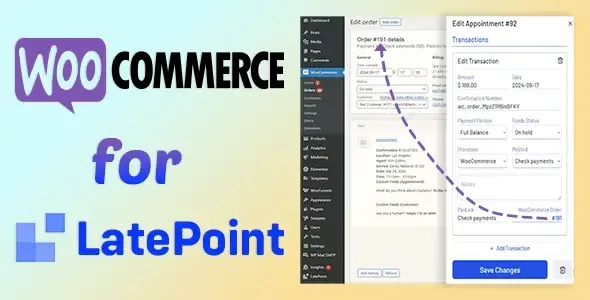
About WooCommerce for LatePoint
Charge for the appointment with the method your client already uses
Whoever books online makes the decision at the last step. If they reach the payment page and don't see the method they feel comfortable with, they close the tab and that hour in your calendar stays empty. In a service business (clinic, hair salon, classes, studio) that gap can't be recovered: time isn't kept in a warehouse or resold the next day.
That's why the payment gateway isn't a technical detail in an appointment business, it's the front door of the calendar. The more payment paths you offer, the fewer bookings you lose right at the end, when the client had already chosen a day and time.
WooCommerce for LatePoint sends bookings to the WooCommerce gateway
It's a LatePoint addon: payment for bookings goes through WooCommerce. That gives you access to hundreds of payment methods through WooCommerce, instead of being stuck with one or two options.
- Email notifications: in the demo, the person booking receives the order and appointment notifications at the email address they enter in the form.
Make a test booking before you decide
The most useful thing you can do is try the demo the way your client would: fill in the booking form with a valid email and pay with the test credentials shown at checkout. That way you see for yourself how many steps the process has, how the payment is presented and which emails arrive afterwards.
Pay special attention to whether the flow feels natural to someone booking from their phone and whether the notifications the client receives give them the information you would want them to have. If something doesn't fit the way you work, it's better to know before setting it up.
Is it worth setting up WooCommerce just to charge for appointments?
This addon doesn't work on its own: it needs LatePoint and WooCommerce installed and operational. If you don't have WooCommerce yet, you'll have to add it to your site and set up your payment methods there. If the payment methods you already have on your bookings are enough, you may not need this extra layer. It makes more sense when your clients ask for payment options you can't offer now or when you already use WooCommerce for other sales.
Does it work without LatePoint?
No. It needs LatePoint to work.
Do I need WooCommerce even if I only sell appointments?
Yes. Payment is handled through WooCommerce, so it has to be installed alongside LatePoint.
How many payment methods can I offer?
Hundreds, through WooCommerce.
Can I try it before using it?
Yes, with the demo: make a booking with a valid email and pay with the test credentials at checkout.
Topics
Version history
-
v
10.7.0 Current 13 May 2024
Customer reviews
Sign in to leave a review. Only people who have the product can review it.
No reviews for this product yet.
Frequently asked questions
-
GPL (General Public License) is the license under which WordPress and most premium plugins/themes are distributed. It grants you the right to use, modify and redistribute the software in as many projects as you want, with no domain restrictions.
-
Yes. With membership you get automatic updates via our GPLClub Updater plugin (installed on your WP, detects new versions and applies them). With individual purchase, you get one year of manual updates from your account.
-
Depends on the plan. Monthly: 3 domains. Semi-annual: 7. Annual and Lifetime: 15. Individual purchase: 1 domain.
-
GPLClub offers its own support for installation, configuration and compatibility. For direct support from the original author (feature requests, product-specific bugs), a license purchased from the author is required.