WooCommerce Pricing & Discounts!
Antivirus scan
Powered by ClamAV
✅ Verified clean
This product file has passed our security filters.
Want to run a fresh ClamAV scan right now? Takes a few seconds and shows scanner version, signature DB and live result.
This can take 5 to 30 seconds.
Clean file Threat detected
No threats detected in this file.
- File
- Size
- Scanned
- ClamAV
- Signature database
⚡ Powered by ClamAV
Scan could not be completed
Report product
If you detected an issue (broken file, malware, inappropriate content, etc.) let us know and we'll review it ASAP.
Sign in to report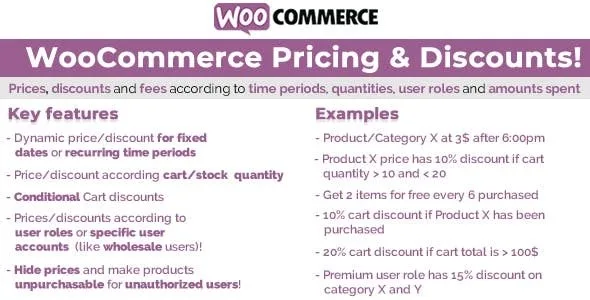
About WooCommerce Pricing & Discounts!
A store with wholesalers, regular customers and date-based offers, not one discount for everyone
When a store sells the same product to different audiences, a single price falls short: the wholesaler expects one rate, the loyal customer another and the end-of-month offer yet another. Doing it by hand, editing prices every time, ends in mistakes and in offers nobody remembers to remove. WooCommerce Pricing & Discounts! is built for that buyer: someone who needs price rules that apply themselves depending on who buys, when and how much.
It won't help if you want a coupon code or a "buy X, get Y" promotion: the plugin works with price rules and cart discounts, not codes. Nor does it assign roles by itself based on spending: for that, the product page points to a separate companion plugin (WooCommerce Role by Amount Spent).
Rules by date, role, user, quantity or spending
Each rule can depend on one or more of these factors:
- Time periods: specific dates and times, useful for limited offers.
- User roles or specific accounts: for example special prices for wholesalers.
- Quantity: units in the cart, remaining stock, total sales of the product or the customer's number of purchases.
- Amount spent: per item or by cart total.
With them you can set a product's price, apply a cart discount or add a fee.
Bulk editor for the catalog and individual rules on each product
Once activated, a bulk editor appears in the main menu. From there you assign rules to specific products or whole categories, with the option to apply them to everything except the selection and to include subcategories. If a product needs special treatment, you can also create rules on its own edit page, variations included.
If both apply to one product, the rule defined on the product wins. And if you enable the option to stack rules, only those of the same type add up (product rules with each other, bulk rules with each other).
Four details of WooCommerce Pricing & Discounts! to know before building your rules
- Sale prices set manually on a product are ignored: remove them so the rule takes over.
- Prices must be entered exclusive of tax for it to work properly.
- With the stock strategy, the price is decided by current stock, not by tiers of units bought. With 20 units in stock and rules for 10 to 19 and 20 to 30, someone buying 5 pays everything under the 20 to 30 rule.
- For variable products, the total sales considered are those of the main product, and the customer's number of purchases only counts those made while the plugin is active.
What the customer sees on the product page
The displayed price updates every time the customer changes the quantity, so they know what they will pay without adding anything to the cart. When a rule leaves the price below the original, the WooCommerce sale badge appears; you can disable it in the general settings or change its text.
Frequently asked questions
Can I give wholesalers different prices?
Yes, by assigning the rule to a user role or to specific accounts.
Does it work with variable products?
Yes, you can create rules for variations from the product edit page. Keep in mind that total sales are measured on the main product.
Does it coexist with WooCommerce sale prices?
No: the plugin ignores manual sale prices, so they must be removed.
Can I remove the sale badge?
Yes, in the general options, or just change its text.
Topics
Version history
-
v
15.2 Current 12 Jun 2024
Customer reviews
Sign in to leave a review. Only people who have the product can review it.
No reviews for this product yet.
Frequently asked questions
-
GPL (General Public License) is the license under which WordPress and most premium plugins/themes are distributed. It grants you the right to use, modify and redistribute the software in as many projects as you want, with no domain restrictions.
-
Yes. With membership you get automatic updates via our GPLClub Updater plugin (installed on your WP, detects new versions and applies them). With individual purchase, you get one year of manual updates from your account.
-
Depends on the plan. Monthly: 3 domains. Semi-annual: 7. Annual and Lifetime: 15. Individual purchase: 1 domain.
-
GPLClub offers its own support for installation, configuration and compatibility. For direct support from the original author (feature requests, product-specific bugs), a license purchased from the author is required.