WooCommerce Quantity Discounts, Rules & Swatches
Antivirus scan
Powered by ClamAV
✅ Verified clean
This product file has passed our security filters.
Want to run a fresh ClamAV scan right now? Takes a few seconds and shows scanner version, signature DB and live result.
This can take 5 to 30 seconds.
Clean file Threat detected
No threats detected in this file.
- File
- Size
- Scanned
- ClamAV
- Signature database
⚡ Powered by ClamAV
Scan could not be completed
Report product
If you detected an issue (broken file, malware, inappropriate content, etc.) let us know and we'll review it ASAP.
Sign in to report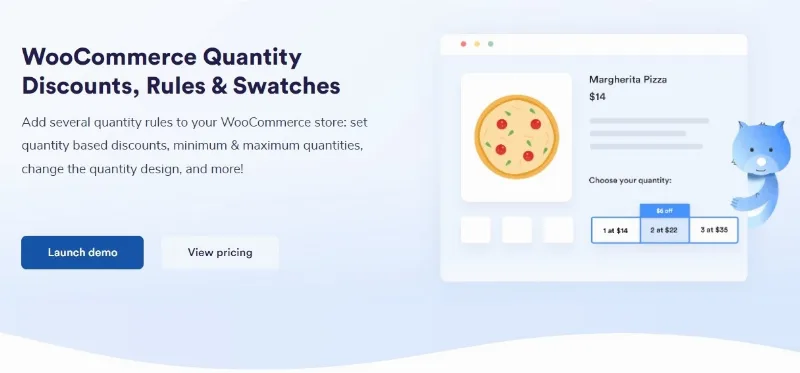
About WooCommerce Quantity Discounts, Rules & Swatches
Selling by quantity without making the customer do the maths
Volume discounting only works if the customer sees it before deciding. A price table buried in the description changes nothing: the customer puts one in the basket and leaves. What does lift average order value is the price moving in front of them as they adjust the quantity.
This plugin does both at once: it defines the price tiers and it changes how quantity is chosen so the discount is visible at the moment of deciding.
Tiered discounts
You configure quantity ranges with their price, and the customer sees the unit price change as they select. There is also a tier table shown on the product page, so it is clear at a glance where the worthwhile jump sits.
The quantity swatches
Here is the part least expected and most noticed. The plugin replaces WooCommerce's default numeric field, the one where you have to type or press a tiny arrow, with quantity buttons whose colours and typography you configure.
It looks cosmetic and it is not: on mobile, the default numeric field is one of the most awkward elements in WooCommerce, and swapping it for large buttons changes how many customers actually get as far as changing the quantity. The swatches also work alongside product variations.
Quantity rules
- Minimum and maximum per product, validated at checkout, not just a decorative notice.
- Step intervals, to force buying in fives or twelves, which is how a good deal of trade stock is sold.
- Dynamic messaging telling the customer when the quantity entered is invalid, rather than letting them find out at payment.
Languages
Translation-ready code, with WPML and Polylang compatibility.
Requirements
PHP 7.1 or higher, WordPress 8.0 or higher and WooCommerce 6.0 or higher.
Who it is for
Wholesale, business-to-business trade, and any shop wanting to push the basket upwards or selling product that only makes sense in multiples.
Frequently asked questions
Does the customer see the discount before buying?
Yes, the price changes with the selected quantity and there is a tier table visible on the product page.
Can I force buying in fives?
Yes, with quantity step intervals, which are also validated at checkout.
Does it work with variable products?
Yes, the quantity swatches work alongside variations.
Which WooCommerce version do I need?
WooCommerce 6.0 or higher, with WordPress 8.0 and PHP 7.1 as a minimum.
Topics
Version history
-
v
1.1.8 Current 14 May 2024
Customer reviews
Sign in to leave a review. Only people who have the product can review it.
No reviews for this product yet.
Frequently asked questions
-
GPL (General Public License) is the license under which WordPress and most premium plugins/themes are distributed. It grants you the right to use, modify and redistribute the software in as many projects as you want, with no domain restrictions.
-
Yes. With membership you get automatic updates via our GPLClub Updater plugin (installed on your WP, detects new versions and applies them). With individual purchase, you get one year of manual updates from your account.
-
Depends on the plan. Monthly: 3 domains. Semi-annual: 7. Annual and Lifetime: 15. Individual purchase: 1 domain.
-
GPLClub offers its own support for installation, configuration and compatibility. For direct support from the original author (feature requests, product-specific bugs), a license purchased from the author is required.