WooCommerce Variation Swatches and Photos
Antivirus scan
Powered by ClamAV
✅ Verified clean
This product file has passed our security filters.
Want to run a fresh ClamAV scan right now? Takes a few seconds and shows scanner version, signature DB and live result.
This can take 5 to 30 seconds.
Clean file Threat detected
No threats detected in this file.
- File
- Size
- Scanned
- ClamAV
- Signature database
⚡ Powered by ClamAV
Scan could not be completed
Report product
If you detected an issue (broken file, malware, inappropriate content, etc.) let us know and we'll review it ASAP.
Sign in to report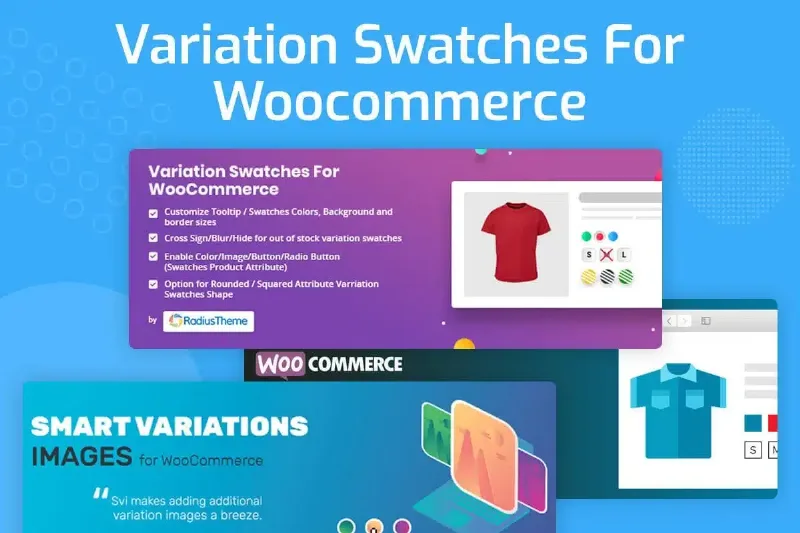
About WooCommerce Variation Swatches and Photos
A dropdown that says “Green” doesn't sell a sweater
When a product has variations, shoppers choose with their eyes, and a dropdown menu forces them to read. “Navy blue”, “Petrol blue” or “Sky blue” don't mean the same thing to everyone, and a buyer who isn't sure about the shade hesitates or ends up returning the item. Stores with many colors, patterns or finishes feel it right there, in a step the customer should be able to settle at a glance.
WooCommerce Variation Swatches and Photos replaces those dropdowns on variable products with color and image swatches. The customer sees the shade or the texture and clicks, without decoding names. It works for colors, but also for styles, sizes or any option that can be represented with a color or an image.
Color and image swatches, each for what it does best
There are two types of swatch, and you should pick according to the attribute:
- Color: a shade you define from the admin panel.
- Image: a thumbnail you can use where a flat color isn't enough.
- Styles, sizes or other options: they can also be shown this way, as long as they have a clear visual representation.
A store where the options are visible tends to look more polished and cleaner than one with rows of menus, and that affects how the whole catalog is perceived.
Define them per attribute or adjust them product by product
From the admin interface you can assign colors and images at attribute level or at product level.
You can also customize the swatches on a specific product, for example if that color name corresponds to a different shade in that line. To see the result before deciding, the demo shows the plugin in action.
Are swatches on the product page enough, or do you need them in the listing?
That is the decision that matters. The plugin works on the individual product page and does not natively include swatches on the shop page or on category archives. If you want customers to pick a color from the listing, you will need a separate solution. In addition, the final look depends on your theme: depending on which one you use, you may have to adjust sizes and alignment with your own CSS.
Does it work with any product?
With WooCommerce variable products, which is where variations exist. It is a WooCommerce extension, so it needs the store to be active; it is no use for simple products.
Can I use images instead of colors?
Yes. You can define colors or images, depending on what best represents each attribute.
Do I have to set up each product one by one?
Not necessarily. You can define the swatches at attribute level and keep per-product adjustments for the exceptions.
Will it look right in my theme without touching anything?
That is not guaranteed. Try it with a real product in your theme and check in the demo how it should look; if your design is very particular, expect to tweak some styles.
Topics
Version history
-
v
3.1.18 Current 5 Sep 2026
-
v
3.1.17 6 Jul 2026
-
v
3.1.14 23 Dec 2025
Customer reviews
Sign in to leave a review. Only people who have the product can review it.
No reviews for this product yet.
Frequently asked questions
-
GPL (General Public License) is the license under which WordPress and most premium plugins/themes are distributed. It grants you the right to use, modify and redistribute the software in as many projects as you want, with no domain restrictions.
-
Yes. With membership you get automatic updates via our GPLClub Updater plugin (installed on your WP, detects new versions and applies them). With individual purchase, you get one year of manual updates from your account.
-
Depends on the plan. Monthly: 3 domains. Semi-annual: 7. Annual and Lifetime: 15. Individual purchase: 1 domain.
-
GPLClub offers its own support for installation, configuration and compatibility. For direct support from the original author (feature requests, product-specific bugs), a license purchased from the author is required.