WooCommerce Wishlists
Antivirus scan
Powered by ClamAV
✅ Verified clean
This product file has passed our security filters.
Want to run a fresh ClamAV scan right now? Takes a few seconds and shows scanner version, signature DB and live result.
This can take 5 to 30 seconds.
Clean file Threat detected
No threats detected in this file.
- File
- Size
- Scanned
- ClamAV
- Signature database
⚡ Powered by ClamAV
Scan could not be completed
Report product
If you detected an issue (broken file, malware, inappropriate content, etc.) let us know and we'll review it ASAP.
Sign in to report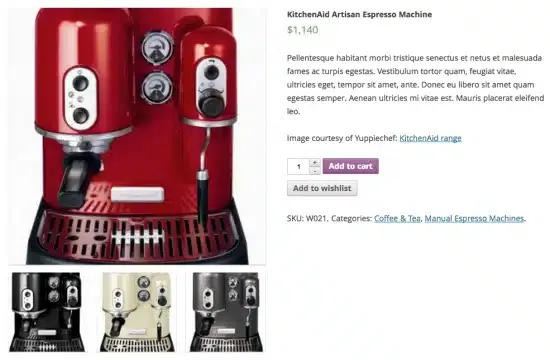
About WooCommerce Wishlists
Whoever saves a product today rarely buys it today
A customer who leaves your store without buying doesn't tell you why: maybe they were waiting for a date, maybe they wanted someone else to decide, maybe they just wanted to think about it. Without somewhere to keep what they like, that interest gets lost in a browser tab.
WooCommerce Wishlists turns it into saved lists, for both guests and registered customers, and lets you see what actually gets saved.
Unlimited lists with three privacy levels
Each customer can create as many lists as they want: one for their birthday, a personal one, one to share. And each list can be:
- Public: anyone can find it by searching the owner's name or email.
- Shared: only people with the URL can see it.
- Private: only its owner can see it.
They can be shared on Facebook, Twitter, Pinterest or by email with a personalised message. Whoever receives a list sees it in the owner's layout and can add its items to their own cart.
Gift registry: the person who chooses and the person who pays are different people
At a wedding or a birthday, the customer who creates the list decides and their guests pay. That is why it matters that purchased items clear themselves from the list and that you can see how many units of each have been bought.
It works with simple, grouped and variable products, and with Product Add-ons and Gravity Forms Add-on: the options the customer chose are saved with the item and restored when it goes to the cart.
Saving from the catalogue and from the cart
The button appears in shop and category listings, as a heart over the image or above or below Add to Cart. If the product is variable, it asks for the options before it goes to the cart. In the cart, every line has a Save for later link: the item moves to a list below the cart and comes back with one click.
It is built with blocks (Add to Wishlist and Wishlist), which you can move or restyle in the site editor, and it also works with classic themes. For page builders and custom templates there are two shortcodes: one places the button in any template and the other places it for a specific product.
Guest lists expire after 30 days
A guest saves products without an account, but their list lasts at most 30 days or until they clear their cookies. If they register or log in, their lists move to the account and are kept indefinitely. If losing those lists matters to you, you can require login before saving.
- Already solved: unlimited lists, privacy per list, sharing by social networks and email, save for later and bulk actions (add to cart, remove, update quantities or move items to another list).
- Already solved: an admin screen to view, sort and edit your customers' lists, useful for knowing what they want.
- On your own: adding the link to the lists in your theme's menu.
- On your own: placing the button with a shortcode if your template isn't standard.
- On your own or with a designer: custom CSS if your design is very distinctive. The plugin respects your theme's styles, but it can't guess them.
Frequently asked questions about WooCommerce Wishlists
Can it work as a gift registry?
Yes. You share the list, set purchased items to clear from it, and it shows how many units of each item have been bought.
Can customers without an account use it?
Yes, with the 30-day or cookie limit described above.
Can I customise the button?
Yes. The Add to Wishlist text can be changed, it can be a button or a link with a star or icon, and a designer can add their own icon.
What does a visitor see on a public list?
The list in its owner's layout, with the option to add its items to their own cart.
Topics
Version history
-
v
2.5.1 Current 21 Oct 2026
-
v
2.4.4 22 Sep 2026
-
v
2.4.0 9 Sep 2026
-
v
2.3.23 5 Sep 2026
-
v
2.3.22 26 Aug 2026
-
v
2.3.14 18 Mar 2026
Customer reviews
Sign in to leave a review. Only people who have the product can review it.
No reviews for this product yet.
Frequently asked questions
-
GPL (General Public License) is the license under which WordPress and most premium plugins/themes are distributed. It grants you the right to use, modify and redistribute the software in as many projects as you want, with no domain restrictions.
-
Yes. With membership you get automatic updates via our GPLClub Updater plugin (installed on your WP, detects new versions and applies them). With individual purchase, you get one year of manual updates from your account.
-
Depends on the plan. Monthly: 3 domains. Semi-annual: 7. Annual and Lifetime: 15. Individual purchase: 1 domain.
-
GPLClub offers its own support for installation, configuration and compatibility. For direct support from the original author (feature requests, product-specific bugs), a license purchased from the author is required.