WP Frontend Admin (Premium)
Antivirus scan
Powered by ClamAV
✅ Verified clean
This product file has passed our security filters.
Want to run a fresh ClamAV scan right now? Takes a few seconds and shows scanner version, signature DB and live result.
This can take 5 to 30 seconds.
Clean file Threat detected
No threats detected in this file.
- File
- Size
- Scanned
- ClamAV
- Signature database
⚡ Powered by ClamAV
Scan could not be completed
Report product
If you detected an issue (broken file, malware, inappropriate content, etc.) let us know and we'll review it ASAP.
Sign in to report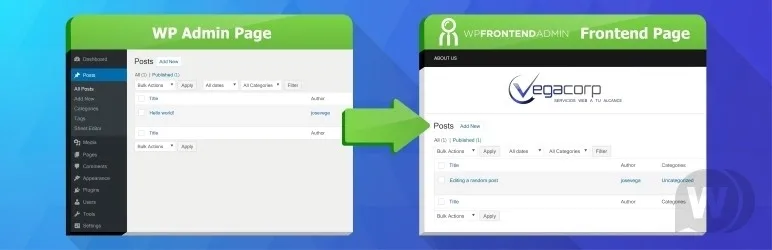
About WP Frontend Admin (Premium)
Your client doesn't need to see the whole wp-admin to publish a post
Handing over a website and watching the client get lost among menus, notices and settings they don't understand ends in phone calls, screenshots and manuals nobody reads. And if you are building a platform where your users manage their own content, sending them to the WordPress dashboard looks like a half-finished tool.
WP Frontend Admin (Premium) solves that by showing admin pages inside a normal page of your site, with your design and your navigation. The idea behind it: the WordPress admin is a tool for whoever builds the site, not for whoever uses it. The people who use it need one or two screens, not the whole panel.
One page, one shortcode and a live editor
You create a page with Elementor, Divi, Brizy or the standard editor and paste a shortcode with the URL of the admin content you want to display. From there:
- A live editor lets you remove elements with one click, change texts, title, URL and template, and add the page to a menu.
- You adjust navigation and styles with your page builder, as on any other page.
- Logged-out users see an automatic login page.
- There is a gallery of dashboard designs you can import so you don't start from scratch.
WP Frontend Admin (Premium) depending on who installs it
Freelancer or agency with clients who only publish
You display the post editing screen and nothing else. Explaining how to manage the blog goes from a manual full of arrows to a single address, and the client isn't distracted by menus that aren't theirs.
Membership site
Your members don't have to step into the backend. If you show them the screens they need inside the site itself, the experience feels like an application, not a borrowed dashboard.
Anyone who wants to build a subscription platform
The proposal is to turn existing plugins into apps with your own brand: galleries, newsletters with MailPoet, polls, a URL shortener, donations with Give, courses with LearnPress or analytics with Monster Insights, each one showing its editor or reports on the frontend. The manufacturer's free course outlines a Shopify-style platform combining Multisite, WP Ultimo, WooCommerce and this plugin, so count on several pieces, not just one.
WooCommerce store managed by other people
You can bring product and coupon creation, the order list for dispatching, sales reports and store settings to the frontend. Useful if whoever runs the store shouldn't enter the general admin.
Questions before building your first screen
Which page builders does it work with? Elementor, Divi, Brizy or the standard WordPress editor: all you need is a page where you can paste the shortcode.
Does it work on a Multisite network? Yes, it is also designed for Multisite networks and for platforms where each user has their own site.
Can I display the screen of any plugin? The approach is to display admin pages, so in theory any plugin with its own screen is a candidate. Check in the demo that the specific screen you need displays and behaves well on the frontend.
Do I need to code? The basic setup is done with a shortcode and the visual editor; you handle the design with your page builder.
It displays other plugins' screens, it doesn't replace them
This plugin doesn't create galleries, stores or newsletters: it places on the frontend the screens of plugins you already have installed.
- Each feature of your app depends on the plugin that provides it being installed and active.
- A complete paid platform needs more pieces (Multisite, WooCommerce or others), depending on what you want to charge for.
- The final look depends on your work with the page builder.
Version history
-
v
1.22.3 Current 8 Jan 2025
Customer reviews
Sign in to leave a review. Only people who have the product can review it.
No reviews for this product yet.
Frequently asked questions
-
GPL (General Public License) is the license under which WordPress and most premium plugins/themes are distributed. It grants you the right to use, modify and redistribute the software in as many projects as you want, with no domain restrictions.
-
Yes. With membership you get automatic updates via our GPLClub Updater plugin (installed on your WP, detects new versions and applies them). With individual purchase, you get one year of manual updates from your account.
-
Depends on the plan. Monthly: 3 domains. Semi-annual: 7. Annual and Lifetime: 15. Individual purchase: 1 domain.
-
GPLClub offers its own support for installation, configuration and compatibility. For direct support from the original author (feature requests, product-specific bugs), a license purchased from the author is required.