WP Post Modules for Elementor
Antivirus scan
Powered by ClamAV
✅ Verified clean
This product file has passed our security filters.
Want to run a fresh ClamAV scan right now? Takes a few seconds and shows scanner version, signature DB and live result.
This can take 5 to 30 seconds.
Clean file Threat detected
No threats detected in this file.
- File
- Size
- Scanned
- ClamAV
- Signature database
⚡ Powered by ClamAV
Scan could not be completed
Report product
If you detected an issue (broken file, malware, inappropriate content, etc.) let us know and we'll review it ASAP.
Sign in to report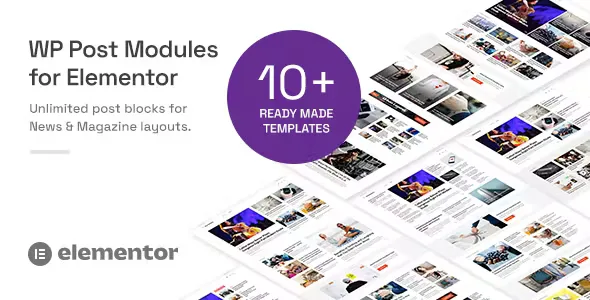
About WP Post Modules for Elementor
A magazine front page fails when it repeats the same story
Building the home page of a digital newspaper or a content-heavy blog often ends in lists of posts copied by hand, blocks that show the same story three times or layouts that fall apart on mobile. And someone landing on a front page decides at a glance whether there is anything new to read.
That is why having many pretty blocks matters less than controlling what goes into each one. WP Post Modules for Elementor adds a widget to Elementor for building magazine-style post sections, and its strong point is filtering: you can place the featured story at the top and make the other blocks skip it.
Five block formats and a query builder in WP Post Modules for Elementor
Each module is configured from the Elementor panel with one of these formats:
- Grid: four sub styles, unlimited columns and custom spacing between items.
- List: you decide the ratio between thumbnail and text, with circular images and full, half or no borders.
- Tile: text overlaid on the image with a color or gradient background, shown always, on hover or never, with zoom and rotate on hover.
- Ticker: a headline strip with editable title, label, colors and animation duration.
- Bullet list: a simple list with adjustable bullet size and color.
The query builder pulls posts by category, tag, custom post type, taxonomy, post ID or author ID, with offset, exclusion and ordering. That offset and exclusion are what prevent repeats between blocks.
For each post you choose the title tag (from h1 to h6 or p), the excerpt length, the read more link and the visible data: category, author with avatar, date and comments. You can also add share buttons for Twitter, Facebook, WhatsApp, LinkedIn, Pinterest, VK, Reddit or email. If a post has more categories than the number you set, they are grouped into a dropdown. There are styles ready for WP Review and Post Views Counter, although you install those plugins separately.
The limits, so there are no surprises: it is a widget, so it only works inside Elementor; it displays posts that already exist and does not create content; the slider works for grid, list and tile, not for ticker or bullet list; and AJAX loading is also limited to grid, list and tile. The 12 templates are home page layouts, not a complete site. WPBakery and Gutenberg have their own separate versions of the product.
Slider, image cropping and structured data
The slider lets you choose how many slides show at once, loop, autoplay with its timing, speed, transition (slide, zoom or fade), auto height, arrows, dots and side padding.
Images are cropped on the fly with BFI Thumb: width, height, hard crop and quality from 1 to 100. You can also turn them grayscale or tint them with a color. The generated HTML is W3C valid and carries Schema microdata that you edit from the widget.
Posts, custom types and languages: what people usually ask
Can I show my own content types, such as a portfolio?
Yes. The query supports custom post types and taxonomies, as well as categories, tags and authors.
Does it work on right-to-left language sites?
Yes, it has RTL support, and it includes POT and PO/MO files to translate the plugin's texts.
Does it load more stories without reloading the page?
Yes, with AJAX previous and next navigation or a load more button, in grid, list and tile.
Can I try it before deciding?
You can drag the widget onto a new post in the demo and move the settings to see how each style responds.
The 12 front pages are JSON files and full width is chosen on the page
Each front page ships as an Elementor JSON template file, so you can import only the ones you will use and ignore the rest. To make the section span the full width, choose Elementor Canvas as the layout in the page settings.
A practical method: configure a single block first, adjust its query with an offset so it does not repeat the main story, and then duplicate it for the other formats, changing only the category and style.
Topics
Version history
-
v
2.8.0 Current 10 Sep 2026
-
v
2.7.0 7 Sep 2026
-
v
2.4.0 8 May 2024
Customer reviews
Sign in to leave a review. Only people who have the product can review it.
No reviews for this product yet.
Frequently asked questions
-
GPL (General Public License) is the license under which WordPress and most premium plugins/themes are distributed. It grants you the right to use, modify and redistribute the software in as many projects as you want, with no domain restrictions.
-
Yes. With membership you get automatic updates via our GPLClub Updater plugin (installed on your WP, detects new versions and applies them). With individual purchase, you get one year of manual updates from your account.
-
Depends on the plan. Monthly: 3 domains. Semi-annual: 7. Annual and Lifetime: 15. Individual purchase: 1 domain.
-
GPLClub offers its own support for installation, configuration and compatibility. For direct support from the original author (feature requests, product-specific bugs), a license purchased from the author is required.