WPCargo Parcel Quotation Add-ons
Antivirus scan
Powered by ClamAV
✅ Verified clean
This product file has passed our security filters.
Want to run a fresh ClamAV scan right now? Takes a few seconds and shows scanner version, signature DB and live result.
This can take 5 to 30 seconds.
Clean file Threat detected
No threats detected in this file.
- File
- Size
- Scanned
- ClamAV
- Signature database
⚡ Powered by ClamAV
Scan could not be completed
Report product
If you detected an issue (broken file, malware, inappropriate content, etc.) let us know and we'll review it ASAP.
Sign in to report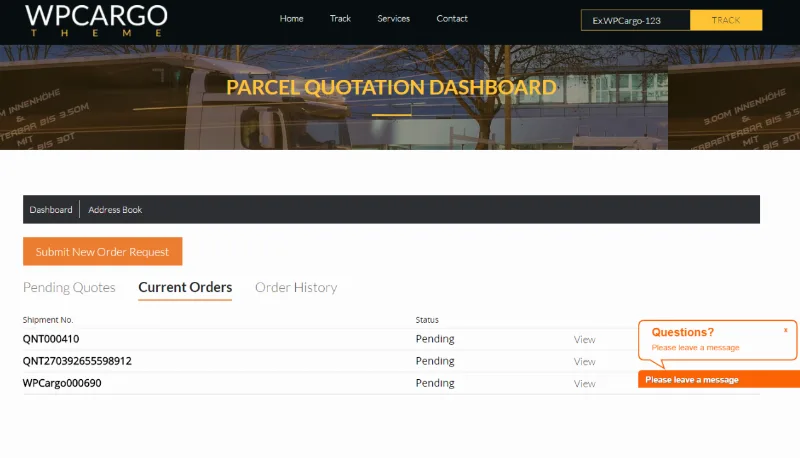
About WPCargo Parcel Quotation Add-ons
An international shipment has no price until someone looks at it
When a customer asks how much it costs to ship a parcel, there is rarely a fixed rate: it depends on freight, fuel, shipping costs and whatever each route adds. Replying by email, calculating by hand and writing again once the customer accepts eats up hours and leaves room for mistakes.
In logistics, the final price almost never matches the first one quoted, and the customer knows it. Whoever quotes in writing, with every charge itemized, avoids the argument later. WPCargo Parcel Quotation Add-ons moves that exchange to your site: the customer asks, you reply and they approve.
WPCargo Parcel Quotation Add-ons: request, quote and approve without leaving the site
The flow has three steps:
- Customer request: the customer asks for a quotation from your site, with no emails to write.
- Administrator quotation: you send it. Default charges exist when you activate the plugin and you can modify them as you like.
- Approval: the customer accepts the quotation they receive and the process moves on.
- Adjustments to fit you: you can change the emails that are sent, the names of the quotation statuses, the currency (and add others) and how the quotation appears on the shipment invoice.
- Who gets in: you can give access to the quotation page to a custom user role or make it public.
One limit is worth knowing: it is an add-on for WPCargo, so it does not work on its own. You set the amount of each charge.
Questions before you decide
Do I need WooCommerce?
Not for the customer to approve the quotation: that case is covered.
Can I change the default charges?
Yes, you can modify them.
Can I quote in another currency?
Yes, you can change the quotation currency and add others.
Can people without an account request a quotation?
You can set the quotation page as public. If you prefer to keep control, restrict access to a specific role.
Approval does not need WooCommerce
Before publishing anything, decide how you want to get paid. If you only need the customer to accept, you can skip the WooCommerce integration.
Then review the default charges and remove or adjust the ones you will not use, set the currency, read the automatic emails through a customer's eyes and decide who sees the page: public or a role of your own. Run a complete test quotation, from request to approval, before giving the address to your customers.
Topics
Version history
-
v
6.6.0 Current 21 Aug 2024
Customer reviews
Sign in to leave a review. Only people who have the product can review it.
No reviews for this product yet.
Frequently asked questions
-
GPL (General Public License) is the license under which WordPress and most premium plugins/themes are distributed. It grants you the right to use, modify and redistribute the software in as many projects as you want, with no domain restrictions.
-
Yes. With membership you get automatic updates via our GPLClub Updater plugin (installed on your WP, detects new versions and applies them). With individual purchase, you get one year of manual updates from your account.
-
Depends on the plan. Monthly: 3 domains. Semi-annual: 7. Annual and Lifetime: 15. Individual purchase: 1 domain.
-
GPLClub offers its own support for installation, configuration and compatibility. For direct support from the original author (feature requests, product-specific bugs), a license purchased from the author is required.