WPForms Calculations
Antivirus scan
Powered by ClamAV
✅ Verified clean
This product file has passed our security filters.
Want to run a fresh ClamAV scan right now? Takes a few seconds and shows scanner version, signature DB and live result.
This can take 5 to 30 seconds.
Clean file Threat detected
No threats detected in this file.
- File
- Size
- Scanned
- ClamAV
- Signature database
⚡ Powered by ClamAV
Scan could not be completed
Report product
If you detected an issue (broken file, malware, inappropriate content, etc.) let us know and we'll review it ASAP.
Sign in to report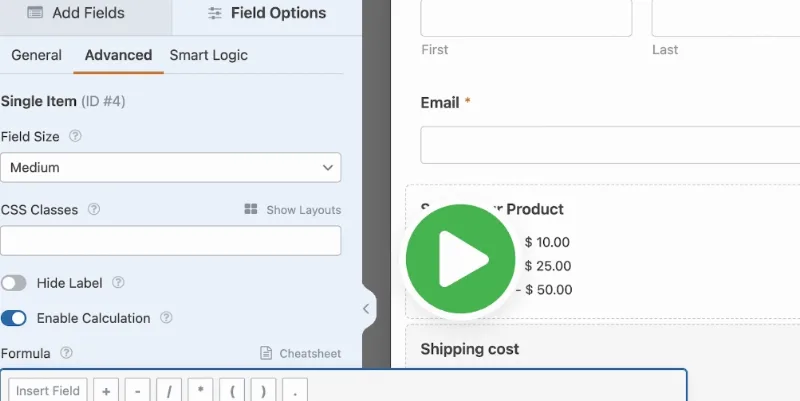
About WPForms Calculations
Your rate card has exceptions you have never written down
Your price lives in your head: so much per unit, a surcharge if it is urgent, a different deal for a large job, and that one exception only you remember. As long as you do the math yourself, that rate card can stay unwritten. The day you want a form to do it, it has nowhere left to hide.
WPForms Calculations turns the data in a form into results that update while the visitor fills it in. The hard part is deciding your rules: each exception becomes a line of formula with its condition. Whatever you cannot express that way is a part of your price that still depends on your judgment, and it is better to find that out before you publish a figure.
What it does with your form fields
- Fields that receive the result: Single Line Text, Paragraph Text, Number, Hidden and Single Item. With calculation on, the field's value can only come from the formula.
- Fields that feed the formula: text, dropdowns, multiple choice, checkboxes, Numbers, Number Slider, Date/Time, Rating and Total, among others.
- Operators: addition, subtraction, multiplication, division and modulo, plus comparisons and the logical AND, OR and NOT.
- Conditions: if, elseif, else and endif, with as many elseif statements as you need and nested blocks.
- Functions: among them average, rounding, power, square root, logarithm, random number and difference between dates.
- Amounts: the value of a payment field is read with $FX_amount, useful for adding taxes, discounts or shipping to an order.
How to write a rate card as a formula
Each field is named by its ID, such as $F1, and typing $ in the editor lists the available fields. This work order is our own suggestion, so try it on your real cases:
- Write the rate card in sentences, with each exception on its own line.
- Create a field for each piece of data that moves the price: quantity, date, type of service.
- Keep intermediate steps in Hidden fields. Only fields work as variables, and one calculated field can feed another.
- Translate the exceptions into if and elseif, and close each block with endif.
- Validate the formula: syntax errors appear next to the affected line.
- Rerun quotes you already sent and compare the figures.
Where a formula trips and where the addon stops
- An error does not block saving. If the formula fails validation, the form still saves, the calculation is ignored and the field works as a regular one.
- IDs can change. When you delete a field and add it again, its ID is different, so check the formulas that used it.
- No dynamic options. Dropdown, Multiple Choice and Checkboxes with dynamic choices cannot be used as variables.
- Decimals with a dot. A comma in a large number causes a validation error.
The addon calculates, but it does not charge: to request a deposit in the same form you need to add payment, for example with Stripe. And Numbers fields accept numeric values only, so a result with text must go in Single Line Text or Paragraph Text.
WPForms Pro first, then your formula
You need an up-to-date WPForms Pro, installed and active. The currency of the results comes from WPForms » Settings » Payments.
- Install and activate the addon.
- In a supported field, open Advanced and turn on Enable Calculation.
- Write the formula in the editor that appears below and validate it.
- Save and test the form on the published page, with high, low and empty values.
When the calculator should not live in WPForms
If your site does not use WPForms, look at these two. Cost Calculator Builder Pro, by StylemixThemes, builds estimate forms with its own calculation builder and lead capture. Stylish Cost Calculator focuses on instant quotes, with sliders, lists and checkboxes, and lets people print the result or send it by email.
If your forms are in Gravity Forms, the catalog has Gravity Perks Advanced Calculations.
Answers about formulas and results
Does it work without WPForms Pro?
No. It is a WPForms addon and asks for the Pro level or higher.
Does the visitor see the result before submitting?
Yes. The result recalculates as soon as a form value changes.
Can I calculate with dates?
Yes. There are functions for the difference between two dates, useful for ages, stays or deadlines.
What about checkboxes with several options?
Each option is referenced by its number, such as $FX_1 for the first one, as long as the field does not use dynamic choices.
Topics
Version history
-
v
1.10.0 Current 30 Jan 2026
Customer reviews
Sign in to leave a review. Only people who have the product can review it.
No reviews for this product yet.
Frequently asked questions
-
GPL (General Public License) is the license under which WordPress and most premium plugins/themes are distributed. It grants you the right to use, modify and redistribute the software in as many projects as you want, with no domain restrictions.
-
Yes. With membership you get automatic updates via our GPLClub Updater plugin (installed on your WP, detects new versions and applies them). With individual purchase, you get one year of manual updates from your account.
-
Depends on the plan. Monthly: 3 domains. Semi-annual: 7. Annual and Lifetime: 15. Individual purchase: 1 domain.
-
GPLClub offers its own support for installation, configuration and compatibility. For direct support from the original author (feature requests, product-specific bugs), a license purchased from the author is required.