YITH WooCommerce Stripe Premium
Antivirus scan
Powered by ClamAV
✅ Verified clean
This product file has passed our security filters.
Want to run a fresh ClamAV scan right now? Takes a few seconds and shows scanner version, signature DB and live result.
This can take 5 to 30 seconds.
Clean file Threat detected
No threats detected in this file.
- File
- Size
- Scanned
- ClamAV
- Signature database
⚡ Powered by ClamAV
Scan could not be completed
Report product
If you detected an issue (broken file, malware, inappropriate content, etc.) let us know and we'll review it ASAP.
Sign in to report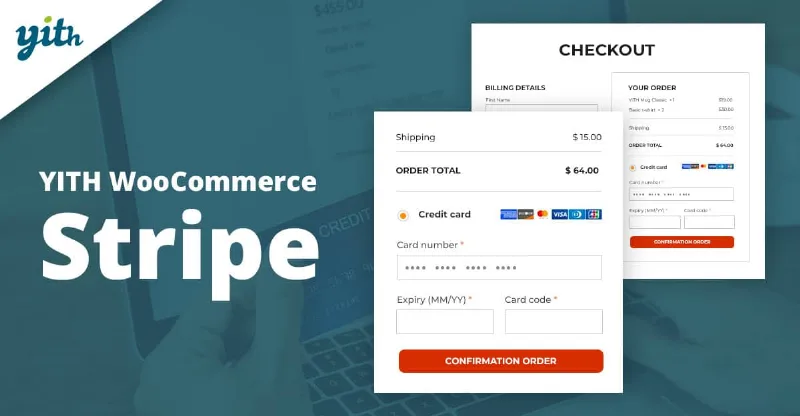
About YITH WooCommerce Stripe Premium
The customer reaches payment and can't find their card
The worst part of an abandoned cart is that you already did all the work: the customer found the product, added it and made it to checkout. If all they see there is a bank transfer or a method they don't use, they leave without a word and you never know why. YITH WooCommerce Stripe Premium adds card payments to WooCommerce through Stripe, so the last step isn't the one that costs you the sale.
There is something people overlook when installing a gateway: charging at the moment of the order doesn't always suit you. If you confirm stock, prepare orders by hand or ship days later, charging immediately forces you to refund every time something goes wrong. This plugin lets you decide when the charge happens.
An order from start to finish with YITH WooCommerce Stripe Premium
Picture a store that prepares and ships what it sells itself. This is how each step plays out.
1. You choose how the customer sees the form
There are three modes. The standard one shows the card fields on your own checkout and requires SSL. Elements embeds a form managed by Stripe. Stripe Checkout redirects the customer to a payment page hosted by Stripe. In the last two, Stripe controls the form or the page.
2. You decide whether to charge now or just authorize
You can charge as soon as the customer places the order, or only authorize the payment and charge it later, for example once you have shipped the products. If something is out of stock, there is nothing to refund.
3. You ask for data that slows down fraud
You can require billing details even if the standard checkout doesn't ask for them: full billing and shipping address and ZIP code. They help verify who owns the card. The plugin supports SCA (Strong Customer Authentication) and sends the data entered at checkout to Stripe. To speed up repeat purchases, cards can be saved automatically or the customer can choose. They then manage them from their account and see them at checkout.
4. A payment is rejected
Users with a rejected payment are automatically added to a blacklist, so you can keep an eye on suspicious attempts and block potential fraudulent orders.
5. Time to give money back
You open the order details in WooCommerce and click the refund button: the refund is processed in Stripe. Webhooks work in the opposite direction: if you make a refund (full or partial) from your Stripe dashboard, the store updates itself.
Before opening to the public, run tests with dummy cards. And be clear about the limit: you need your own Stripe account and your business must be in a supported country. Also, this only adds card payments: it does not include PayPal or other methods.
Questions before enabling Stripe in your store
Do I need a Stripe account? Yes, the plugin connects WooCommerce to your account, and your business must be in a country Stripe supports.
Can I test it without charging for real? Yes, it supports tests with dummy cards.
Can customers' cards be saved? Yes, automatically or by letting each customer decide, and they can then manage them from their account.
Does it work if I sell under European payment rules? It includes support for SCA, Strong Customer Authentication. This alone does not guarantee that your store complies with all regulations.
Subscriptions, memberships and auctions: the plugin doesn't work alone here
Recurring charges depend on YITH WooCommerce Subscription: with it, weekly, monthly or yearly charges to the customer's card are automated, and if a renewal fails you can retry with another card. It is also compatible with YITH WooCommerce Membership.
With YITH Auctions for WooCommerce you can stop users from bidding if they have no valid card linked and automatically charge the winner. With YITH WooCommerce Customize My Account Page, the Stripe methods appear in the payment methods section. If you don't use those add-ons, none of this applies and the plugin stays at card payments.
Topics
Version history
-
v
3.48.0 Current 2 Nov 2026
-
v
3.47.0 9 Oct 2026
-
v
3.46.0 5 Sep 2026
-
v
3.45.0 27 Jul 2026
-
v
3.42.0 3 Apr 2026
Customer reviews
Sign in to leave a review. Only people who have the product can review it.
No reviews for this product yet.
Frequently asked questions
-
GPL (General Public License) is the license under which WordPress and most premium plugins/themes are distributed. It grants you the right to use, modify and redistribute the software in as many projects as you want, with no domain restrictions.
-
Yes. With membership you get automatic updates via our GPLClub Updater plugin (installed on your WP, detects new versions and applies them). With individual purchase, you get one year of manual updates from your account.
-
Depends on the plan. Monthly: 3 domains. Semi-annual: 7. Annual and Lifetime: 15. Individual purchase: 1 domain.
-
GPLClub offers its own support for installation, configuration and compatibility. For direct support from the original author (feature requests, product-specific bugs), a license purchased from the author is required.