YITH WooCommerce Tab Manager Premium
Antivirus scan
Powered by ClamAV
✅ Verified clean
This product file has passed our security filters.
Want to run a fresh ClamAV scan right now? Takes a few seconds and shows scanner version, signature DB and live result.
This can take 5 to 30 seconds.
Clean file Threat detected
No threats detected in this file.
- File
- Size
- Scanned
- ClamAV
- Signature database
⚡ Powered by ClamAV
Scan could not be completed
Report product
If you detected an issue (broken file, malware, inappropriate content, etc.) let us know and we'll review it ASAP.
Sign in to report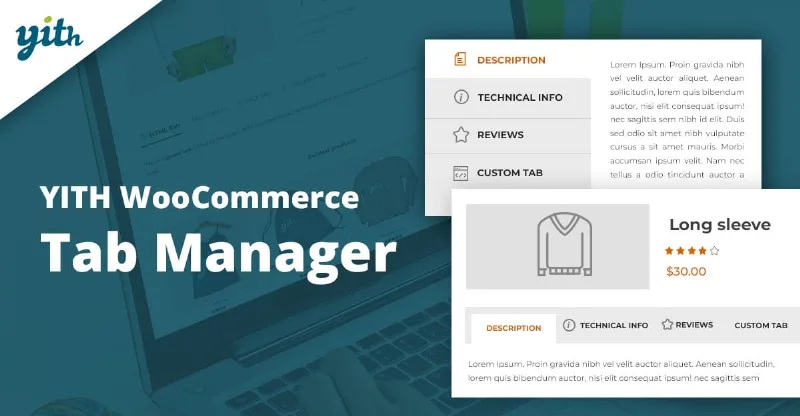
About YITH WooCommerce Tab Manager Premium
The doubt that stops the purchase is rarely in the long description
Anyone who sells online knows the pattern: the customer lands on the product page, looks for a size chart, a manual or a way to ask for a quote, can't find it among the paragraphs and leaves. Putting everything in the product description ends up as an endless block where nothing can be found. YITH WooCommerce Tab Manager Premium spreads that information across dedicated tabs, each one in the format it needs.
A walkthrough with customizable T-shirts, tab by tab
Imagine a store selling customizable T-shirts. This is how the plugin would solve it:
- Step 1, a global tab by category. You create a tab with customization instructions and show it only in the T-shirt category. If you prefer, you can enable it for all products with one click, and hide it on the products where it doesn't apply.
- Step 2, removing what's not needed. You disable the WooCommerce additional information tab and replace it with your own, or change its position, or disable the reviews tab. You can also override the content of the WooCommerce tabs product by product.
- Step 3, downloadable files. With the download tab type you upload the size chart, the catalog or the PDF manual so customers can consult them without leaving the product page.
- Step 4, frequently asked questions. You answer in advance what holds back the order (for example, whether the garment can be machine washed) and, along the way, summarize features as questions and answers.
- Step 5, video, gallery and contact. A usage video, an image gallery with a lightbox effect or a contact form. The form also works for out-of-catalog products sold only by quote.
- Step 6, order and style. You drag the tabs to decide which goes first, give them an icon (included or your own), hide them on mobile devices and adjust the colors of the FAQs, the download buttons and the contact form.
It helps to know where the plugin ends: the color options cover only those three tabs, the map you can add is a Google map and you write the content of each tab yourself. It is a product page tab manager, not a page builder. You can also insert shortcodes inside the tabs and add an introductory text above the content.
Questions before installing the plugin
Can I have different tabs on each product? Yes. Besides global tabs (for all products or for one category), you can create tabs for specific products.
Can I remove the tabs that WooCommerce includes? Yes, you can disable them or change their position, and override their content on each product.
Can I hide a tab on mobile? Yes, it is an option in the Premium version.
What YITH Tab Manager Premium adds over the free version
The free version stays with tabs of text and images. Premium adds galleries, video, FAQs, a contact form, downloads and a map, plus tabs by category, custom icons, hiding global tabs on specific products and hiding them on mobile devices. If you only need a couple of text tabs, you may not need it; if your products call for manuals, sizes or quotes, that's where it shows. It is compatible with YITH Frontend Manager.
Topics
Version history
-
v
2.20.0 Current 7 Oct 2026
-
v
2.19.0 2 Oct 2026
-
v
2.18.0 5 Sep 2026
-
v
2.17.0 29 Jun 2026
-
v
2.15.0 21 Apr 2026
Customer reviews
Sign in to leave a review. Only people who have the product can review it.
No reviews for this product yet.
Frequently asked questions
-
GPL (General Public License) is the license under which WordPress and most premium plugins/themes are distributed. It grants you the right to use, modify and redistribute the software in as many projects as you want, with no domain restrictions.
-
Yes. With membership you get automatic updates via our GPLClub Updater plugin (installed on your WP, detects new versions and applies them). With individual purchase, you get one year of manual updates from your account.
-
Depends on the plan. Monthly: 3 domains. Semi-annual: 7. Annual and Lifetime: 15. Individual purchase: 1 domain.
-
GPLClub offers its own support for installation, configuration and compatibility. For direct support from the original author (feature requests, product-specific bugs), a license purchased from the author is required.