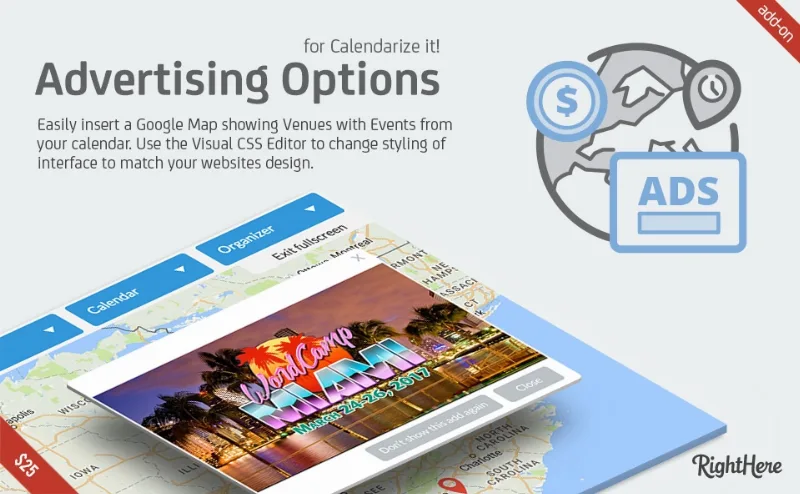
Advertising Options add-on for Calendarize it!
Antivirus scan
Powered by ClamAV
✅ Verified clean
This product file has passed our security filters.
Want to run a fresh ClamAV scan right now? Takes a few seconds and shows scanner version, signature DB and live result.
This can take 5 to 30 seconds.
Clean file Threat detected
No threats detected in this file.
- File
- Size
- Scanned
- ClamAV
- Signature database
⚡ Powered by ClamAV
Scan could not be completed
Report product
If you detected an issue (broken file, malware, inappropriate content, etc.) let us know and we'll review it ASAP.
Sign in to reportNewer version out, or a problem?
About Advertising Options add-on for Calendarize it!
Ads that appear when the visitor picks the filter they already want
Advertising Options shows the banner when the visitor selects a taxonomy filter you have assigned to the ad.
To make it work, enable in the Calendarize it! options panel the taxonomies you want to use as triggers. Each ad needs at least one assigned taxonomy, or it will never be shown. By default, the available taxonomies are Calendars, Organizers and Venues.
Only appears on the events map
Banners are displayed in the Events Map View, which works with Google Maps, so you need that add-on installed for the ads to be visible. If you want to use custom taxonomies as triggers, the Capabilities and Taxonomies add-on is also required.
When the visitor closes a banner, the next one appears according to the configured delay. If they click the button to stop seeing that ad, it will not be displayed again and the next ad in the queue will be triggered.
Image, link and dates for each banner
By default, each ad is an image. You can take it from the media library or upload it directly, and add the destination URL, which must be absolute (the full address). You choose whether the link opens in the same tab or in a new one.
Start and end dates are set with the calendar, and the ad can run all day or have specific start and end times. If you want something more elaborate, the advanced option lets you use the content of a post instead of just an image. The Calendarize it! shortcode also accepts the show_ad argument with the slug of an ad category, to display only that group.
Ads submitted by users with Community Events
With the Community Events add-on, your visitors can submit their own banners. In that add-on's media settings you set the maximum upload size in KB and a label with the recommended size in pixels, so whoever uploads the image knows which format to use.
If you also have Payment Options, you can charge people who submit a banner.
Frequently asked questions about Advertising Options
Do I need the Events Map View add-on?
Yes. Banners are only displayed within the map view, so Events Map View must be installed and active.
What happens if an ad has no taxonomy assigned?
It will never be triggered. Each banner must have at least one assigned taxonomy to appear when the visitor selects that filter.
Can I use custom taxonomies as triggers?
Yes, with the Capabilities and Taxonomies add-on. Custom taxonomies can be used as filters on the map and therefore as ad triggers.
What happens if the visitor closes the banner?
The next ad is shown according to the configured delay. If the visitor clicks the button to stop seeing that ad, they will not see it again.
Which add-ons it works with and what your map needs
Advertising Options relies on Calendarize it! and Events Map View, so those are the two essential pieces. Community Events and Payment Options only come into play if you want users to submit banners and to charge them for it. Capabilities and Taxonomies is needed only if you want custom taxonomy filters.
Before deciding, think about which taxonomies you will use as filters, because they determine whether each ad appears at the right moment. If your map has few filters, the default taxonomies may be enough.
Topics
Version history
-
v
1.0.6.58717 Current 12 May 2024
Customer reviews
Sign in to leave a review. Only people who have the product can review it.
No reviews for this product yet.
Frequently asked questions
-
GPL (General Public License) is the license under which WordPress and most premium plugins/themes are distributed. It grants you the right to use, modify and redistribute the software in as many projects as you want, with no domain restrictions.
-
Yes. With membership you get automatic updates via our GPLClub Updater plugin (installed on your WP, detects new versions and applies them). With individual purchase, you get one year of manual updates from your account.
-
Depends on the plan. Monthly: 3 domains. Semi-annual: 7. Annual and Lifetime: 15. Individual purchase: 1 domain.
-
GPLClub offers its own support for installation, configuration and compatibility. For direct support from the original author (feature requests, product-specific bugs), a license purchased from the author is required.