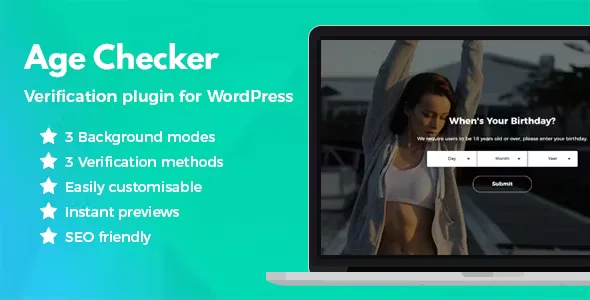
Age Checker for WordPress
Antivirus scan
Powered by ClamAV
✅ Verified clean
This product file has passed our security filters.
Want to run a fresh ClamAV scan right now? Takes a few seconds and shows scanner version, signature DB and live result.
This can take 5 to 30 seconds.
Clean file Threat detected
No threats detected in this file.
- File
- Size
- Scanned
- ClamAV
- Signature database
⚡ Powered by ClamAV
Scan could not be completed
Report product
If you detected an issue (broken file, malware, inappropriate content, etc.) let us know and we'll review it ASAP.
Sign in to reportNewer version out, or a problem?
About Age Checker for WordPress
An age notice that appears before the content
A drinks shop, a betting website or an adult site may need the visitor to confirm their age before seeing the content. Age Checker for WordPress shows a popup when the page loads and keeps the content inaccessible until the person confirms they meet the minimum age you set.
Three ways to confirm age
You can choose between three forms: asking for the date of birth, showing a checkbox or an entry field. If your audience is spread across areas with different requirements, the form includes a location dropdown: the visitor picks their region and each one has its own minimum age, which you define from the admin panel.
For birthday verification there is also an option with the Canadian provinces.
Two ways to apply the restriction: to the whole site or to specific parts
- Whole site: a single age restriction for the entire website, before any visitor reaches the content.
- Specific parts: individual pages, posts, categories or post types.
If only one section of your website has restricted content, you can restrict only those parts.
How the notice looks: background, logo and texts to your liking
The background can be a color, an image or a video. With an image or video you adjust the opacity of the layer covering it. You can upload your logo, change the form text and the validation messages, and create a Yes/No form if it fits your sector.
You also choose the date order according to your region, with day, month and year or with month, day and year.
Exit, cookies and search engines
The optional Exit button sends anyone who does not meet the age requirement to the URL you specify. You can set how long the cookie that stores the verification lasts. And if search ranking matters to you, the plugin lets you omit common search engine crawlers from the verification.
Age Checker for WordPress on mobile and in the editor
The notice is responsive and optimized for all types of devices. The changes you make in the admin editor appear in an instant preview. If you want to see the notice working before deciding, the live preview on the official website shows it.
Frequently asked questions about Age Checker for WordPress
Is it suitable for alcohol shops, betting sites or adult websites?
Yes. It is an intended use case: the plugin is designed for those sectors, among others.
Can I restrict only some pages or posts?
Yes. You can restrict individual pages, posts, categories or post types, or enable the restriction for the whole site.
Can I change the form text and add my logo?
Yes. You edit the form and the validation texts to your liking and upload your own logo.
Which date format can I use?
You can choose DD MM YYYY or MM DD YYYY according to your visitors' region.
Version history
-
v
1.3.3 Current 8 May 2024
Customer reviews
Sign in to leave a review. Only people who have the product can review it.
No reviews for this product yet.
Frequently asked questions
-
GPL (General Public License) is the license under which WordPress and most premium plugins/themes are distributed. It grants you the right to use, modify and redistribute the software in as many projects as you want, with no domain restrictions.
-
Yes. With membership you get automatic updates via our GPLClub Updater plugin (installed on your WP, detects new versions and applies them). With individual purchase, you get one year of manual updates from your account.
-
Depends on the plan. Monthly: 3 domains. Semi-annual: 7. Annual and Lifetime: 15. Individual purchase: 1 domain.
-
GPLClub offers its own support for installation, configuration and compatibility. For direct support from the original author (feature requests, product-specific bugs), a license purchased from the author is required.