Amazia – Multipurpose Wordpress Theme WordPress Theme
Antivirus scan
Powered by ClamAV
✅ Verified clean
This product file has passed our security filters.
Want to run a fresh ClamAV scan right now? Takes a few seconds and shows scanner version, signature DB and live result.
This can take 5 to 30 seconds.
Clean file Threat detected
No threats detected in this file.
- File
- Size
- Scanned
- ClamAV
- Signature database
⚡ Powered by ClamAV
Scan could not be completed
Report product
If you detected an issue (broken file, malware, inappropriate content, etc.) let us know and we'll review it ASAP.
Sign in to report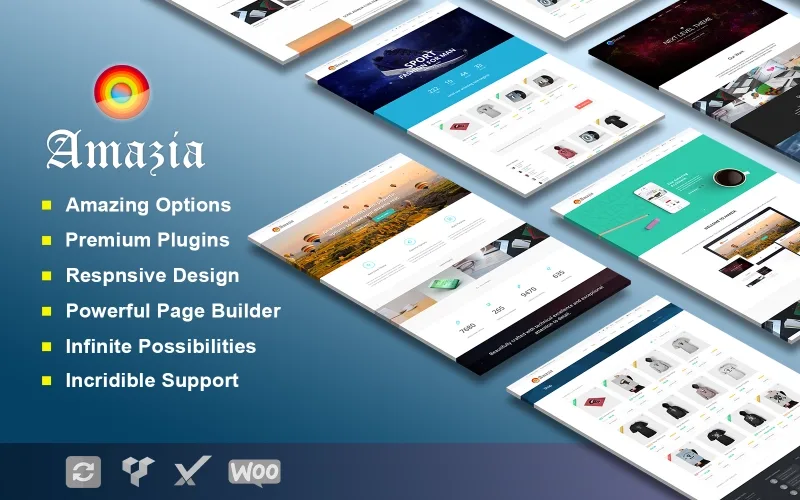
About Amazia – Multipurpose Wordpress Theme WordPress Theme
Nobody uses a multipurpose theme in a multipurpose way
Amazia comes with more than ten home pages and more than thirty inner pages, including portfolio and blog variations. It is a figure that impresses on a sales listing and it is worth understanding how it gets used in practice: you pick one demonstration on day one, adapt it, and never open the other twenty nine.
That is not a flaw in the product. It is what you actually buy with a multipurpose theme: you are not buying thirty designs, you are buying the right not to decide yet. You look at the options, find the one that resembles your business, and save yourself building from scratch.
Knowing this changes how you choose. The useful question is not how many demos it includes, but whether one of them genuinely resembles what you need. Thirty demos that do not fit are worth less than one that does.
What it includes
- More than ten home pages to choose from without building from scratch.
- More than thirty inner pages, including portfolio and blog variations and templates.
- One hundred per cent customisable, according to its maker, Cometor.
- Fully responsive design for any screen size.
- Built for several sectors: agency, company, consulting, corporate, digital business, financial and marketing.
How to pick a demonstration properly
By structure, not by colour. Colours and fonts change in ten minutes. What is costly to change is the order of the sections and how much information fits on the front page. Pick the demo whose skeleton matches what you want to say, even if you do not like its colours.
By how much real content it needs. A demo with six testimonials, four case studies and a team of twelve looks spectacular with filler content and sad with what you actually have. Count what you can fill in before choosing.
And once chosen, delete the rest. Leftover demonstration pages get indexed, show up in searches for your own brand and confuse whoever lands on them. It is one of the most forgotten steps when setting up a theme like this.
What flexibility costs
A theme that serves seven sectors loads the options of all seven. That is paid in two places: in page weight, because there are styles and scripts for features you do not use, and in the options panel, where finding the setting you want takes longer than it should.
There is one case where it does not pay off: if you know exactly what business you have and there is a specific theme for it, the specific one almost always wins. A restaurant theme brings the menu and bookings solved; a multipurpose one brings a services section you will have to turn into a menu by hand.
Multipurpose pays off when the project is not yet defined, when you build several different sites and want to learn a single panel, or when yours is precisely an agency building varied sites.
What it does not do
It brings no business functionality. No bookings, no quote calculator, no client area, no invoicing. The "services" and "pricing" pages are layout, not a system.
It is also not a shop theme built from WooCommerce, even though it can be combined with it. For selling at volume there are options built around the shop.
The published version is 1.0.0 and there is no official site reachable from our listing, so compatibility with specific builders, multilingual support and the update policy are worth checking beforehand on a staging install.
Requirements and getting started
An up to date WordPress and room to import the demonstration, which in these themes tends to be the step that consumes the most server resources.
1. Review the ten front pages and settle on one, by structure. 2. Import only that demonstration, not the full pack if it lets you choose. 3. Delete the pages you will not fill in before they get indexed. 4. Replace the filler content with yours before changing colours, because design is judged differently with real text.
Alternatives in the catalogue
On the same multipurpose ground and with far more track record, Salient is one of the veterans of the format, and Enginir combines multipurpose with an industrial focus.
And if you end up discovering that yours was a shop, Woodmart is built from WooCommerce rather than adapted to it. To edit it all visually, Elementor Pro.
Frequently asked questions
How many home pages does it include?
More than ten, plus more than thirty inner pages with portfolio and blog variations.
Can I use several demos at once?
Technically yes, but the result is usually an incoherent site. Better to pick one.
Does it work for a shop?
It can be combined with WooCommerce, but it is not built from it. For selling at volume there are better options.
Does it weigh more than a specific theme?
Usually yes, because it loads options for sectors you do not use.
When does multipurpose pay off?
When the project is undefined, when you build several different sites, or when you are an agency.
What WordPress version does it need?
Not specified in the vendor listing. It is worth testing beforehand on a staging install.
Version history
-
v
1.0.0 Current 15 Jun 2024
Customer reviews
Sign in to leave a review. Only people who have the product can review it.
No reviews for this product yet.
Frequently asked questions
-
GPL (General Public License) is the license under which WordPress and most premium plugins/themes are distributed. It grants you the right to use, modify and redistribute the software in as many projects as you want, with no domain restrictions.
-
Yes. With membership you get automatic updates via our GPLClub Updater plugin (installed on your WP, detects new versions and applies them). With individual purchase, you get one year of manual updates from your account.
-
Depends on the plan. Monthly: 3 domains. Semi-annual: 7. Annual and Lifetime: 15. Individual purchase: 1 domain.
-
GPLClub offers its own support for installation, configuration and compatibility. For direct support from the original author (feature requests, product-specific bugs), a license purchased from the author is required.