BabyBo – Baby Shop and Children Kids Store WordPress Theme
Antivirus scan
Powered by ClamAV
✅ Verified clean
This product file has passed our security filters.
Want to run a fresh ClamAV scan right now? Takes a few seconds and shows scanner version, signature DB and live result.
This can take 5 to 30 seconds.
Clean file Threat detected
No threats detected in this file.
- File
- Size
- Scanned
- ClamAV
- Signature database
⚡ Powered by ClamAV
Scan could not be completed
Report product
If you detected an issue (broken file, malware, inappropriate content, etc.) let us know and we'll review it ASAP.
Sign in to report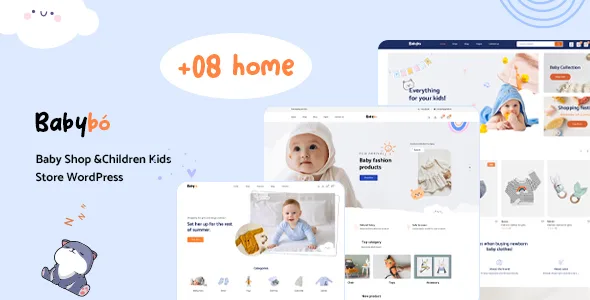
About BabyBo – Baby Shop and Children Kids Store WordPress Theme
A kids store sells sizes that expire
People who buy clothes, toys or baby items are not looking for just any product: they want the size for right now, the right age range or a color that goes with what they already have. If the store does not let them narrow things down that way, they go to another one. And often the buyer is not even the parent: it is a grandmother or a friend giving a gift without knowing the child's size.
That is why this kind of catalog is bought by attributes (age, size, color, brand, condition) and not by name. BabyBo is a WooCommerce theme for baby and kids stores that organizes products by category and puts search at the center of the design.
Search, filters and product pages in BabyBo
Search lets shoppers narrow results by categories, availability, product condition, brands, price ranges, sizes, colors and other custom specifications. There is instant search and Ajax filters, both on the homepage and in the shop, so the listing updates without reloading the page.
- Product page: details that follow you as you scroll, a fixed add to cart button, video, 360-degree view, full-width layout, variation swatches (color, size, image) and a frequently bought together block.
- Shop: grid or list view, infinite scroll or a load more button, and more than 21 shop layouts and styles.
- Selling: Ajax cart and wishlist, compatibility with WPC Smart Wishlist and WPC Smart Compare, pre-order products, availability notifications, trust badges, recently viewed products and real-time visitors.
Multiple vendors: compatible, but managed in its own plugin
BabyBo works with MultiVendorX, WC Vendors and Dokan, and none of them is required. If you build a marketplace, each vendor's own settings are configured in the chosen plugin, not from the theme options.
The AI assistant needs an external provider
It includes Wpbingo AI Commander for WooCommerce, which lets you create or edit titles, descriptions, prices, categories, attributes or stock with natural language instructions. It works with providers such as OpenAI, Claude, Gemini, Groq or OpenRouter, so you choose the AI service and connect it yourself.
Frequently asked questions about BabyBo
Does it work for a multi-vendor marketplace?
Yes, it is compatible with MultiVendorX, WC Vendors and Dokan. Installing them is optional and they do not cause conflicts, but their properties are managed from the plugin.
Can I run the store in several languages or in a right-to-left language?
Yes: it is compatible with WPML for multilingual sites and includes right-to-left support.
Do I need to code to edit it?
No. It is built on Elementor, so you edit by dragging and dropping, and it comes with more than 24 shortcodes for Elementor.
Is it only for baby clothes?
Its look is designed for kids and baby stores, although it is also presented as a multipurpose design. Check in the demo whether its style suits your type of product.
Headers, footers and a mega menu built your way
There are eight headers and four footers to choose from, a footer builder and a mega menu builder, plus a sticky header and a mobile-friendly menu. The homepage starts from more than eight layouts, with banner sliders for featured and trending products, twelve banner effects and widgets to show best sellers.
On the blog you can choose between list, grid or masonry, and the 404 page is customizable. Typography: more than 500 Google Fonts with preview.
One click imports the whole demo, mega menu included
The theme lets you import all the demo content with a single click, and the sample data also brings the mega menu already built. That way you can see the store working before replacing anything with your own products.
Before deciding, prepare your real attributes (size, age, color, brand) and check in the demo that the filters and variation swatches behave well with them. That is where the sale is won in a kids store.
Version history
-
v
1.0.3 Current 21 Aug 2024
Customer reviews
Sign in to leave a review. Only people who have the product can review it.
No reviews for this product yet.
Frequently asked questions
-
GPL (General Public License) is the license under which WordPress and most premium plugins/themes are distributed. It grants you the right to use, modify and redistribute the software in as many projects as you want, with no domain restrictions.
-
Yes. With membership you get automatic updates via our GPLClub Updater plugin (installed on your WP, detects new versions and applies them). With individual purchase, you get one year of manual updates from your account.
-
Depends on the plan. Monthly: 3 domains. Semi-annual: 7. Annual and Lifetime: 15. Individual purchase: 1 domain.
-
GPLClub offers its own support for installation, configuration and compatibility. For direct support from the original author (feature requests, product-specific bugs), a license purchased from the author is required.