Barn2 Media WooCommerce Restaurant Ordering
Antivirus scan
Powered by ClamAV
✅ Verified clean
This product file has passed our security filters.
Want to run a fresh ClamAV scan right now? Takes a few seconds and shows scanner version, signature DB and live result.
This can take 5 to 30 seconds.
Clean file Threat detected
No threats detected in this file.
- File
- Size
- Scanned
- ClamAV
- Signature database
⚡ Powered by ClamAV
Scan could not be completed
Report product
If you detected an issue (broken file, malware, inappropriate content, etc.) let us know and we'll review it ASAP.
Sign in to report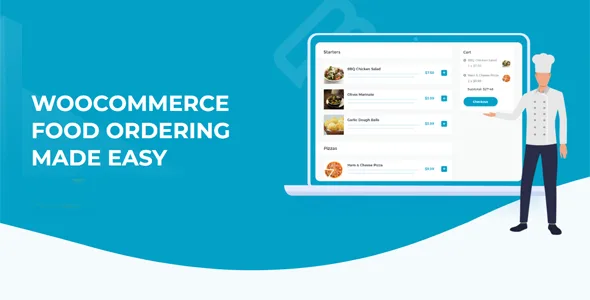
About Barn2 Media WooCommerce Restaurant Ordering
A restaurant order is three questions, not one
Someone opens your menu on their phone and wants to order dinner. Before paying they need the system to answer three things: what they can order, whether the place is taking orders right now and how the food will reach them.
This plugin answers the first two; the third depends on WooCommerce shipping, so a good menu does not settle on its own how the food arrives.
WooCommerce Restaurant Ordering turns WooCommerce products into a one-page order form, divided by category, and controls when orders are accepted with opening hours. For delivery and collection it relies on the shipping options WooCommerce already has, with their methods, fees and zones.
Order forms, options and hours
- Automatic order page: on install it creates a page with all your products in a one-page form, divided by category.
- Shortcode forms: show the products of the categories you choose wherever you want, with their own options on each one. You can add as many forms as you need.
- Category pages: the form layout can also be enabled on WooCommerce categories.
- Ordering style: instant one-click ordering, or a lightbox to choose quantity and options.
- Variations: each variation appears as a dropdown list, for example size or crust type.
- Menu layout: a single list or two or three columns, with the product details you decide to show.
- Hours: up to two sessions per day, with different times for each day of the week. While the place is closed, orders are blocked and open or closed messages can appear, including when it next opens.
- Restaurant information: you can show the place's details and delivery information, and the full hours in a lightbox.
A menu with pizzas, sizes and a dinner session, to test
One possible setup: one form per menu category, with pizzas as a variable product where size is a dropdown, ordering through a lightbox and hours with two sessions, lunch and dinner. It is a combination of features worth testing with real test orders before opening to the public.
Outside a session, the form stops accepting orders and shows the notice you configured. The extras a menu asks for, such as extra toppings or dietary requirements, do not come with this plugin: a separate product options plugin adds them.
Pieces that complete the order
- Popup cart: needs the WooCommerce Fast Cart plugin, which adds a cart and checkout in a window on the page itself.
- Delivery slots: choosing a date and time, and capping orders per slot, requires WooCommerce Opening Hours & Chosen Times.
- Fixed-price menus: built with Quantity Manager (minimums and maximums per category) and Discount Manager (tiered discounts and fixed-price combos).
- Dietary filters: added by WooCommerce Product Filters using product attributes.
- Allergens and nutrition: not a field of its own; they go in the product description and the lightbox option is enabled in the settings.
Requirements and first steps
You need WooCommerce. It works with any well-coded theme, without editing templates, and with WPML, WeGlot, TranslatePress and right-to-left languages.
- Install the plugin with the WordPress installer and activate it.
- Review the order page that is created on its own, or create a form with a shortcode.
- Choose between instant ordering or a lightbox in the settings.
- Set the opening hours and the closed-place messages.
- Define the WooCommerce shipping methods and zones for delivery and collection.
Food ordering to compare
To compare with another food ordering solution, look at Orderable Pro. The popup cart this plugin mentions is WooCommerce Fast Cart.
Answers about Restaurant Ordering
Does it include options like extra toppings?
No. Variations come from WooCommerce and checkbox or text-field options are added by a separate product options plugin.
Can I close ordering outside hours?
Yes. It supports up to two sessions per day, different each day, and blocks orders while the place is closed.
Does it include a popup cart?
No. The WooCommerce Fast Cart plugin is used for that.
Does it work on mobile?
Yes. The ordering system works on all devices.
Topics
Version history
-
v
2.1.12 Current 5 Feb 2026
Customer reviews
Sign in to leave a review. Only people who have the product can review it.
No reviews for this product yet.
Frequently asked questions
-
GPL (General Public License) is the license under which WordPress and most premium plugins/themes are distributed. It grants you the right to use, modify and redistribute the software in as many projects as you want, with no domain restrictions.
-
Yes. With membership you get automatic updates via our GPLClub Updater plugin (installed on your WP, detects new versions and applies them). With individual purchase, you get one year of manual updates from your account.
-
Depends on the plan. Monthly: 3 domains. Semi-annual: 7. Annual and Lifetime: 15. Individual purchase: 1 domain.
-
GPLClub offers its own support for installation, configuration and compatibility. For direct support from the original author (feature requests, product-specific bugs), a license purchased from the author is required.